SAP MC84: How to Create a Product Group in SOP with Members and Proportional Factors
Planning every single material one by one is slow, and it hides the bigger picture. A product group lets planners work with a handful of groups, such as "Liquid," and have SAP split the result down to the individual materials automatically. This guide walks through MC84 step by step, explains members, proportional factors and single-level versus multi-level groups, shows how MC85 and MC86 fit in, and covers what to do next. If you run into any errors while following along, feel free to send a screenshot to pramod@learntosap.com for help.
✅ What Is a Product Group in SAP PP?
A product group combines materials, or other product groups, according to whatever criterion suits your business: product design, manufacturing method, market segment, or simply how the planning team thinks. Because it summarizes many materials into one object, a product group can be used at a higher level in forecasting and planning than individual end items.
Each member of a product group carries a proportional factor, a percentage that says how much of the group's quantity belongs to that member. When a plan is made for the group, SAP uses these factors to disaggregate it, meaning to split it into plans for the members. If the group "LIQUID" has two members at 50 percent each and the plan is 1,000 pieces, each member receives 500.
Product groups are used mainly in Sales and Operations Planning (SOP), where planners agree sales and production volumes at group level before the detailed work of MRP begins. They are also helpful in reporting, because a group gives a meaningful total across many materials.
📋 Product Group Transactions at a Glance
The product group transactions are easy to mix up, because they do not follow the usual create, change, display order. In SOP they run as follows:
| Transaction | Purpose | Typical User |
|---|---|---|
| MC84 | Create a product group. | Planner, consultant |
| MC86 | Change a product group, for example to add members or edit proportions. | Planner, consultant |
| MC85 | Display a product group and its proportional distribution. | Planner, analyst |
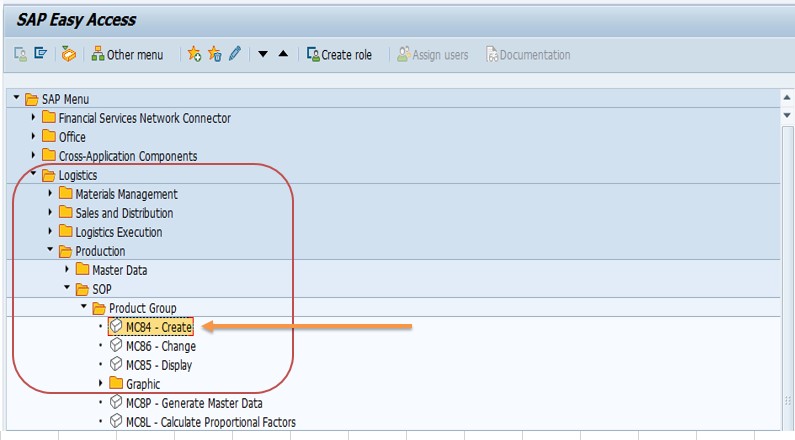
The SOP menu route is Logistics → Production → SOP → Product Group, followed by Create, Change or Display. Your original path through SPRO may differ slightly by release, so use the transaction codes if you cannot find the folder.
🔧 Building Blocks: Members, Proportions and Levels
Members
Members are what a product group contains. They can be materials, or they can be other product groups. A group cannot mix the two at the same level. The choice is made when the group is created or changed, and it decides whether the group is single-level or multi-level.
Proportional factors
Each member has a proportion, entered as a percentage. The factors normally add up to 100 percent, and SAP can check this. In the planning hierarchy maintenance, SAP even asks whether the 100 percent check should be ignored for one level or for the whole maintenance session, which shows how important the rule is.
Single-level and multi-level groups
A product group is single-level when its members are materials. It is multi-level when its members are other product groups. In a multi-level structure, the lowest product group in the hierarchy must contain materials. For example, a group "BEVERAGES" could contain "LIQUID" and "POWDER," and each of those contains real materials.
Plant and base unit
A product group is maintained for a plant and has a base unit of measure. The members' quantities are interpreted in that unit, so choose a unit that all members can be converted to sensibly.
📝 A Product Group Is Stored Like a Material
One detail surprises many users: SAP stores a product group as a material, using a material type reserved for product groups. When you create a group with MC84, SAP creates the underlying material record in the background, with MRP data only, and fills in defaults for fields you did not enter. Community discussions note, for example, that the industry sector can default to mechanical engineering when MC84 creates the record.
This has practical effects. A group created through MC84 may show fewer views in the material master display than a group created through MM01 with the product group material type. Neither is wrong, but it is worth deciding on one approach and using it consistently, so that all groups behave the same way in planning and reporting.
🔧 Step-by-Step: Creating a Product Group with MC84
The steps below follow the original example: a product group named LIQUID in plant 1254 with unit EA and two member materials.
Run transaction MC84, or follow the SOP menu path Logistics → Production → SOP → Product Group → Create. Use MC86 to change a group and MC85 to display one.
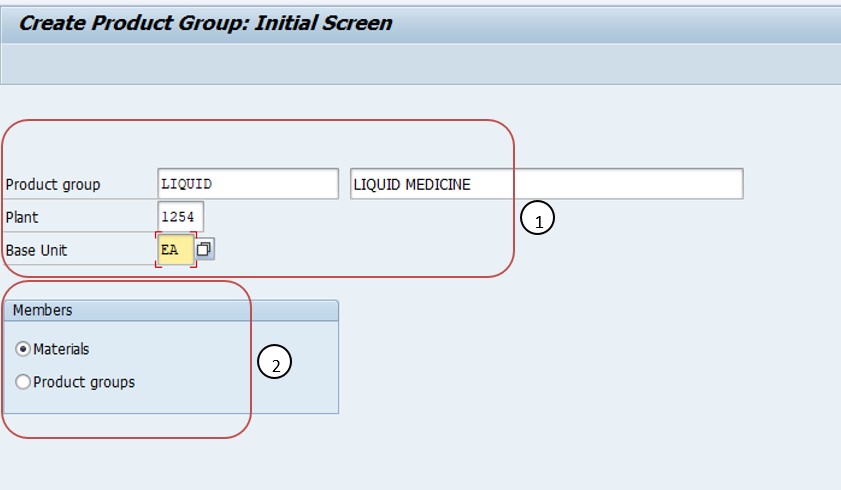
Enter the basic details: the Product group name (for example LIQUID), the Plant (for example 1254) and the Base unit of measure (for example EA).
Choose the member type: select materials for a single-level group, or product groups for a multi-level group, and press Enter.
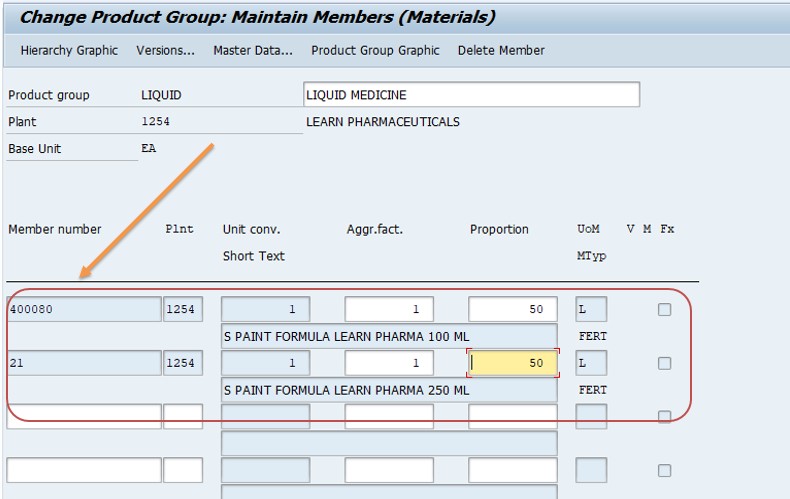
On the Product Group Members screen or tab, enter the material numbers that belong to the group. In the example these are materials 400080 and 21.
Define the proportional factors for each member. In the example each material receives 50 percent, so the two add up to 100 percent.
Save the product group. It can now be used as a planning object in SOP, and its members and proportions can be reviewed with MC85 or edited with MC86.
⚙ Proportional Factors: A Worked Example
Proportional factors are the heart of a product group, so it is worth seeing how they behave. Suppose the group LIQUID contains three bottled products, and the planning team agrees a plan of 10,000 pieces for next month.
| Member Material | Proportion | Disaggregated Quantity |
|---|---|---|
| 400080 (1 liter bottle) | 50% | 5,000 |
| 21 (500 ml bottle) | 30% | 3,000 |
| Third member (2 liter bottle) | 20% | 2,000 |
| Total | 100% | 10,000 |
If the team later learns that the 2 liter bottle is selling faster, they change the proportions, for example to 45, 30 and 25 percent, without touching the group plan. The next disaggregation immediately produces new quantities for each material.
Where historical data exists, SAP can also help derive proportions from actual figures, and in the product group and planning hierarchy functions planners can review and adjust them. Whatever the source, treat the factors as living data and review them at regular intervals.
🔄 Single-Level vs Multi-Level Product Groups
| Question | Single-Level | Multi-Level |
|---|---|---|
| What are the members? | Materials | Other product groups |
| How many planning levels? | One group level above the materials | Two or more group levels |
| Where must materials appear? | In the group itself | In the lowest group of the hierarchy |
| Typical use | Small, simple product ranges | Large ranges with natural families and sub-families |
Start simple. Many plants run for years on single-level groups. Move to a multi-level hierarchy only when planners really need to plan at both family and sub-family level, because each extra level adds proportions to maintain and check.
The hierarchy graphic function shown in the display transaction is a quick way to see the whole structure: it shows the group, its members and the distribution below it, which is very helpful in review meetings.
🔍 What Happens Behind the Scenes
When you save a group in MC84, SAP creates the material master record for the group, with MRP data, and stores the member assignments and proportional factors as the group's structure. The group then behaves like a planning object: you can plan it in SOP, aggregate member data up to it, and disaggregate group plans down to the members.
During disaggregation, SAP reads the structure, applies each member's proportion to the group plan, and writes the result as plans for the member materials. Those member plans can then be transferred to demand management, so that MRP can use them as planned independent requirements. Community guidance notes that product groups are used up to the SOP stage, and that to operationalize the plan you transfer it to demand management and then run MRP, where a product group indicator can be set so that planning covers the group's members.
Because the structure is data rather than Customizing, it is not moved by transports. Product groups and their proportions must be created or loaded in each system, which is a common surprise when moving from development to production.
📋 Product Group vs Planning Hierarchy vs Information Structure
These three objects work together in SOP and are often confused. The product group is master data: it says which materials belong together and in what proportion. The information structure is the container in which planning data is stored, defined with MC21 and parameterized with MC7F. The planning hierarchy links planning levels, so a plan at one level can flow to the next, and it can be built from product groups.
Think of it this way: the product group answers "what belongs together," the information structure answers "where do the numbers live," and the planning method set in MC7F answers "how do numbers move between levels." A working SOP setup needs all three, and a mistake in one shows up as odd numbers in another.
💼 Real-World Scenario: Planning Bottled Products as One Group
Pradnya Pawar, an SAP PP consultant working with a beverage manufacturer in Pune, was asked to help the planning team stop planning each bottled product separately. The sales team gave a single monthly volume for all liquid products, and planners spent days splitting that number by hand in spreadsheets.
Anand Rathi, the head of planning, asked whether SAP could do the split. Pradnya opened MC84, entered LIQUID as the product group name, plant 1254 and unit EA, and chose materials as the member type. She entered materials 400080 and 21 as members, gave each a 50 percent proportion, and saved. Anand wanted to check the result, so she opened MC85 and showed him the proportional distribution and the hierarchy graphic.
The team then entered a plan for LIQUID in SOP and ran disaggregation. Each material received half of the group plan, exactly as set up. Two weeks later sales showed that material 400080 was moving faster, so Anand asked for 60 and 40 percent. Pradnya changed the proportions in MC86 in a few seconds, and the next disaggregation reflected the new split. The spreadsheet disappeared, and the planners could spend their time on decisions instead of arithmetic.
❗ Common Mistakes When Creating Product Groups
- Proportional factors that do not add up to 100 percent, so quantities are lost or inflated.
- Mixing members of different units without checking that they convert sensibly to the group's base unit.
- Building a deep multi-level hierarchy before it is needed.
- Leaving the lowest group in a hierarchy without materials, which SAP does not allow.
- Forgetting that product groups are master data and must be created in every system.
- Creating some groups with MC84 and others with MM01, then wondering why they look different.
- Never reviewing proportions, so group plans are split using outdated shares.
- Using the display transaction when the change transaction is needed, because the codes do not follow the usual order.
✅ Best Practices for Product Groups
- Group materials by how the business plans them, not by how the master data happens to be arranged.
- Keep groups small enough to be meaningful, and avoid catch-all groups.
- Use a clear naming convention that tells planners what the group contains.
- Review proportional factors on a fixed schedule, for example every quarter.
- Document each group: purpose, owner, members and the date proportions were last reviewed.
- Decide whether to create groups with MC84 or MM01 and use one approach.
- Check the structure with the hierarchy graphic after every significant change.
- Test disaggregation with a small sample plan before using a new group in real planning.
📋 What to Configure Next After Creating a Product Group
- Information structure: make sure a suitable structure exists, created with MC21.
- Planning parameters: set the planning method and key figure behavior with MC7F.
- Planning type and hierarchy: create the layout and, if needed, the hierarchy that links levels.
- Plan the group: enter sales and production plans for the product group in SOP.
- Disaggregate: split the group plan down to the member materials.
- Transfer to demand management: pass the member plans on so MRP can use them.
A product group with no plan attached is only a structure. It becomes valuable when planners plan with it and the result flows into MRP.
🔒 Authorization Considerations
Product groups drive planning numbers for many materials at once, so changes should be controlled. Creation and change rights, MC84 and MC86, are usually limited to planners and key users responsible for the group, while display rights, MC85, can be given more widely.
Because a product group is stored as a material, authorizations for the material master and for SOP both matter. After a new group is created, test with a real planner user to confirm that they can see, plan and disaggregate it without hitting a missing authorization.
🔧 Troubleshooting Common Product Group Issues
"Required parameters missing when calling up module" in MC84
Create the product group in MM01 using the product group material type, then add members and proportions in MC86.
The product group looks different depending on how it was created
Groups created through MC84 carry MRP data only, with defaults filled in for other fields. Groups created through MM01 can have more views. Pick one approach and stay with it.
Disaggregation gives unexpected quantities
Check the proportional factors with MC85, and confirm they total 100 percent. Also verify the base unit and member units.
A hierarchy cannot be saved
The lowest product group in a hierarchy must contain materials. Make sure no group at the bottom is empty.
Planning table for the group is empty
Check that the information structure is generated, that MC7F parameters are saved and that a planning type exists. Also confirm you are using the right version of the plan.
Product group missing in QA or production
Product groups are master data and are not transported. Create them again or load them with a migration tool in each system.
🏢 How Different Industries Use Product Groups
- Consumer goods: groups by brand, pack type or flavor to plan promotions and seasonal peaks.
- Discrete manufacturing: groups by product family so capacity can be planned before configurations are known.
- Electronics: groups by model line, with proportions reflecting expected mix of variants.
- Process industries: groups by recipe family or base product, with members for pack sizes.
In each case the group should mirror how demand is discussed in planning meetings. If people talk about "liquid," "powder" and "tablets," those are likely candidates for groups.
📋 Product Group Rollout Checklist
- Agree with the business how products should be grouped.
- Decide single-level or multi-level.
- List the member materials and their units.
- Agree initial proportional factors that total 100 percent.
- Create the group in MC84, or in MM01 plus MC86 if MC84 is not available.
- Display the group with MC85 and review the hierarchy graphic.
- Set up the information structure and planning parameters.
- Run a test plan and disaggregation.
- Record the group in your register and schedule proportion reviews.
📊 Reports and KPIs Built on Product Groups
- Plan versus actual by group: compares group plans with actual sales or production.
- Mix accuracy: compares planned proportions with actual member shares.
- Forecast accuracy by group: usually better than by single material, because errors average out.
- Capacity load by group: shows the demand a group puts on key resources.
The mix accuracy figure is especially useful for keeping proportional factors honest. If actual shares drift away from the proportions, it is time to revise them.
📱 Product Groups in SAP S/4HANA
Classic SOP, including product groups and the transactions MC84, MC85 and MC86, remains available in many SAP S/4HANA on-premise systems, and the concepts in this guide still apply. For new projects, SAP's newer planning offerings are positioned as the strategic direction, so it is sensible to check with your SAP team whether classic SOP is still the right choice for you.
For existing implementations nothing about product groups needs to change simply because the system moves to S/4HANA, but confirm compatibility for your specific release and test the planning and disaggregation flow after any upgrade.
📋 Related SAP Transactions
| Transaction | Purpose |
|---|---|
| MC84 / MC86 / MC85 | Create, change and display product groups. |
| MM01 | Create a material, including a product group material type. |
| MC21 | Create a self-defined information structure. |
| MC7F | Set parameters and planning method for information structures. |
| MC76 | Disaggregate a product group plan to its members, as cited by community sources. |
| MD02 | Run MRP, where a product group indicator can be used. |
🎓 Interview-Style Questions and Answers
Q: What is a product group?
A combination of materials, or other product groups, that can be planned together in SOP, with proportional factors for each member.
Q: Which transactions maintain product groups?
MC84 creates, MC86 changes and MC85 displays.
Q: What is a proportional factor?
The percentage of the group quantity that belongs to a member, used when splitting a group plan to its members.
Q: What must the lowest level of a multi-level hierarchy contain?
Materials.
Q: How is a product group stored?
Like a material, using a product group material type.
Q: How does a group plan reach MRP?
It is disaggregated to the members and transferred to demand management as planned independent requirements, after which MRP can use it.
📚 Quick Glossary
- Product group: A set of materials or product groups planned together.
- Member: A material or product group that belongs to a product group.
- Proportional factor: A member's percentage share of the group quantity.
- Disaggregation: Splitting a group plan down to its members.
- Aggregation: Adding member data up to the group level.
- Single-level group: A group whose members are materials.
- Multi-level group: A group whose members are other product groups.
📝 Governance for Product Groups
Product groups look harmless, but they carry assumptions that affect real production and purchasing decisions. Keep a register listing each group, its owner, its members, the current proportions and the date they were last reviewed. When someone asks why a plan was split in a particular way, the register gives the answer immediately.
Review the register at least quarterly. Remove empty or unused groups, correct proportions that no longer match reality, and make sure new materials are added to the right group when they are introduced.
🔄 Aggregation and Disaggregation in SOP
Two words appear again and again when working with product groups. Aggregation adds data from the members up to the group, so a planner who looks at LIQUID sees the combined total of all its materials. Disaggregation works the other way: a plan entered for the group is distributed to the members using their proportional factors.
Which direction you use depends on who is planning. A sales manager who thinks in product families usually plans at group level, and the system disaggregates. A planner who knows the individual materials may plan at member level, and the system aggregates the result so the group total is visible. Both views read the same data, so a change in one appears in the other once the figures are recalculated.
How strictly the levels stay in agreement depends on the planning method set for the information structure in MC7F. With consistent planning they always agree, while with level-by-level planning each level keeps its own values and planners reconcile them. This is why product groups, information structures and planning methods should be designed together rather than one after another.
💡 How to Decide Which Materials Belong in a Group
Good groups come from asking how the business really talks about its products. A few questions help.
- Do the members share demand patterns? Materials that sell together, or are promoted together, make good group members.
- Do they use similar resources? If the same line makes them, a group total is a good proxy for capacity demand.
- Can the mix be predicted? Proportions only work if the share of each member is reasonably stable.
- Do they share a unit? Members that convert cleanly to one base unit keep the arithmetic simple.
Avoid grouping materials only because they look alike in the master data. A group of unrelated items produces proportions that change constantly, and the plan becomes harder to trust than planning each item separately.
📝 A Simple Routine for Maintaining Proportions
Proportions are the part of a product group that goes out of date fastest. A light routine keeps them honest without turning into a burden.
- Once a quarter, compare actual sales or production by member with the current proportions.
- If any member has drifted by more than an agreed threshold, such as five percentage points, update the proportions in MC86.
- Always check that the factors still total 100 percent after the change, and review the result with MC85.
- Record the date and the reason in your product group register.
- Tell the planners, because the next disaggregation will produce different member quantities.
This routine takes a few minutes per group, and it prevents the slow drift that makes planners stop trusting group-level plans.
🎯 Conclusion
MC84 takes only a few minutes to use, yet it changes how a planning team works. By grouping materials and giving each a proportional factor, you let planners plan at the level where decisions are made, and let SAP do the arithmetic of splitting the result. Remember that groups are stored like materials, that proportions should total 100 percent, that MC84 creates, MC86 changes and MC85 displays, and that groups must be created in every system. Keep this guide handy the next time your team wants to stop planning one material at a time.