SAP MC7F Explained: How to Set SOP Planning Methods (Consistent, Level-by-Level and Delta)
Before anyone can plan sales, production or stock in SAP Sales and Operations Planning (SOP), the system needs to know how data should behave when it moves between levels such as product group and material. Transaction MC7F, "Set Parameters for Info Structures and Key Figures," is where that is decided. This guide walks through MC7F step by step, explains the three SOP planning methods in plain language, compares them side by side, and shows what to configure next. If you run into any errors while following along, feel free to send a screenshot to pramod@learntosap.com for help.
✅ What Is MC7F in SAP Production Planning?
MC7F is the transaction used to set the parameters of an information structure and its key figures in SAP Sales and Operations Planning. SOP is the part of SAP PP where sales, production, stock and other high-level quantities are planned over time, usually before detailed MRP runs. All SOP data lives in information structures, and each information structure needs a planning method before it can be planned. That planning method is defined in MC7F.
An information structure contains characteristics (such as product group or plant), key figures (such as sales quantity, production quantity or target stock level) and a period unit. Think of it as a table that SAP uses to store, aggregate and report planning values. MC7F does not create that table; it tells SAP how the values inside it should be calculated and stored as users plan.
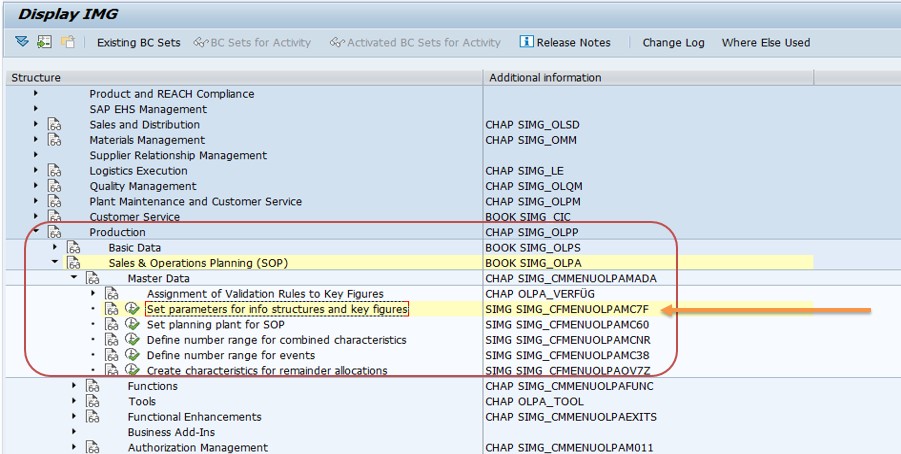
You reach it through the SOP menu path Production → Sales & Operations Planning (SOP) → Planning → Set parameters for info structures and key figures, or by running MC7F directly. The same activity also appears in Customizing for Sales & Operations Planning.
📋 Where MC7F Fits in the SOP Setup Sequence
MC7F is one step in a short chain of SOP configuration. Seeing the sequence makes it clear why the planning method must be chosen early.
| Step | What You Do | Typical Transaction |
|---|---|---|
| 1 | Create (or choose) an information structure with characteristics and key figures. | MC21 |
| 2 | Set parameters for the structure and its key figures, including the planning method. | MC7F |
| 3 | Create a planning type that defines the planning table layout. | MC8A |
| 4 | Plan sales, production and stock in the planning table. | MC93 (change), MC94 (display) |
| 5 | Transfer the plan to demand management for MRP. | MC75 |
Standard SOP is the ready-made version: it works with one organizational unit, the product group hierarchy, and plans predefined key figures in a fixed planning table, all based on the standard information structure S076. Flexible planning lets you build your own structures and key figures, and that is where MC7F gets used most actively.
🔧 The SOP Planning Methods at a Glance
The planning method is the most important setting in MC7F. It controls how a value entered at one level (for example a product group) relates to values at another level (for example individual products). SOP provides three methods. The overview below is the one shown on the original screenshot for this tutorial.
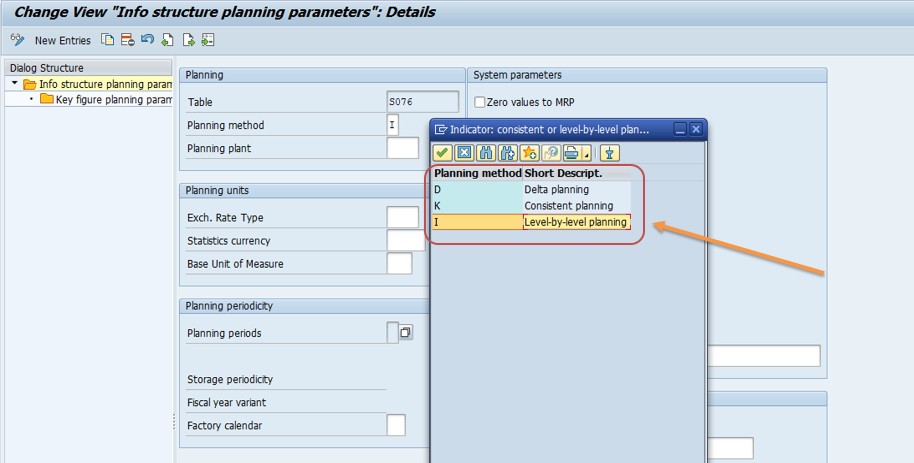
| Method | How Data Is Stored | Effect of a Change |
|---|---|---|
| Consistent planning | Data is disaggregated to the most detailed level, where it is stored. | Changes at one level show up at every level. |
| Level-by-level planning | Values are stored at the level where they are entered. | Changes at one level do not update other levels automatically. |
| Delta planning | Differences between levels are kept separately. | Higher-level changes are stored as a delta against the lower level (not available in all releases). |
🔄 1) Consistent Planning
Consistent planning keeps every level of the hierarchy in agreement. When you plan a quantity at product group level, SAP breaks it down to the most detailed level using proportional factors and stores it there. When you later display the same data at product group level, SAP rebuilds the figure by adding up the detailed values.
- Consistency: aggregated data at higher levels always matches the detailed data below it.
- Propagation: a change made at one level is reflected at all levels, so nobody sees two different answers.
- No mismatches: because only one set of detailed values exists, there is nothing to reconcile.
The system can calculate the proportional factors automatically, for example from historical or existing data, or you can enter them. Consistent planning is a good fit when management plans at a high level but the numbers must always agree with the detailed plan, such as a product group sales target that must reconcile with product-level plans. In consistent planning you work with dual-level planning, meaning an owner level and member levels in the hierarchy.
📊 2) Level-by-Level Planning
Level-by-level planning treats each level as its own plan. Planning is done step by step, moving from higher levels such as product groups to lower levels such as individual materials, and each level is planned separately. Values are stored where they are entered, and changes at one level do not automatically update the others.
- Structured and hierarchical: planners can set a top-level target first, then refine it at lower levels.
- Independent levels: a product group plan and the material plans below it can legitimately differ while planning is in progress.
- Separate planning types: a separate planning type is typically created for each level that will be planned.
This is the method used by the standard SOP information structure S076, which is why most SOP users meet level-by-level planning first. It gives planners freedom, but it also means they are responsible for reconciling levels themselves, for instance by comparing the product group plan against the sum of its members before releasing the plan.
⚡ 3) Delta Planning
Delta planning is built around the difference, or delta, between a higher level and the detailed levels below it. Instead of rewriting all detailed data when a higher-level figure changes, the system records the change as a delta. That makes it efficient for frequent small adjustments, because only the modified values need processing.
- Processes changes only: reduces effort when many small adjustments are made.
- Keeps detailed data intact: the underlying detailed plan is not overwritten by every high-level change.
- Release dependent: some SAP community sources note that delta planning is no longer offered in newer releases, so check what your own system's MC7F allows before relying on it.
If your release does not list delta planning, the choice in practice is between consistent and level-by-level planning. In that case the same goals, such as handling frequent top-down adjustments, are usually met with consistent planning and well-chosen proportional factors.
🔧 Step-by-Step: Setting Parameters in MC7F
The steps below describe the standard flow. Screens differ slightly by release, so treat the field names as a guide rather than an exact script.
Run transaction MC7F, or follow the SOP menu: Production → Sales & Operations Planning (SOP) → Planning → Set parameters for info structures and key figures.
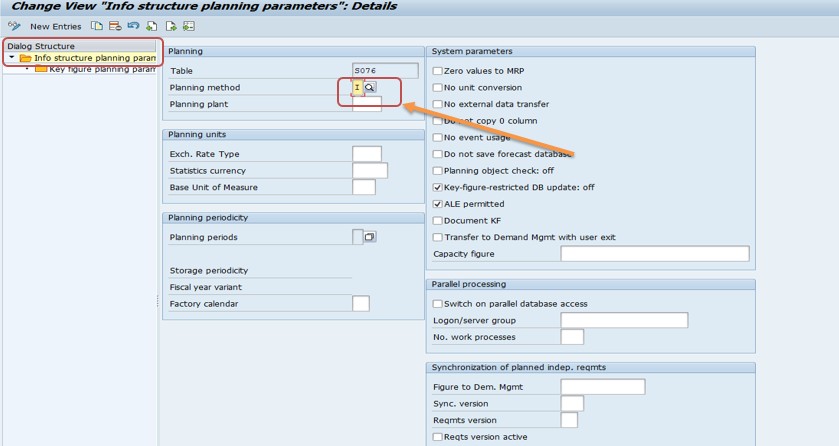
Enter the information structure you want to configure, for example the standard SOP structure S076 or a self-defined structure you created earlier, and open its parameters.
Set the planning method for the structure: consistent planning, level-by-level planning, or delta planning if your release still offers it. Every information structure that will be planned needs one.
Maintain the planning periods, also called the storage periodicity, such as month, week or posting period. Consistent planning requires a defined periodicity. Level-by-level planning does not strictly require one, although you can set it.
Go to the key figure parameters and set, for each key figure, its unit and how it is aggregated and disaggregated when values move between levels. For stock-type key figures this setting is especially important, because adding up stock across periods is usually wrong.
Save the settings and enter a transport request if prompted. Afterwards, create the planning type and, for consistent or level-by-level planning, the planning hierarchy.
⚙ Key Figure Parameters: Aggregation, Units and Periods
The planning method sets the overall behavior, but MC7F also controls how each key figure behaves, and this is where many practical issues arise.
Aggregation and disaggregation
When data moves up a hierarchy, SAP must know how to combine values; when it moves down, how to split them. Sales and production quantities are normally summed up and split in proportion. A stock level, by contrast, should not be added together across time periods. The aggregation type of a key figure can be set in MC7F, and a planning type can override it for specific planning lines.
Units
Each key figure carries a unit, such as a quantity unit or a currency. Consistent units matter because planning values are added together across materials and groups.
Storage periodicity
The period unit of an information structure determines whether data is stored by posting period, month, week or day. The standard SOP structure S076 uses posting periods. If you want to look at the plan in weeks and months in the same table, consistent planning allows more than one period indicator, with a time bucket grid defined in the planning type deciding which weeks and months are shown.
Planning type is a template
Planning data is saved in the information structure, not in the planning type. The planning type is only a template on the structure. If two planning types use the same structure and key figures, a value planned in one appears in the other.
📋 Consistent vs Level-by-Level vs Delta: Which Should You Choose?
| Question | Consistent | Level-by-Level | Delta |
|---|---|---|---|
| Do all levels always agree? | Yes | No, only if planners reconcile | Differences are tracked as deltas |
| Where is data stored? | Most detailed level | Level where entered | Detailed level plus delta |
| Planning strategy | Dual-level only | Single- or dual-level | Dual-level only |
| Separate planning type per level? | Not required | Typically yes | Not required |
| Best suited for | Top-down plans that must reconcile | Independent, staged planning | Frequent small adjustments (where available) |
A useful rule of thumb: if leadership sets a target and the detailed plan must follow it exactly, use consistent planning. If different teams own different levels and want room to negotiate, level-by-level is more natural. When in doubt, start with how your planning meetings actually work, and choose the method that mirrors that process.
💼 Real-World Scenario: Choosing a Planning Method for a Beverage Plant
Pradnya Pawar, an SAP PP consultant working with a beverage manufacturer in Pune, was asked to set up SOP so that the sales team and the plant could agree on monthly volumes by product group. The business had created a self-defined information structure with product group and plant as characteristics, and sales quantity, production quantity and target stock as key figures.
Anand Rathi, the head of planning, explained that the sales director sets a total volume per product group, but the plant needs to see how that splits across individual products and that the numbers must always add up. Pradnya opened MC7F, selected the structure and compared the options with Anand. Because the totals and the detailed volumes had to agree at all times, she chose consistent planning, defined a monthly periodicity, and set the stock key figure so it is not summed across periods.
She then created a planning type and a planning hierarchy, and Anand's team entered a trial plan at product group level. When they displayed the plan at product level, the volumes had been split in proportion to the proportional factors, and the group total matched. Anand asked whether they could still adjust individual products; Pradnya confirmed they could, and that the group total would update accordingly. The exercise showed why the planning method has to be agreed with the business before anyone touches the planning table.
🔍 What Happens Behind the Scenes
Saving MC7F settings stores the planning method, periodicity and key figure rules against the information structure in Customizing. Planning values themselves are not stored in the planning type. They are stored in the information structure, which is why an entered figure remains available when the planning type is changed. For standard SOP, that structure is S076.
When a planner saves a value in the planning table, SAP applies the planning method. In consistent planning it disaggregates the value to the most detailed level using the proportional factors and saves it there. In level-by-level planning it saves it exactly where it was entered. The macros attached to the planning type can then calculate additional key figures, such as a target stock level, as values are aggregated and disaggregated.
Because planning data and rules are separated this way, changing a planning type's layout is safe, but changing the planning method on a structure that already holds data should be treated as a controlled change with testing in a non-production client first.
❗ Common Mistakes with MC7F and SOP Planning Methods
- Choosing a planning method before understanding how the business actually plans, then discovering levels do not agree.
- Changing the planning method on an information structure that already contains plan data.
- Forgetting to define a storage periodicity for consistent planning.
- Summing a stock key figure across periods because its aggregation type was never reviewed.
- Assuming level-by-level planning keeps levels in sync and not reconciling product group totals with member totals.
- Creating a planning type before the information structure parameters are saved.
- Not transporting MC7F changes with the information structure, so QA and production behave differently.
- Expecting delta planning to be available without checking the release.
✅ Best Practices for SOP Parameter Setup
- Run a short workshop with sales and production leaders before choosing the planning method.
- Keep the information structure lean: only key figures people will actually plan.
- Review every key figure's aggregation type, especially stock and ratio figures.
- Document the planning method and the reason for it, so future consultants do not change it casually.
- Test with a small hierarchy and sample data before opening the structure to all planners.
- Use standard SOP and S076 where it fits, and move to flexible planning only when needed.
- Agree a reconciliation routine if you use level-by-level planning.
- Keep MC7F, planning types and hierarchies in the same transport where possible.
📋 What to Configure Next After MC7F
- Create the planning type to define the lines, key figures and horizon of the planning table.
- Create a planning hierarchy for consistent or level-by-level planning, so levels can be linked.
- Maintain proportional factors for consistent planning, automatically or manually.
- Plan in the planning table and test aggregation and disaggregation with sample values.
- Transfer the plan to demand management so MRP can use it as planned independent requirements.
- Set authorizations so planners can see and change only the structures they own.
Only after these steps does the plan feed production. An information structure that has parameters but no planning type or hierarchy simply cannot be planned, which is a common reason for "nothing to plan" complaints after configuration.
🔒 Authorization Considerations
SOP planning data influences production and purchasing decisions, so it is usually protected by authorization checks on the information structure and on the planning activities. MC7F itself is a configuration-level activity and should be limited to a small group of consultants or key users, because a change to a planning method can affect every planner using the structure.
Planners typically need rights to create and change plans for their own structures, while managers may need display access only. After building new structures, check that the relevant roles include them. A frequent cause of "not authorized" messages after a new SOP go-live is roles that were built for the old structures.
🔧 Troubleshooting Common SOP Planning Issues
Product group total does not equal the sum of its members
This is expected in level-by-level planning, because each level stores its own values. If totals must agree, consider consistent planning, or add a reconciliation step.
Planning table is empty or cannot be opened
Check that the information structure has parameters saved in MC7F, that a planning type exists, and, for consistent or level-by-level planning, that a planning hierarchy exists.
Values split unevenly when disaggregated
Review the proportional factors. If they are calculated automatically from existing data, an unusual history can skew the split; entering factors manually may be better.
Stock figures look inflated at a higher level
The key figure is probably being summed across periods. Check its aggregation type in MC7F or on the planning type line.
Delta planning option is missing
Your release may not offer it. Use consistent or level-by-level planning instead.
Changes not visible in QA or production
Confirm the MC7F settings and the information structure were released in a transport and imported in the right order.
🏢 How Different Industries Use SOP Planning Methods
- Consumer goods: consistent planning to align product group sales targets with detailed product plans.
- Discrete manufacturing: level-by-level planning where sales sets family volumes and production refines them by line.
- Seasonal businesses: flexible planning with monthly and weekly views and stock targets controlled by macros.
- Process industries: SOP to balance capacity at resource level before detailed scheduling.
SAP does not prescribe one method. The right choice depends on who owns each level of the plan and how tightly the levels must agree.
📋 MC7F Rollout Checklist
- Confirm whether standard SOP (S076) is enough or flexible planning is needed.
- Agree the planning method with business owners.
- Create the information structure with the right characteristics and key figures.
- Set parameters in MC7F: method, periodicity and key figure rules.
- Create the planning type and, if needed, the planning hierarchy.
- Maintain proportional factors for consistent planning.
- Test aggregation and disaggregation with sample data.
- Transport all objects together and retest in QA.
- Train planners and set authorizations.
📊 KPIs and Reports Supported by SOP Planning
- Plan vs actual sales: compares planned and actual quantities by product group.
- Production vs sales plan: shows whether planned output supports planned sales.
- Stock coverage: tracks planned stock against target levels.
- Forecast accuracy: measures how well forecast values matched actual demand.
All of these depend on a consistent setup in MC7F. If planning methods and aggregation rules are unclear, the same data can produce different totals in different reports.
📱 MC7F and SOP in SAP S/4HANA
Classic SOP, including MC7F, remains in use on many ECC and S/4HANA systems, and the planning methods work as described here. However, SAP's newer planning offerings, such as integrated business planning and S/4HANA-based sales and operations tools, are positioned as the strategic direction for new projects. If you are starting fresh on S/4HANA, check with your SAP team whether classic SOP or a newer planning solution fits your roadmap.
For existing implementations, nothing about MC7F needs to change simply because the system moves to S/4HANA, but compatibility and supported functions should always be confirmed for your specific release.
📋 Related SAP Transactions
| Transaction | Purpose |
|---|---|
| MC7F | Set parameters for info structures and key figures, including the planning method. |
| MC21 | Create a self-defined information structure. |
| MC8A | Create a planning type for flexible planning. |
| MC93 / MC94 | Change or display standard SOP planning. |
| MC75 | Transfer the SOP plan to demand management. |
| MD61 / MD62 | Create or change planned independent requirements directly. |
🎓 Interview-Style Questions and Answers
Q: What is MC7F used for?
It sets parameters for information structures and key figures in SOP, including the planning method.
Q: What planning method does standard SOP use?
Level-by-level planning, based on the standard information structure S076.
Q: How does consistent planning differ from level-by-level planning?
Consistent planning disaggregates values to the most detailed level so all levels agree. Level-by-level stores values where they are entered and does not update other levels automatically.
Q: Where is planning data stored, in the planning type or the information structure?
In the information structure. The planning type is only a template.
Q: Why does aggregation type matter for key figures?
It decides how values are combined and split between levels. Stock figures, for example, should not simply be summed across periods.
Q: What happens after you set parameters in MC7F?
You create a planning type and hierarchy, plan in the planning table and transfer the plan to demand management.
📚 Quick Glossary
- SOP: Sales and Operations Planning, high-level planning of sales, production and stock.
- Information structure: A structure of characteristics, key figures and a period unit used to store planning data.
- Key figure: A numerical value that is planned, such as sales quantity.
- Planning type: A template that defines the layout and horizon of a planning table.
- Planning hierarchy: A structure linking planning levels, such as product groups and materials.
- S076: The standard SOP information structure.
- Proportional factors: Ratios used to split higher-level values across lower levels.
📝 Governance for SOP Configuration
Because the planning method underpins every plan made on a structure, treat MC7F changes like any other significant master data or configuration change: document the decision, get sign-off from the planning owner, and test in a non-production client first. Keep a simple register listing each information structure, its planning method, periodicity and owner.
A clear register prevents the common situation where a new consultant adjusts a structure without realizing a planning hierarchy and several planning types depend on it. It also makes audits and upgrades far easier.
🎯 Conclusion
MC7F is a short transaction with a large impact. By setting the planning method, periodicity and key figure rules for an information structure, it decides whether your SOP plan behaves as a single consistent set of numbers or as a set of independent levels. Understand how your planners really work, choose between consistent, level-by-level and, where available, delta planning accordingly, and then build the planning type and hierarchy on top. Test with sample data, document your decisions, and keep this guide handy the next time you set up or review SOP in SAP PP.