How to Create, Change & Display a Routing in SAP PP (CA01, CA02, CA03)
A routing is the production recipe of SAP PP: it lists the operations needed to make a product, the order they happen in, the work center that performs each one, and the standard times used for scheduling, capacity planning, and costing. This guide walks through creating a routing with CA01, changing it with CA02, and displaying it with CA03, explains every important field on the screens, and covers how the routing works together with the Bill of Material and the production order. If you run into any errors while following along, feel free to send a screenshot to pramod@learntosap.com for help.
✅ What Is a Routing in SAP PP?
In SAP Production Planning (PP), on both ECC 6.0 and SAP S/4HANA, a routing is a master data object that defines the process steps required to manufacture a material. Each step, called an operation, records what work is done, in which order, at which work center, and how much time and which resources it needs. If the Bill of Material answers the question "what goes into the product," the routing answers "how is it made."
A routing is what turns a list of components into an executable plan. When a production order is created, SAP copies the operations from the routing into the order, schedules them forward or backward from a date, checks the capacity of each work center, and later uses the standard values to calculate planned costs. Without a routing, the system can still list the materials needed, but it cannot tell planners how long production will take or what it will cost to run the machines and labor.
Because the routing feeds scheduling, capacity requirements planning, product costing, and shop floor confirmations all at once, it is one of the most heavily reused master data objects in a manufacturing plant. Time invested in getting routings accurate pays back in more reliable delivery dates and costing figures.
📋 Routing Transaction Codes at a Glance
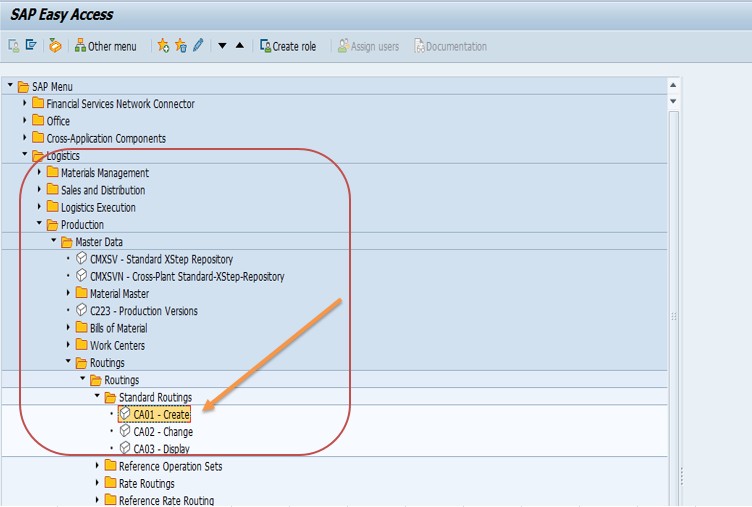
Three transactions cover the everyday life of a standard routing. All three are found under SAP Menu → Logistics → Production → Master Data → Routings → Routings → Standard Routings.
| Transaction | Purpose | Typical User |
|---|---|---|
| CA01 | Create a new standard routing for a material and plant. | Production engineer, PP master data team |
| CA02 | Change an existing routing, for example to add an operation or update a standard time. | Production engineer, process planner |
| CA03 | Display a routing without any risk of changing it. | Planner, costing analyst, auditor |
A good habit is to let most users work in CA03 and restrict CA01 and CA02 to a small group. Routing changes affect scheduling and costing for every future production order, so it makes sense to control who can make them.
🔧 Where the Routing Fits in SAP PP Master Data
A routing never stands alone. It sits in the middle of a small set of master data objects that together describe how a product is built, and understanding that chain makes the screens in CA01 far easier to follow.
| Master Data Object | Role | Typical Transaction |
|---|---|---|
| Material Master | Describes the product, including its MRP and work scheduling views. | MM01 |
| Bill of Material (BOM) | Lists the components and quantities needed to make one unit. | CS01 |
| Work Center | The machine, line, or labor group that performs an operation; holds capacity and cost data. | CR01 |
| Routing | Sequences the operations, assigns work centers, and holds standard values; created here. | CA01 |
| Production Order | The executable document that copies the BOM and routing for a specific quantity and date. | CO01 |
The work center and the material must both exist before the routing can be completed, and the BOM is usually created alongside it so the two can be linked through component allocation. This is why routing creation is typically one of the later steps in setting up a new product for manufacturing.
🔧 Step-by-Step: Creating a Routing Using CA01
The steps below follow the example used in the screenshots: a bottle washing operation for material 400080 in plant 1254. The same approach applies to any product and plant in your system.
Run transaction CA01, or follow the menu path: Logistics → Production → Master Data → Routings → Routings → Standard Routings → Create. Use CA02 to modify an existing routing and CA03 to display one.
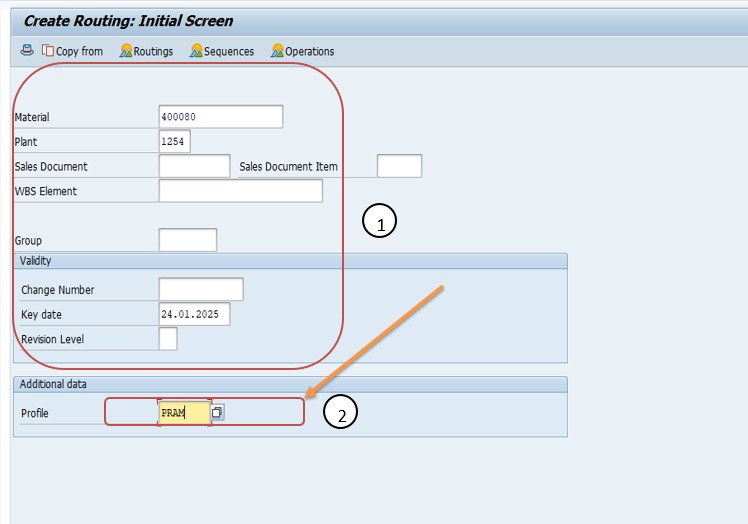
On the initial screen, enter the Material (for example 400080), the Plant (for example 1254), and the Profile (for example PRAM). Press Enter to move to the routing header screen.
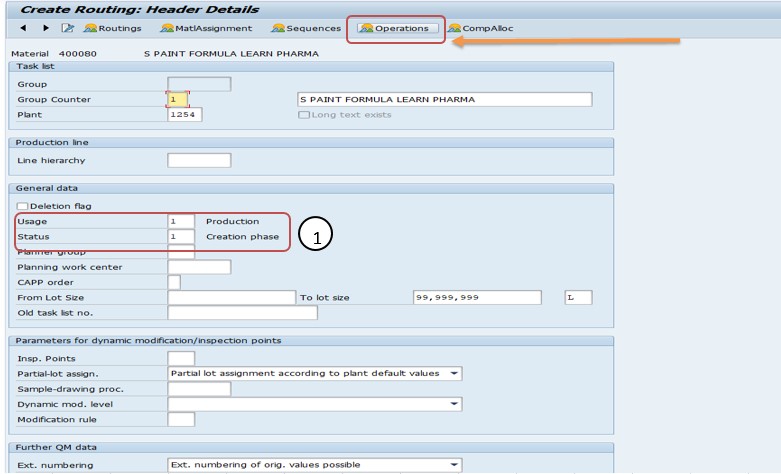
On the header screen, enter the Usage (for example 1 for production, meaning the routing can be used in production orders) and the Status (a newly created routing is commonly given a status such as 1, meaning it is still in the creation phase, until it is released). The lot size range can also be entered here so the routing only applies to a defined quantity range.
Click the Operation button to open the operation overview. This is where the actual production steps are listed, one per row.
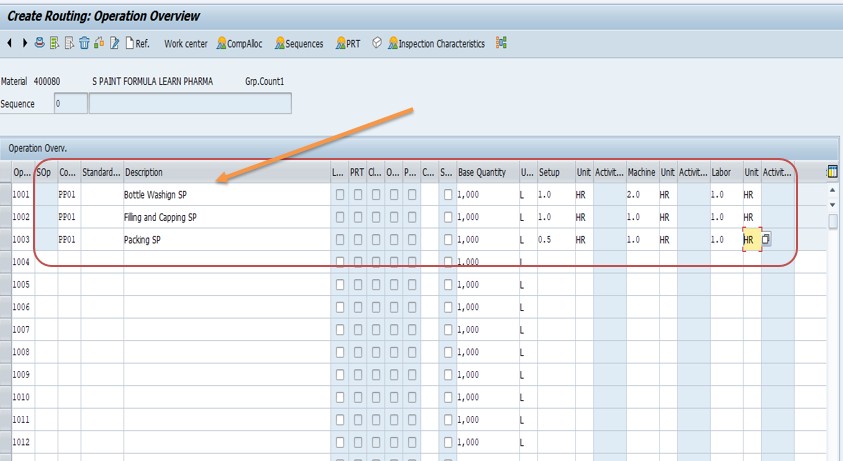
Add each operation by filling in the following fields:
- Operation number: the sequence in which operations occur, such as 0010, 0020, 0030. Leaving gaps between numbers makes it easy to insert a step later.
- Work center: where the operation takes place, for example WM_PRAM.
- Operation description: a clear short text, for example "Bottle Washing SP."
- Control key: decides how the operation is handled; PP01 is a commonly used key for in-house production.
- Standard values: setup time, machine time, and labor time, each with its unit, used for scheduling and costing.
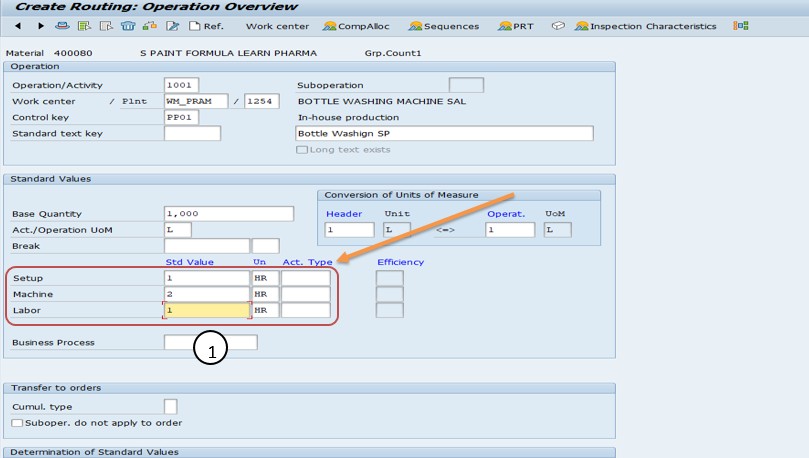
Use the Check function to let SAP validate the routing, then Save it. SAP assigns a group number and a group counter, and the routing is now linked to the material and plant you entered.
📝 Understanding the Routing Header Fields
The header screen controls how the whole routing is used. These are the fields that matter most.
| Field | What It Does |
|---|---|
| Group / Group Counter | Together they uniquely identify a routing. A group can hold several alternatives, each with its own counter. |
| Usage | Says which areas may use the routing, for example production only, or production plus plant maintenance. |
| Status | Controls whether the routing is usable for planning, costing, or order creation. |
| Planner Group | Identifies the person or team responsible for maintaining the routing. |
| Lot Size From / To | Limits the routing to a quantity range so different processes can serve small and large batches. |
| Valid From | The change-number or date from which the version of the routing applies. |
Usage and status are the two fields most often responsible for the question "why won't SAP pick up my routing?" A routing with the wrong usage or a status that has not been released for order will simply be ignored when a production order is created.
⚙ Understanding Operation Fields, Control Keys, and Standard Values
Each row in the operation overview carries instructions to SAP about how that step should behave. A few fields deserve extra attention.
Control key
The control key tells the system how to treat an operation. It decides, among other things, whether the operation is scheduled, whether it is relevant for costing, whether it is confirmed on the shop floor, whether it can be printed on the order papers, and whether it is performed in-house or externally. PP01 is widely used for in-house production, while other keys cover external processing and similar cases.
Standard values
Standard values are the planned times for an operation: setup, machine, and labor, and sometimes additional values such as teardown. SAP uses a formula on the work center to turn these into scheduled duration and capacity requirements, and into activity quantities for costing. If these values are wrong, every downstream figure is wrong too.
Base quantity
Times are normally stated for a base quantity, for example the time to produce 100 pieces, rather than per piece. This avoids rounding errors on very fast operations and matches how engineers measure the process.
Component allocation
Once a BOM exists, components can be assigned to the operation where they are consumed. This makes SAP stage the material for the correct operation, so a bottle-washing step receives its detergent at the right time rather than all materials being pulled at the start.
🔄 Changing and Displaying a Routing (CA02 and CA03)
Changing a routing in CA02 uses the same screens as creation. Enter the material and plant, select the correct group and counter if several alternatives exist, then edit the operations or header fields directly. Typical changes include adding a quality inspection step, replacing a work center after a machine upgrade, or revising a standard time after a time study.
Many companies prefer to make routing changes with a change number (engineering change management). This records who changed what and the date the change takes effect, and it lets a new version of the routing become valid on a future date without disturbing orders already in progress. If your organization uses change numbers, make sure they are entered at the start of the CA02 session rather than after the edits.
CA03 opens the routing in read-only mode. It is the right tool for planners checking lead times, cost analysts verifying standard values, and auditors reviewing how a product is made. Because it cannot alter data, it is safe to give widely.
🔍 What Actually Happens Behind the Scenes
Saving a routing writes to several tables. The routing header, with fields such as group, group counter, usage, status, and planner group, is stored in table PLKO. The individual operations, including work center reference, control key, and standard values, are stored in table PLPO. The link between the material, plant, and routing is stored in table MAPL, which is what SAP reads to find a routing when a production order is created for a given material.
When a production order is created, SAP searches MAPL for routings assigned to the material and plant, applies selection rules based on usage, status, lot size, and validity date, and then reads the matching header and operations. It copies the operations into the order tables, so changes to the master routing later do not retroactively rewrite orders that already exist.
Work center data, including capacity and the formula parameters that interpret standard values, lives separately in table CRHD and related tables. That separation is what allows the same routing to be costed and scheduled differently if the work center's rates or capacity change.
📋 Routing vs BOM vs Work Center - How They Differ
New SAP users often mix up these three objects because they all appear on a production order. Each answers a different question. The Bill of Material answers "what do we need," listing components and quantities. The work center answers "where and with what," describing a machine or labor group, its capacity, and its cost rates. The routing answers "how and in what order," linking operations to work centers and attaching the times.
When a production order is created, SAP combines all three. It explodes the BOM to get the components, reads the routing to get the operations, looks up each work center for capacity and rates, and produces a schedule and a cost estimate. Missing any one of the three leaves the order incomplete: a BOM without a routing gives materials but no schedule, and a routing without work center capacity cannot be loaded.
You can also have a routing that is not tied to a single material, such as a reference operation set that holds a commonly repeated sequence. Those can be called from many routings, so a change to the shared steps is made once rather than in every routing individually.
💼 Real-World Scenario: Setting Up a Routing for a New Bottled Product
Pradnya Pawar, an SAP PP consultant supporting a beverage manufacturer in Pune, was asked to prepare master data for a new bottled product, material 400080, being introduced at plant 1254. The BOM had already been created, but production planning could not yet release trial orders because no routing existed.
Anand Rathi, the production supervisor, explained that the first physical step was washing returned bottles on a dedicated line. Pradnya created the work center WM_PRAM, then opened CA01, entered the material, plant, and profile PRAM, and set the usage to production. In the operation overview she added operation 0010 for the washing step, assigned it to work center WM_PRAM, gave it the description "Bottle Washing SP," and used control key PP01 so the step would be scheduled, costed, and confirmed in-house.
Anand supplied the measured times from a recent trial run, and Pradnya entered the setup time, machine time, and labor time with their units. She ran the check, which flagged a missing unit on the labor value, corrected it, and saved. To confirm the result, she created a trial production order and verified that the operation appeared with the right work center and that a realistic scheduled duration was calculated. Only then did she ask Anand's team to proceed, a reminder that a routing is not finished when it is saved but when a real order uses it correctly.
❗ Common Mistakes When Creating a Routing
- Using the wrong usage or leaving the status unreleased, so production orders ignore the routing.
- Entering a work center that does not exist in the plant, or one with no capacity category assigned.
- Picking the wrong control key, for example one that is not relevant for costing, leaving the operation out of the cost estimate.
- Leaving standard values blank or entering them in mismatched units, giving zero or wildly inflated durations.
- Numbering operations 0001, 0002, 0003 with no gaps, making it hard to insert a step later.
- Forgetting to allocate BOM components to operations, so all material is staged at the first step.
- Changing a routing without a change number in a plant that requires change management, losing the audit trail.
- Assuming open production orders pick up routing changes automatically.
✅ Best Practices for Routing Maintenance
- Number operations in steps of ten so new operations can be inserted without renumbering.
- Write operation descriptions that a shop floor operator would understand, not internal abbreviations only the author knows.
- Base standard values on real time studies or trial runs, and review them on a regular schedule.
- Use routing profiles and reference operation sets to keep routings consistent and reduce repetitive entry.
- Release routings only after the check passes and a trial production order confirms the result.
- Restrict CA01 and CA02 to authorized planners and give everyone else CA03.
- Keep the BOM and routing aligned: when a component or operation changes, review the other object at the same time.
- Document the reasoning for non-obvious operations so later engineers do not remove steps they do not understand.
💰 How the Routing Drives Scheduling, Capacity, and Costing
The practical value of a routing shows up in three places. First, scheduling: SAP adds up the setup, processing, and wait times of each operation, usually working backward from the required finish date, to give start and end dates for the order. Accurate times mean delivery promises that hold up.
Second, capacity planning: the time each operation needs is posted as a load on its work center. Planners can view capacity loading across the plant and spot overloaded machines before they become late orders.
Third, product costing: the standard values, multiplied by the activity rates at each work center, produce the planned cost of conversion, which is added to material cost to give the standard cost of the product. An inaccurate routing therefore does not just cause scheduling trouble; it skews margins and inventory valuation.
Because one object feeds all three areas, a routing review is often the cheapest way to improve planning accuracy across a plant. Coordinate with the costing and capacity planning teams whenever standard values are updated.
🔒 Authorization Considerations for Routing Maintenance
Routing authorizations are normally controlled by plant and by activity (create, change, display), and often by planner group. This lets a company ensure that only the production engineering team of a specific plant can edit that plant's routings, while planners elsewhere can still display them.
After setting up a new plant or planner group, check that the relevant roles include it. A frequent cause of "you are not authorized" messages in CA01 or CA02 is a role that was built for the old planner groups and never updated.
Involve your security team early when routing maintenance is being centralized or moved to a new team, so role changes are tested before the first real routing is created.
🔧 Troubleshooting Common Routing Errors
"No routing found" when creating a production order
Check that the routing is assigned to the right material and plant in MAPL, that its usage allows production, that its status is released for order, and that the lot size and validity date match the order.
Work center not found or not allowed in the routing
Confirm the work center exists for the same plant, is not blocked, and has the task list application enabled for routings in its usage settings.
Operation shows zero duration in the production order
This usually means standard values are blank, or the formula parameters on the work center do not reference the values entered. Review both the operation and the work center.
Operation is missing from the cost estimate
Review the control key: if it is not flagged as relevant for costing, the operation is skipped. Also confirm the work center has an activity type and a valid cost center assignment.
Routing change is not visible in an existing production order
Existing orders hold their own copy of the operations. Reschedule or recreate the order, or use the available function to refresh the order from the routing where permitted.
Cannot save: missing mandatory data
Run the check function and read each message. Typical causes are a missing control key, unit of measure, or work center on one of the operations.
🏢 How Different Industries Use Routings
- Discrete manufacturing: Routings list machining, assembly, and inspection steps, often with alternative sequences for different lines.
- Food and beverage: Routings (or master recipes in process industry setups) cover washing, mixing, filling, and packing, with attention to batch sizes and cleaning times.
- Automotive suppliers: Highly detailed routings with short cycle times, base quantities, and strict standard values feeding takt-time planning.
- Pharmaceuticals: Routings or recipes include quality checkpoints and regulated steps, with change control tightly enforced.
- Make-to-order engineering: Routings may be built from reference operation sets and adjusted per order.
Whatever the industry, the principle is the same: the routing should mirror how work is actually done on the floor, not how it was imagined during initial setup.
📋 Routing Creation Checklist
- Confirm the material master exists with the work scheduling view maintained.
- Confirm the BOM exists, or is being created at the same time.
- Confirm every work center needed exists, with capacity and cost data.
- Choose the right routing profile.
- Set usage and status correctly in the header.
- Add operations in logical order, in steps of ten.
- Assign the right control key and enter valid standard values with units.
- Allocate BOM components to operations.
- Run the check, save, then release the status.
- Create a trial production order and verify dates, capacity, and cost.
📊 KPIs and Reports Built on Routing Data
- Planned vs actual operation time: Compares routing standard values with shop floor confirmations to find where standards are unrealistic.
- Work center utilization: Shows loaded capacity from routing times against available capacity.
- Schedule adherence: Measures how often orders finish on the dates the routing predicted.
- Cost variance: Highlights differences between planned conversion cost from routings and actual cost incurred.
These reports are only as trustworthy as the standard values behind them. Regular review of routings against actual confirmations keeps planning and costing credible.
📱 Routings in SAP S/4HANA
Transactions CA01, CA02, and CA03 remain available in SAP S/4HANA, and the routing concept is unchanged. Standard routings continue to work with production orders, and many companies migrate their existing routings without redesign. What improves is the surrounding experience: Fiori apps and embedded analytics make it easier to monitor capacity load, schedule performance, and cost variances in near real time.
If your plant also uses process manufacturing, remember that master recipes serve a similar purpose to routings but are maintained with different transactions. Confirm with your PP team whether a given product should use a routing or a master recipe before creating either.
📋 Related SAP Transactions
| Transaction | Purpose |
|---|---|
| CA01 / CA02 / CA03 | Create, change, and display standard routings. |
| CR01 / CR02 / CR03 | Create, change, and display work centers. |
| CS01 / CS02 / CS03 | Create, change, and display Bills of Material. |
| MM01 | Create a material master, including work scheduling data. |
| CO01 | Create a production order that uses the routing and BOM. |
| CA85 | Mass replace a work center across multiple routings. |
🎓 Interview-Style Questions and Answers
Q: What is the purpose of a routing in SAP PP?
It defines the operations, work centers, and standard times needed to produce a material, feeding scheduling, capacity planning, and product costing.
Q: Which tables store routing data?
PLKO holds the header, PLPO the operations, and MAPL the assignment between material, plant, and routing.
Q: What does the control key do?
It determines how the operation behaves: scheduled or not, costed or not, confirmable, printable, and whether it is performed in-house or externally.
Q: How does SAP choose among several routings for one material?
It uses selection rules based on usage, status, lot size range, and validity date, along with the order's requirements, to pick the matching routing.
Q: What happens to an open production order when a routing is changed?
Nothing automatically. The order holds its own copy of the operations, so it must be rescheduled or refreshed if the change should apply.
Q: Why use gaps between operation numbers?
So new operations can be inserted later without renumbering the whole routing.
📚 Quick Glossary of Terms Used in This Guide
- Routing: A master data object listing the operations and work centers needed to make a material.
- Operation: One production step within a routing.
- Work Center: A machine, line, or labor group that performs operations and holds capacity and cost data.
- Control Key: A setting that controls how an operation is scheduled, costed, confirmed, and printed.
- Standard Values: Planned setup, machine, and labor times for an operation.
- Group Counter: A number that distinguishes alternative routings inside the same group.
- PLKO / PLPO / MAPL: Tables for routing header, operations, and material assignment.
📝 Governance and Naming for Routings
Routings tend to accumulate over years, and without discipline a plant ends up with duplicates, obsolete alternatives, and operation descriptions nobody understands. Agree early on conventions for operation descriptions, planner groups, and when a new group counter is justified versus editing the existing routing.
Many organizations require sign-off from production engineering before standard values are changed, because those values flow directly into costing. Using change numbers and a short review step keeps changes traceable and protects the integrity of product costs.
Periodically list routings that have not been used in production orders for a long time and mark them obsolete. A clean master data set is easier to maintain, and it reduces the chance of a planner picking the wrong alternative.
🎯 Conclusion
Creating a routing in SAP PP with CA01 takes only a few minutes once the material, BOM, and work center are in place, but the quality of what you enter determines how reliable scheduling, capacity planning, and costing will be for every order that follows. Pay attention to usage and status, choose control keys deliberately, enter realistic standard values, and always confirm the result with a trial production order. Use CA02 for controlled changes and CA03 for safe viewing, and keep this guide handy the next time you need to set up or review a routing in your plant.