How to Assign Standard Purchasing Organization to Plant in SAP – OMKI Configuration Guide
When a plant is served by more than one purchasing organization, SAP needs to know which one to default to automatically. This guide walks through the OMKI configuration step, explains exactly when it's needed and when it isn't, and shows how it fits alongside the OX17 assignment covered in our companion guide.
⚠ What Is a Standard Purchasing Organization?
In most SAP MM landscapes, a plant is served by a single purchasing organization, assigned through transaction OX17, and that's the end of the story - every purchase order for that plant simply uses that one purchasing organization. But some businesses deliberately assign more than one purchasing organization to the same plant, most commonly when direct materials and indirect materials (like MRO or office supplies) are bought by entirely separate buying teams operating under different purchasing organizations, even though both teams are procuring for the same physical site.
Once a plant has multiple purchasing organizations assigned to it, SAP needs a rule for what to propose automatically in situations where a process needs a purchasing organization but none has been explicitly specified - creating a source list entry from a certain screen, for example, or running an automatic reorder process. That rule is the standard purchasing organization, configured through transaction OMKI. It designates exactly one of the plant's assigned purchasing organizations as the default the system falls back on.
Why "Standard" Doesn't Mean "Only"
A common misunderstanding is thinking the standard purchasing organization is somehow more valid or more powerful than the others assigned to the same plant. It isn't - all purchasing organizations assigned via OX17 remain fully usable for manual purchase order and requisition creation regardless of which one is flagged as standard. The standard designation only matters for automatic proposals and defaults; a buyer can still manually select any of the plant's assigned purchasing organizations on a document at any time.
When OMKI Is Not Needed at All
If a plant has only one purchasing organization assigned to it - by far the more common setup, and the one covered as the default case in our OX17 guide - there is nothing for OMKI to disambiguate, and this configuration step can simply be skipped. OMKI only becomes relevant the moment a second (or third) purchasing organization is assigned to the same plant.
✅ Step-by-Step: Assigning a Standard Purchasing Organization Using OMKI
Navigate to the Configuration Path
Go to SPRO > Enterprise Structure > Assignment > Materials Management > Assign Standard Purchasing Organization to Plant, or execute transaction OMKI directly.
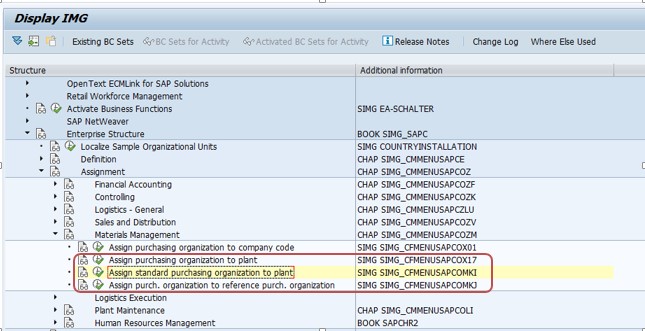
Select New Entries
On the OMKI overview screen, click New Entries to open a blank row for the plant you want to configure a default purchasing organization for.
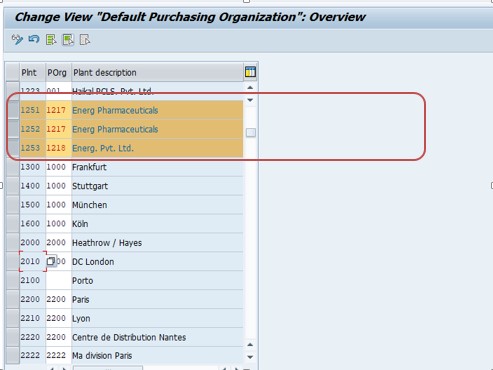
Enter the Plant and Standard Purchasing Organization
Enter the plant code and the purchasing organization code that should act as the default for that plant. This purchasing organization must already be assigned to the plant via OX17 - OMKI does not create a new assignment, it only marks one of the existing assignments as the standard.
Save and Transport
Save the entry and assign it to a transport request so the standard purchasing organization setting moves consistently through development, quality assurance, and production, exactly like any other enterprise structure customizing.
🔗 OMKI vs OX17: What Each Transaction Actually Controls
These two transactions are frequently confused because they both deal with the relationship between purchasing organization and plant, and one is a strict prerequisite for the other. Understanding the difference clearly is the single most important thing to take away from this guide.
| Transaction | What It Does | Cardinality |
|---|---|---|
| OX17 | Authorizes a purchasing organization to procure for a plant at all | One plant can have multiple purchasing organizations assigned |
| OMKI | Designates which one of those authorized purchasing organizations is the default | One plant can have only one standard purchasing organization |
Put simply: OX17 answers "which purchasing organizations are allowed to buy for this plant," while OMKI answers "if the system has to guess, which one should it guess?" A plant can exist perfectly well with OX17 entries and no OMKI entry at all, provided only one purchasing organization is assigned - but the moment a second purchasing organization is added to the same plant, skipping OMKI leaves that default question unanswered, which can surface as inconsistent or missing purchasing organization proposals in specific transactions.
🚩 Where the Standard Purchasing Organization Actually Gets Used
Source List Maintenance
When a source list record is being created or maintained for a plant that has multiple purchasing organizations assigned, certain entry screens propose the standard purchasing organization by default rather than forcing the user to select from a full list every time, which speeds up routine master data maintenance for the majority case.
Automatic Reordering and MRP-Driven Procurement
Some automatic procurement processes - where a purchase requisition or purchase order needs to be generated without a human explicitly choosing a purchasing organization on the spot - rely on the standard purchasing organization to resolve which one to use when a plant could otherwise be served by more than one.
Consistency in Reporting Defaults
Certain standard reports and selection screens that ask for a purchasing organization alongside a plant will pre-populate with the standard purchasing organization when a user hasn't specified one, which is a smaller but still noticeable convenience for procurement teams running routine reports.
Onboarding New Buyers and Support Staff
There's also a less technical but genuinely practical benefit worth mentioning: when a new buyer or support analyst is being onboarded onto a plant with multiple purchasing organizations, having a clearly documented standard purchasing organization gives trainers a simple, consistent reference point - "for this plant, PO51 is the default unless you're specifically working on indirect spend" - rather than having to explain the full nuance of both purchasing organizations and when each applies from day one. This kind of small operational clarity compounds over time across a large procurement team.
In every one of these cases, if OMKI hasn't been configured for a plant with multiple purchasing organizations, the system either has no default to propose or falls back to unpredictable behavior depending on the exact transaction - which is why this small, easy-to-overlook configuration step is worth deliberately completing rather than leaving to chance whenever a plant genuinely has more than one purchasing organization.
🤔 Should a Plant Even Have Multiple Purchasing Organizations?
Before reaching for OMKI at all, it's worth stepping back and asking whether assigning more than one purchasing organization to the same plant is actually the right design choice, since every additional purchasing organization on a plant adds complexity that OMKI can only partially smooth over.
Legitimate Reasons for Multiple Purchasing Organizations Per Plant
The clearest justification, illustrated in the Arjun Industries case study below, is a genuine organizational split in buying responsibility - direct materials bought by one team under one set of vendor relationships, indirect or capital procurement bought by a completely different team under different governance and approval rules. Another common driver is regulatory or contractual separation, where certain categories of spend must be demonstrably managed under a distinct procurement entity for audit or compliance reasons.
When a Single Purchasing Organization Is the Simpler, Better Choice
If the "split" being proposed is really just a reporting preference - wanting to see raw material spend separately from packing material spend, for instance - that's exactly what purchasing groups, covered in our OME4 guide, already solve without introducing a second purchasing organization at all. Reaching for multiple purchasing organizations per plant purely for reporting granularity usually adds more configuration and training overhead (including the OMKI step covered in this guide) than it returns in value, since purchasing group already gives category-level reporting without touching the plant/purchasing-org relationship.
A useful rule of thumb: if two buying teams genuinely operate under different governance, approval chains, or vendor relationships for the same plant, multiple purchasing organizations - and therefore OMKI - are justified. If the goal is simply to slice spend by category for the same underlying procurement process, purchasing group alone is almost always the simpler and sufficient answer.
📈 How the Standard Purchasing Organization Affects Reporting
Beyond the transactional defaults covered earlier, the standard purchasing organization setting has a quieter but still meaningful effect on how procurement reporting looks to end users day to day.
Selection screens on transactions that ask for both a plant and a purchasing organization - where the purchasing organization field is optional - will typically pre-populate with the plant's standard purchasing organization once one is set, saving a manual entry step for the majority of routine reporting. Without a standard purchasing organization configured, these same screens either leave the field blank, forcing a manual choice every time, or, worse, silently return results scoped to whichever purchasing organization happens to be first in the system's internal sort order - a subtle trap that has led more than one procurement analyst to draw the wrong conclusion from a report that looked complete but was actually missing an entire purchasing organization's transactions.
This is a good example of why OMKI, despite being a small and often-skipped configuration step, is worth taking seriously in any landscape with multi-purchasing-organization plants: the cost of skipping it isn't a hard error most of the time, it's quietly incomplete or inconsistent reporting that can go unnoticed for a long time.
💼 Real-World Scenario: Setting a Standard Purchasing Organization at Arjun Industries
Building on the OX17 case study from our companion guide, recall that Arjun Industries centralized raw material buying across its Pune and Nagpur plants under purchasing organization PO51. About a year later, the company decided to separate indirect procurement - office supplies, maintenance parts, general consumables - from that centralized raw material buying, creating a new purchasing organization, PO52, specifically for indirect spend.
Pramod Behera assigned PO52 to both plant 1251 and plant 1252 via OX17, alongside the existing PO51 assignment, meaning each plant now had two valid purchasing organizations. This is exactly the situation OMKI exists for: without a standard purchasing organization set, several routine master data screens started prompting Nagpur's procurement clerks to choose between PO51 and PO52 even for simple raw-material source list updates that should have defaulted to PO51 automatically. Pramod set PO51 as the standard purchasing organization for both plants via OMKI, since raw material buying remained the dominant, higher-volume activity at each site, while PO52 stayed fully usable for indirect purchases whenever a buyer explicitly selected it.
This small configuration step removed the unnecessary extra click from the majority of day-to-day transactions while keeping both purchasing organizations equally valid and available - a good illustration of how OMKI is a convenience and consistency setting layered on top of OX17, not a restriction on what's possible.
❌ Common Mistakes When Configuring OMKI
Configuring OMKI before the OX17 assignment exists
Since OMKI only designates a default among already-assigned purchasing organizations, attempting to set a standard purchasing organization that hasn't first been assigned via OX17 doesn't achieve anything useful and typically won't be accepted.
Assuming every plant needs an OMKI entry
Teams sometimes spend unnecessary configuration time on OMKI for plants that only ever have one purchasing organization assigned, where the setting has no practical effect.
Setting the wrong purchasing organization as standard
Choosing a low-volume or specialized purchasing organization as the default, rather than the one handling the majority of day-to-day transactions, creates more manual selection work for users rather than less - defeating the purpose of the setting.
Forgetting to revisit OMKI after adding a new purchasing organization to a plant
When a plant that previously had only one purchasing organization gains a second one, it's easy to forget that OMKI now needs attention, since the plant worked fine without it before the change.
Skipping the transport request
An OMKI entry saved locally rather than captured in a transport won't reach quality assurance or production, leaving those environments with inconsistent default behavior compared to development.
🔧 Troubleshooting Common OMKI-Related Issues
Source list screens repeatedly prompting for a purchasing organization
If users report being asked to choose a purchasing organization on screens that used to default automatically, check whether a second purchasing organization was recently assigned to the plant via OX17 without a corresponding OMKI entry being created.
Automatic procurement process picks the "wrong" purchasing organization
This is usually not a bug but a sign that the standard purchasing organization set in OMKI doesn't match what the business actually expected - revisit the OMKI entry rather than looking for an error elsewhere in the process configuration.
OMKI entry doesn't seem to take effect
Confirm the purchasing organization being set as standard is genuinely assigned to that plant via OX17 first; an OMKI entry referencing a purchasing organization that isn't authorized for the plant at all is inconsistent and won't behave as expected.
Behavior differs between development and production
As with any enterprise structure customizing, this points to a transport that was never released or imported for the OMKI change, rather than a logic difference between environments.
🔄 This Configuration in SAP S/4HANA
The OMKI configuration step and the underlying T024W table are unchanged between SAP ECC and SAP S/4HANA. The concept of a standard purchasing organization continues to function the same way to support source list defaults and automatic procurement processes in both versions, and consultants familiar with OMKI in ECC can apply that knowledge directly in an S/4HANA project without adjustment.
💾 Governance, Change Management, and Migration Notes
Treat OMKI Changes Like Any Other Enterprise Structure Change
Because the standard purchasing organization influences default behavior across multiple transactions and reports, changing it on a live system - not just creating it for the first time - deserves the same impact assessment given to any enterprise structure change. Reassigning the standard purchasing organization for a plant after go-live can shift what buyers see by default in source list screens and reports overnight, which is disruptive if teams aren't told in advance, even though nothing about the underlying OX17 assignments actually changed.
Sequencing With a New Plant Rollout
When a new plant is being added to the landscape and is deliberately designed from day one to have multiple purchasing organizations - unlike the more common single-purchasing-organization case - OMKI should be built and tested as part of the same enterprise structure work as the OX17 assignments themselves, not added as an afterthought once procurement testing surfaces confusing default behavior. Bundling the OX17 and OMKI configuration into the same transport and the same testing cycle keeps the two objects, which are so closely related, from drifting out of sync during a project timeline.
Documentation Pays Off Here More Than Most Objects
Because OMKI is a small, easy-to-miss setting that most consultants only encounter occasionally, documenting exactly why a particular purchasing organization was chosen as standard for a given plant - and under what business circumstances that choice should be revisited - saves a future consultant from having to reverse-engineer the reasoning from scratch during a later enhancement or support ticket.
Authorization Considerations
As with the OX17 assignment it depends on, access to change the OMKI setting should be restricted to the basis and configuration team rather than left open more broadly, since an unexpected change to a plant's standard purchasing organization can quietly alter default behavior across several transactions without triggering an obvious error anyone would immediately notice. Where a business runs a formal change advisory process for configuration changes, OMKI updates are worth explicitly including in that process rather than being treated as a minor tweak that doesn't need sign-off, precisely because its effects are broad but subtle rather than immediately visible.
📖 Quick Glossary of Related SAP Terms
| Term | Meaning |
|---|---|
| Standard Purchasing Organization | The default purchasing organization SAP proposes for a plant with multiple assigned purchasing organizations, set via OMKI. |
| T024W | The table storing the standard purchasing organization assignment for a plant. |
| T024E | The table storing the general OX17 assignment of purchasing organizations to a plant. |
| Source List | Master data defining approved vendors for a material at a plant and purchasing organization, one of the areas that references the standard purchasing organization. |
| Indirect Procurement | Purchasing of non-production materials such as MRO supplies or office goods, often handled by a separate purchasing organization from direct materials. |
✅ OMKI Setup Checklist
- Confirm the plant actually has more than one purchasing organization assigned via OX17 before spending time on OMKI
- Choose the purchasing organization handling the highest volume of routine transactions as the standard, not an infrequently used one
- Set the OMKI entry and confirm it's captured in a transport request
- Revisit OMKI any time a new purchasing organization is added to an existing plant
- Test source list creation and any automatic procurement processes after setting OMKI to confirm the default behaves as expected
- Document why a particular purchasing organization was chosen as standard, so future consultants understand the business reasoning behind it
🎓 Interview and Knowledge-Check Questions
OMKI is a less commonly discussed transaction than OX17, which makes it a good way for an interviewer to test whether a candidate truly understands the purchasing organization structure rather than having memorized only the basics.
What problem does OMKI solve? It resolves ambiguity for a plant that has more than one purchasing organization assigned, by designating one of them as the default the system proposes automatically in certain screens and processes.
Is OMKI required for every plant? No - only for plants with more than one purchasing organization assigned via OX17. A plant with a single purchasing organization doesn't need an OMKI entry.
What's the relationship between OX17 and OMKI? OX17 is a strict prerequisite - a purchasing organization must already be assigned to a plant via OX17 before it can be designated as that plant's standard purchasing organization through OMKI.
Does setting a standard purchasing organization restrict use of the others? No - all purchasing organizations assigned via OX17 remain fully available for manual document entry; the standard setting only affects automatic defaults.
Give a real business scenario where OMKI would be needed. A strong answer references something like the Arjun Industries case study earlier in this guide - splitting direct and indirect procurement into separate purchasing organizations for the same plant, then using OMKI to keep the higher-volume purchasing organization as the default.
❓ Frequently Asked Questions
💡 Key Takeaways
- A standard purchasing organization is the default SAP proposes for a plant that has more than one purchasing organization assigned via OX17
- OMKI is only needed when a plant has multiple purchasing organizations - most plants with a single purchasing organization can skip it entirely
- The purchasing organization assigned as standard must already exist as a valid OX17 assignment for that plant - OMKI designates, it doesn't authorize
- Setting a standard purchasing organization doesn't restrict the other assigned purchasing organizations from being used manually
- Choose the highest-volume purchasing organization as the standard to minimize unnecessary manual selection for users
- Revisit OMKI any time a second purchasing organization is added to a previously single-purchasing-org plant