How to Define Purchasing Group in SAP – OME4 Configuration Guide
Purchasing groups identify who is actually responsible for buying - the person or team behind every purchase requisition, RFQ, and purchase order. This guide walks through the OME4 configuration path, explains how a purchasing group differs from a purchasing organization and a material group, and covers the naming and process decisions that shape procurement reporting for years afterward.
⚠ What Is a Purchasing Group in SAP MM?
A purchasing group is the SAP MM key that represents the buyer, or team of buyers, responsible for procuring a particular category of materials or services. Where a plant tells you where stock physically sits and a storage location tells you which part of that plant it sits in, a purchasing group answers a completely different question: who inside the procurement function owns the relationship with vendors for this purchase.
Every purchase requisition, request for quotation, and purchase order in SAP carries a purchasing group, and that single field drives a surprising amount of downstream behavior - who gets notified when a document needs approval, how spend gets sliced in procurement reporting, and in many configurations, which release strategy or approval workflow a document follows before a vendor ever sees it.
Purchasing Group Is Not Tied to a Plant or Company Code
This is the single most important structural fact to understand about purchasing groups, and it's what makes them behave so differently from the plant and storage location objects covered in our companion guides. A purchasing group is a standalone, cross-client key - it is not assigned to a plant, not assigned to a company code, and not even assigned to a single purchasing organization. The same purchasing group, say E01 for raw materials, can appear on a purchase order for plant 1251 today and a purchase order for plant 3005 tomorrow, without any additional configuration linking it to either site.
That independence is deliberate. Procurement teams are frequently organized by commodity or category - one buyer handles all packaging purchases group-wide, another handles all chemicals - rather than by physical location, and SAP's purchasing group design reflects that real-world reporting line rather than forcing procurement responsibility to follow the plant structure.
Why This Matters Beyond Configuration
Because a purchasing group shows up on every single procurement document, getting the list of purchasing groups right - and getting their naming right - has an outsized effect on how usable procurement reporting is later. A well-designed purchasing group list lets a procurement manager pull a spend report and immediately see how much was spent on raw materials versus packing materials this quarter, and who was responsible for each. A poorly designed list, with vague or duplicated codes, produces a report that technically runs but tells the business almost nothing useful.
✅ Step-by-Step: Creating a Purchasing Group Using OME4
Navigate to the Configuration Path
Go to SPRO > Enterprise Structure > Materials Management > Purchasing > Create Purchasing Groups, or execute transaction OME4 directly.
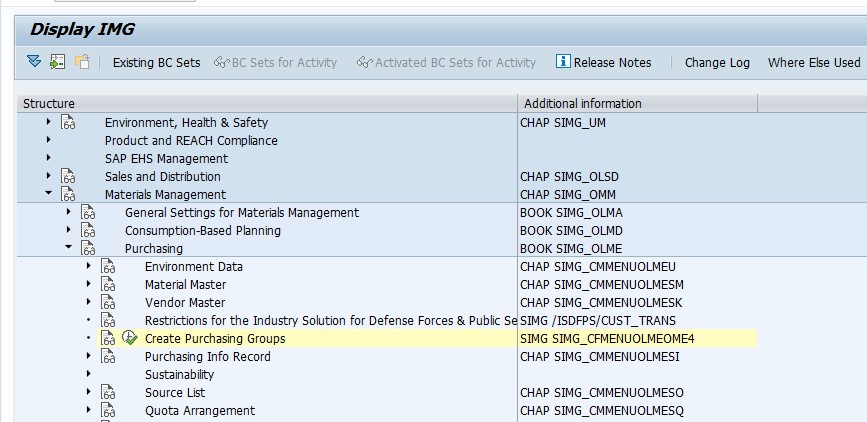
Select New Entries
On the purchasing group overview screen, click New Entries to open a blank row for the next purchasing group you want to create. Unlike plant-based objects, there is no plant or organization selection screen first - purchasing group creation goes straight to the entry table.
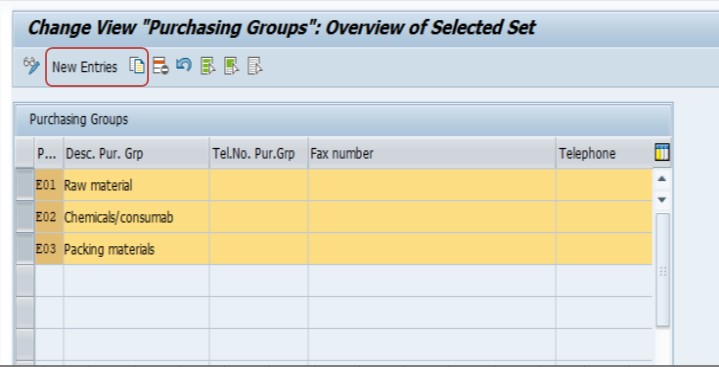
Enter the Purchasing Group Code and Description
Enter a short code - typically three characters, such as E01, E02, or E03 - along with a clear, business-readable description. In this example, three purchasing groups were created: E01 - Raw Material, E02 - Chemicals/Consumables, and E03 - Packing Material, each representing a distinct buying category rather than a physical site.
Save and Transport
Save the entries and assign them to a transport request so the purchasing groups move consistently through your development, quality assurance, and production systems, exactly as you would for any other piece of customizing.
📋 Purchasing Group vs Purchasing Organization vs Material Group
These three objects get confused constantly because they all sound like they're describing "who buys what," but each answers a genuinely different question, and mixing them up leads to procurement reporting that never quite adds up.
| Object | Answers the Question | Configured Via | Assigned To |
|---|---|---|---|
| Purchasing Organization | Which legal/organizational entity procures on our behalf? | OX08 | Company codes and/or plants |
| Purchasing Group | Which buyer or buying team owns this purchase? | OME4 | Nothing - standalone, cross-client key |
| Material Group | What category does this material belong to? | OMSF / WG21 | Individual material master records |
A purchasing organization is a legal and structural boundary - it's tied to the company codes and plants it serves. A purchasing group is a people-and-responsibility boundary - it exists independently of any site. A material group is a classification boundary - it describes the material itself, not who buys it or under what legal entity. In practice, a single purchase order carries all three simultaneously: a purchasing organization determining the legal procuring entity, a purchasing group identifying the responsible buyer, and material groups on each line describing what's actually being bought.
📝 Purchasing Group Naming Conventions and Best Practices
Because a purchasing group can be reused across every plant and purchasing organization in the landscape, the naming decision made here tends to be even more permanent than a plant-specific object like a storage location. A few practices consistently pay off:
- Organize purchasing groups around commodity categories or buyer responsibility - raw material, packing material, chemicals, indirect spend, capital goods - rather than around plants or regions
- Keep the code short and the description explicit; a code like E01 means nothing on its own, so the description carried alongside it does the real communicating
- Avoid naming a purchasing group after a specific individual employee, since people change roles far more often than procurement categories do, and a code tied to a person's name quickly becomes misleading
- Agree the category list with the procurement leadership team before configuration, not after, since retrofitting a new category structure onto years of existing purchase order history is far more disruptive than getting it right up front
- Where the business spans multiple countries, decide whether purchasing groups will be shared globally by category or split regionally, and document that decision clearly for future consultants
- Reserve a small block of unused codes for categories that don't exist yet but are likely to be needed as the business grows
📋 How Purchasing Group Is Used on Procurement Documents
Purchase Requisitions
A purchasing group can be defaulted or manually entered on a purchase requisition, and it's frequently the field used to route the requisition to the right buyer's worklist for conversion into an RFQ or purchase order. In many organizations, a buyer's day starts by filtering the requisition queue down to their own purchasing group before deciding what to action first.
Requests for Quotation and Purchase Orders
The purchasing group carries forward from the requisition onto the RFQ and then the purchase order, though it can also be entered or changed directly on either document. Because it appears at both header and item level, a single purchase order can technically carry different purchasing groups on different line items, which is useful when one order legitimately spans categories owned by different buyers.
Release Strategies and Approval Routing
Many implementations build purchase order release strategies - the approval workflow a document must pass through before it can be sent to a vendor - using purchasing group as one of the classification characteristics, alongside total value and material group. This means the purchasing group chosen on a document isn't just a reporting label; in a correctly configured system it can directly determine who needs to approve the purchase and how many approval levels it passes through.
Vendor Evaluation and Category Management
Where SAP's vendor evaluation functionality is in use, purchasing group is frequently one of the dimensions used to segment vendor scorecards, letting a procurement leadership team compare, for example, how the raw material buying category is performing against the packing material category in terms of on-time delivery or price variance.
🔗 Purchasing Group in Info Records and Source Lists
Two other procurement master data objects worth mentioning alongside purchasing group are purchasing info records and source lists, since both interact with buyer responsibility even though neither is configured directly through OME4.
Purchasing Info Records
A purchasing info record captures the agreed terms between a vendor and a material - price, delivery time, minimum order quantity - and while it doesn't carry a purchasing group field itself, the buyer maintaining that info record is typically the person owning the relevant purchasing group, which is why info record maintenance responsibilities are so often organized along the same category lines as the purchasing group list.
Source Lists and Quota Arrangements
Source lists, which define approved vendors for a material at a plant, and quota arrangements, which split volume across multiple approved vendors, are both typically reviewed and maintained by the buyer responsible for that category - again tying back to purchasing group as the practical organizing principle for who owns which piece of the vendor base, even though the technical link between these objects and purchasing group is indirect rather than a hard system assignment.
📈 Purchasing Group in Procurement Reporting
Because purchasing group sits on nearly every procurement document, it becomes one of the most heavily used filters in standard SAP MM reporting once the system is live.
| Transaction | What It Shows |
|---|---|
| ME2M | Purchase orders by material, filterable by purchasing group |
| ME2L | Purchase orders by vendor, filterable by purchasing group |
| ME80FN | General purchase order reporting and analysis, purchasing-group aware |
| ME54N | Individual release of purchase requisitions, often worked by purchasing group |
| MCE1 / LIS reports | Purchasing statistics in the Logistics Information System, sliced by purchasing group |
A recurring theme, similar to what we cover in our storage location guide, is that these reports are only as useful as the underlying master data discipline behind them. A clean, well-thought-out purchasing group list turns these transactions into genuinely useful category-spend dashboards; a sloppy one - duplicated categories, inconsistent naming, purchasing groups created ad hoc by different consultants over time - turns the same reports into a reconciliation exercise.
🔄 Purchasing Group in SAP S/4HANA
The underlying OME4 configuration step is unchanged between SAP ECC and SAP S/4HANA - purchasing group is still created the same way, stored in the same T024 table, and used the same way on procurement documents. What has changed is how visible and central purchasing group has become in the newer Fiori-based purchasing experience.
Apps such as Manage Purchase Requisitions - Professional and Manage Purchase Orders present purchasing group as a first-class filter and analytics dimension, letting a buyer land directly on their own worklist by purchasing group rather than running a classic ME-transaction report. Situation Handling and My Purchase Orders apps in S/4HANA also frequently use purchasing group to route notifications and approval reminders, which means the category-based naming discipline discussed earlier in this guide pays off even more visibly in an S/4HANA rollout than it did in classic ECC, since buyers now interact with their purchasing group as a personal work queue rather than just a report filter.
💾 Data Migration and Ongoing Governance
Migrating Purchasing Groups Into a New System
Because the purchasing group list is typically small - often a few dozen entries even for a large organization - it's usually loaded through direct OME4 entry or a simple LSMW recording rather than a full-scale migration tool, but the sequencing still matters: purchasing groups need to exist in the target client before any open purchase order or requisition data referencing them is migrated, since a migrated document pointing to a purchasing group that doesn't yet exist will fail validation.
Keeping the List Governed After Go-Live
Unlike storage locations, which are naturally constrained by physical plant layout, purchasing groups have no such built-in constraint - nothing stops a well-meaning super-user from creating a near-duplicate category purely because they weren't aware an equivalent one already existed. This makes lightweight governance worthwhile: a simple rule that new purchasing groups can only be created after sign-off from procurement leadership, combined with the documentation practice mentioned in the checklist below, keeps the list from drifting into confusion the way it can on systems that have been live for many years without any oversight.
💼 Real-World Scenario: Structuring Purchasing Groups at Arjun Industries
When Arjun Industries expanded its SAP footprint beyond the Pune manufacturing plant covered in our storage location case study, Pramod Behera was again the consultant responsible for the procurement side of the enterprise structure build. Rather than asking each plant's local buyer what code they wanted, Pramod first sat down with the head of procurement, Anita Rao, to map out how the buying team was actually organized - not by plant, but by category: one buyer owned raw materials group-wide, a second owned chemicals and general consumables, and a third owned packing materials.
That conversation directly produced the three purchasing groups configured in this guide - E01 for raw material, E02 for chemicals and consumables, and E03 for packing material - deliberately avoiding any plant-specific naming, since Anita's team wanted the same three buyers to be visible in procurement reporting regardless of which plant a given purchase order happened to be raised against. When Arjun Industries later onboarded the Nagpur plant discussed in our storage location guide, no new purchasing groups needed to be created at all; the existing E01, E02, and E03 codes were simply used on Nagpur's purchase orders from day one, immediately giving Anita's team a consistent, group-wide view of category spend across both sites without any additional configuration.
The one adjustment made after go-live came about eighteen months later, when the company began buying capital equipment for a new production line - a category that didn't fit cleanly into any of the original three groups. Rather than forcing capital purchases into the raw material group purely because a similar buyer happened to be handling them temporarily, Pramod created a fourth purchasing group, E04 - Capital Equipment, keeping the category-based logic of the original design intact rather than letting it drift toward a plant- or person-based structure over time.
❌ Common Mistakes When Defining Purchasing Groups
Naming a purchasing group after a specific employee
Codes like "RAJ" or "SMITH" become confusing and misleading the moment that person changes roles or leaves, since the code itself carries no category meaning for anyone who inherits the responsibility.
Creating purchasing groups per plant instead of per category
This defeats the entire point of the object's cross-plant design and produces a duplicated, hard-to-maintain list once the business operates more than a handful of sites.
Skipping the transport request
Purchasing groups saved without being captured in a transport exist only locally, causing the same environment inconsistencies that affect any other uncaptured customizing change.
Confusing purchasing group with material group during design workshops
Teams sometimes try to build a single object that does both jobs, which doesn't map to how SAP actually separates "who buys" from "what category the material belongs to," and causes rework once the mismatch surfaces during testing.
Letting the purchasing group list grow unmanaged over time
Without a governance process, different consultants or super-users end up creating near-duplicate purchasing groups for the same category over successive projects, which quietly erodes the value of category-spend reporting.
Assuming purchasing group drives account determination
It doesn't - account determination is driven by valuation class, movement type, and related settings, not by purchasing group. Treating purchasing group as an accounting object rather than a procurement-responsibility object is a common early misunderstanding.
🔧 Troubleshooting Common Purchasing Group Issues
"Purchasing group does not exist" on a requisition or PO
Since a purchasing group is a cross-client key with no plant restriction, this error almost always means the code simply hasn't been created yet in OME4 in this client, rather than a plant-specific mismatch. Check T024 directly for the code in question.
Purchase orders not appearing in a buyer's worklist
If a buyer expects to see certain purchase orders but doesn't, confirm the purchasing group on those specific documents matches what the buyer's report or worklist is filtering on - it's common for a requisition to be created with the wrong purchasing group defaulted from the material master, which then routes it to the wrong buyer entirely.
Release strategy not triggering as expected
Where release strategies use purchasing group as a classification characteristic, confirm the exact purchasing group on the document matches what's built into the release strategy's characteristic values - a release strategy configured for E01 will simply not fire for a document carrying E02, even if the two categories seem closely related from a business perspective.
Duplicate or overlapping purchasing groups causing reporting confusion
If category-spend reports don't reconcile, check whether more than one purchasing group has effectively been used for the same buying category over time - this is a data governance issue rather than a technical error, and it's resolved by consolidating going forward and documenting the decision, not by further configuration changes.
📖 Quick Glossary of Related SAP Terms
| Term | Meaning |
|---|---|
| Purchasing Group | The key representing the buyer or buying team responsible for a procurement category, defined via OME4. |
| Purchasing Organization | The organizational unit legally responsible for procurement, defined via OX08 and assigned to company codes/plants. |
| Material Group | A classification key describing the category a material belongs to, independent of who buys it. |
| EKGRP | The technical field name that stores the purchasing group on purchasing documents such as EKKO and EKPO. |
| Release Strategy | The configured approval workflow a purchasing document must pass through, which can use purchasing group as a classification characteristic. |
| Vendor Evaluation | SAP MM functionality that scores vendor performance, often segmented and reported by purchasing group. |
✅ Purchasing Group Setup Checklist
- Confirm with procurement leadership how buying responsibility is actually organized before naming a single purchasing group
- Design purchasing groups around commodity categories or buyer responsibility, never around plant or individual employee names
- Create purchasing groups via OME4 and confirm each entry is captured in a transport request
- Cross-check purchasing group codes against any release strategy configuration that will reference them
- Document the category logic behind each code so future consultants understand the "why," not just the code itself
- Reserve spare codes for future buying categories to avoid disruptive restructuring later
- Periodically review the live purchasing group list for near-duplicates or drift away from the original category design
🎓 Purchasing Group Interview and Knowledge-Check Questions
Purchasing group questions come up regularly in SAP MM interviews precisely because the concept is simple but frequently mixed up with purchasing organization and material group. These are the questions worth being able to answer confidently.
What is a purchasing group, and how is it different from a purchasing organization? A strong answer draws the same distinction covered earlier in this guide: purchasing organization is a legal/structural entity tied to company codes and plants, while purchasing group is a people-and-responsibility key with no such tie, representing the buyer rather than the legal procuring entity.
Is a purchasing group assigned to a plant? No - and explaining why (its cross-client, cross-plant design supports category-based buying teams rather than site-based ones) demonstrates a deeper understanding than simply reciting the fact.
Walk through the steps to create a purchasing group. This maps directly to the OME4 steps covered earlier - SPRO path or direct OME4 execution, New Entries, code and description, save and transport.
How does purchasing group affect purchase order approval? A complete answer mentions that purchasing group can be used as a classification characteristic inside release strategy configuration, meaning it can directly determine the approval path a document follows, not just serve as a reporting label.
How would you design a purchasing group structure for a new implementation? The best answers reference gathering the actual procurement organizational structure from business stakeholders first - exactly the approach taken in the Arjun Industries case study earlier in this guide - rather than defaulting to a generic template.
❓ Frequently Asked Questions
💡 Key Takeaways
- A purchasing group represents the buyer or buying team, defined via OME4, and is not tied to any plant, company code, or purchasing organization
- Design purchasing groups around procurement categories or buyer responsibility, never around plant or individual employee names
- Purchasing group appears on purchase requisitions, RFQs, and purchase orders, and can directly drive approval routing through release strategy configuration
- Purchasing group is distinct from both purchasing organization (a legal/structural entity) and material group (a material classification)
- Every purchasing group change should move through a transport request and a proper change management process
- Reserve spare codes for future buying categories so growth doesn't force a disruptive restructuring later