How to Define MRP Controller in SAP – OMD0 Configuration Guide
An MRP controller identifies the planner responsible for a group of materials - the person who reviews exception messages, releases planned orders, and keeps supply aligned with demand. This guide walks through the OMD0 configuration path, explains how MRP controller differs from purchasing group, and covers the naming and process decisions that shape planning operations long after go-live.
⚠ What Is an MRP Controller in SAP?
An MRP controller - sometimes called a planner or dispatcher, depending on the industry - is the SAP key representing the person or team responsible for material requirements planning on a defined group of materials within a plant. Where a purchasing group represents the buyer who executes a purchase once a need has been identified, the MRP controller represents the planner who identifies that need in the first place, deciding how demand should be covered - through production, procurement, or a mix of both.
Every material that's relevant for MRP carries an MRP controller on its MRP1 view in the material master, and that single field determines a great deal of downstream behavior: which planner's worklist a material's exception messages land on, how MD04 (stock/requirements list) and MD07 (MRP list) can be filtered, and in many organizations, who gets held accountable when a stockout or excess inventory situation is investigated.
MRP Controller Is Defined Per Plant
Unlike a purchasing group, which is a standalone, cross-client key with no plant assignment, an MRP controller is maintained per plant through transaction OMD0. This reflects how planning responsibility is typically organized in the real world - a planner usually owns a defined scope of materials at one specific site, closely tied to that plant's physical production and supply chain, rather than a category that spans the entire enterprise the way procurement categories often do.
This also means the same MRP controller code, say 901, can exist independently in two different plants representing two completely different planners, or the two entries can both happen to be assigned to the same real person if that individual supports multiple sites - the system doesn't automatically link them, since each plant maintains its own MRP controller list.
✅ Step-by-Step: Defining an MRP Controller Using OMD0
Navigate to the Configuration Path
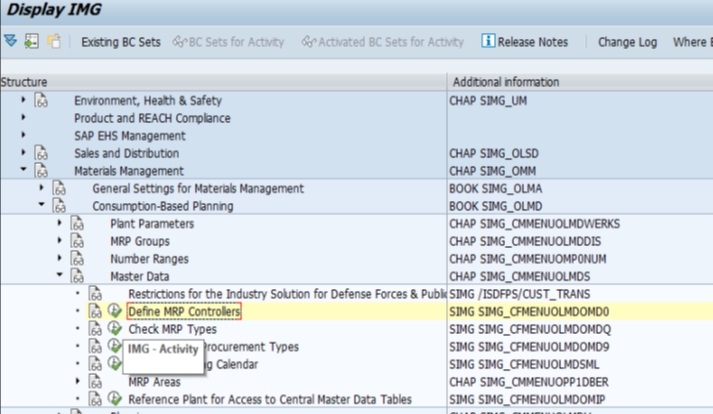
Go to SPRO > Materials Management > Consumption-Based Planning > Master Data > Define MRP Controllers, or execute transaction OMD0 directly.
Select the Plant and Choose New Entries
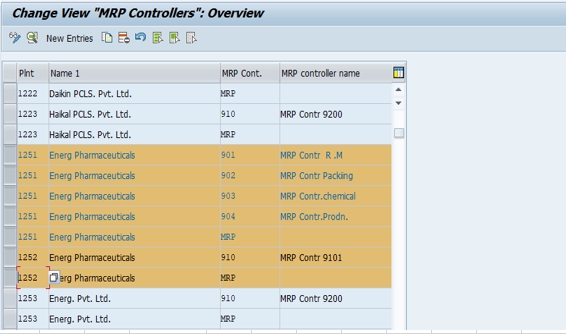
Since MRP controllers are maintained per plant, select the plant you're configuring - in this example, plant 1251 (Energ Pharma) - then click New Entries to open a blank row for the next MRP controller.
Enter the MRP Controller Code and Description
Enter a short code and a clear, business-readable description. In this example, MRP controller 901 - MRP Cont R.M. was created for plant 1251, representing the planner responsible for raw material planning at that site.
Save and Transport
Save the entry and assign it to a transport request so the MRP controller moves consistently through your development, quality assurance, and production systems, exactly as you would for any other piece of customizing.
📋 MRP Controller vs Purchasing Group vs Production Scheduler
These three roles are frequently confused because all three eventually touch the same material, but each one owns a genuinely different part of the supply chain process, and understanding the boundary between them is essential for designing planning and procurement responsibility correctly.
| Role | Answers the Question | Configured Via | Assigned To |
|---|---|---|---|
| MRP Controller | Who plans this material - deciding what's needed and when? | OMD0 | Plant (per-plant master data) |
| Purchasing Group | Who buys this material once a requisition exists? | OME4 | Nothing - standalone, cross-client key |
| Production Scheduler | Who schedules and executes production orders for this material? | OPJ9 / material master MRP3 view | Plant (per-plant master data) |
In a typical make-to-stock scenario, the MRP controller runs or reviews the MRP result and decides a purchase requisition is needed, the purchasing group's buyer converts that requisition into a purchase order and negotiates with the vendor, and - for materials that are produced rather than bought - a production scheduler takes the resulting planned order through to a released production order on the shop floor. All three can be, and often are, different individuals, each accountable for a distinct stage of the same material's supply chain.
📝 MRP Controller Naming Conventions and Best Practices
Because MRP controller is maintained per plant, the naming decision is somewhat more local than a purchasing group, but a few practices still consistently pay off across an implementation:
- Organize MRP controllers around material category or planning scope - raw materials, packing materials, finished goods, semi-finished/WIP - rather than around individual planner names
- Keep the numeric or alphanumeric code short and let the description carry the real meaning, exactly as demonstrated by 901 - MRP Cont R.M. in this guide
- Avoid naming an MRP controller after a specific employee for the same reason discussed in our purchasing group guide - people change roles more often than planning categories do
- Where the same numbering scheme is reused across multiple plants (901 for raw materials in every plant, for example), document that convention clearly so a group-wide MRP controller list stays intuitive to navigate
- Align the MRP controller split with how the planning team is actually organized day to day, not with an idealized structure nobody on the ground actually follows
- Reserve a small block of unused codes per plant for future planning categories as the material portfolio grows
📋 How MRP Controller Is Used in Day-to-Day Planning
Material Master Assignment
The MRP controller field sits on the MRP1 view of the material master and is typically a required entry once a material is flagged as MRP-relevant. This is the single point where a material gets routed to a specific planner's responsibility, and it's why MRP controllers must exist in a plant before material masters can be created there.
MRP Run and Exception Messages
When the MRP run (MD01, MD02, or MRP Live in S/4HANA) executes, it evaluates every MRP-relevant material and generates planned orders, purchase requisitions, or exception messages as needed. Because every material carries an MRP controller, a planner can filter results down to exactly their own scope using MD07 (MRP list) or MD04 (stock/requirements list), rather than wading through results for the entire plant.
Exception Message Review
Exception messages - such as a material falling below safety stock, a planned order that needs to be rescheduled, or a shortage situation - are a core part of a planner's daily routine, and MRP controller is the field that determines whose worklist those messages appear on. A well-designed MRP controller split means each planner's daily exception review is focused and manageable; a poorly designed one means planners either miss exceptions that should have been theirs or wade through noise belonging to someone else's materials.
📈 MRP Controller in Planning Reports and Dashboards
| Transaction | What It Shows |
|---|---|
| MD04 | Stock/requirements list for a material, filterable and grouped by MRP controller |
| MD07 | Collective MRP list, one of the primary screens planners use to review their entire material scope by MRP controller |
| MD06 | Collective display of exception messages, groupable by MRP controller |
| MC.9 / LIS reports | Planning statistics in the Logistics Information System, sliced by MRP controller |
| MRP Live monitoring apps (S/4HANA) | Fiori-based MRP monitoring, filterable by MRP controller as a planner dimension |
As with purchasing group and storage location, these reports are only as useful as the underlying MRP controller structure behind them. A clean split by material category turns MD07 into a genuinely manageable daily worklist per planner; an undifferentiated or overly broad MRP controller assignment turns the same screen into an unfiltered wall of materials nobody can realistically review every day.
💼 Real-World Scenario: Structuring MRP Controllers at Arjun Industries
Continuing the same enterprise structure build covered in our storage location and purchasing group case studies, Pramod Behera also owned the MRP controller design for plant 1251 at Arjun Industries. Rather than defaulting to a single, catch-all MRP controller for every material in the plant, Pramod sat down with the planning manager, Deepak Nair, to understand how the planning team was actually organized - and it mirrored the storage location split almost exactly: one planner owned raw material planning, a second owned packing material planning, and a third owned finished goods and production planning.
That conversation produced three MRP controllers for plant 1251: 901 - MRP Cont R.M. for raw materials, 902 - MRP Cont Packing for packing materials, and 903 - MRP Cont FG for finished goods. Deepak's team could now run MD07 filtered to their own MRP controller each morning and see exactly their own material scope, without needing to scroll past materials belonging to a different planner. When plant 1252 in Nagpur came online later, Pramod reused the same 901/902/903 numbering convention there as well - a deliberate echo of the consistent naming approach used for storage locations and purchasing groups across both plants, making group-wide planning reporting far easier to read for anyone comparing performance across sites.
The one adjustment made after go-live mirrored the purchasing group story too: when Arjun Industries began planning for capital equipment components tied to the new production line, Pramod created a fourth MRP controller, 904 - MRP Cont Capital, rather than forcing those materials into an existing category where they didn't naturally belong.
❌ Common Mistakes When Defining MRP Controllers
Creating a single, catch-all MRP controller for an entire plant
This defeats the purpose of the object entirely, producing an MD07 worklist so broad that no individual planner can realistically own or review it day to day.
Naming an MRP controller after a specific employee
Just like purchasing groups, codes tied to a person's name become misleading the moment that person changes roles or leaves the organization.
Skipping the transport request
MRP controllers saved locally rather than captured in a transport won't reach quality assurance or production, blocking material master creation in those environments until the gap is caught and fixed.
Using inconsistent numbering across plants in a multi-plant landscape
When each plant invents its own MRP controller numbering scheme independently, group-wide planning reporting becomes far harder to read, since 901 might mean raw materials in one plant and finished goods in another.
Confusing MRP controller with purchasing group during design workshops
Teams sometimes assume one object can do both jobs, which doesn't map to how SAP separates planning responsibility from buying responsibility, and causes rework once the mismatch surfaces during testing.
Not involving the actual planning team in the design
An MRP controller split invented purely by the configuration team, without input from the planners who will use it daily, often doesn't match how planning responsibility genuinely works on the ground.
🔧 Troubleshooting Common MRP Controller Issues
"MRP controller does not exist for plant" error on material master save
Since MRP controller is maintained per plant, this almost always means the code exists in a different plant but hasn't been created for the specific plant the material master is being maintained in. Check OMD0 for the exact plant in question.
Materials missing from a planner's MD07 worklist
Confirm the MRP controller assigned on the material's MRP1 view actually matches what the planner is filtering on - it's common for a material to be created with the wrong MRP controller defaulted or copied from a reference material, silently routing it to the wrong planner's list.
MRP controller change works in development but not in quality or production
This is the classic symptom of an MRP controller saved without being assigned to a transport request. Check the transport logs for the original OMD0 change.
Exception messages appearing to be reviewed by the wrong planner
If exception messages seem to be landing with the wrong person, this is almost always a material master data issue - the MRP controller field on the affected materials - rather than a configuration problem with OMD0 itself.
🔄 MRP Controller in SAP S/4HANA
The core OMD0 configuration step is unchanged between SAP ECC and SAP S/4HANA - MRP controller is still created the same way, stored in the same T024D table, and used the same way on the material master. What has changed is how prominently MRP controller shows up in the newer planning experience: MRP Live, the S/4HANA replacement for the classic MRP run, and Fiori apps like Monitor Material Coverage and Manage Material Shortages both use MRP controller as a core filtering and monitoring dimension, letting a planner land directly on their own material scope rather than running a classic MD07 selection every time. This means the category-based naming discipline discussed earlier in this guide pays off even more visibly in an S/4HANA rollout, since MRP controller functions as a personal work queue in the newer apps in much the same way purchasing group does for buyers.
💾 Data Migration and Governance Considerations
Sequencing With Material Master Loads
Because MRP controller is typically a required field on the MRP1 view, MRP controllers must exist in a plant before any material master data load for that plant can succeed. Project teams that sequence material master migration too close to the MRP controller build risk load failures purely because the referenced MRP controller code doesn't exist yet in the target client.
Keeping the List Governed After Go-Live
Similar to purchasing groups, nothing technically prevents a well-meaning user from requesting a near-duplicate MRP controller for a category that already has one, and without light governance - new MRP controllers approved by the planning manager rather than created ad hoc - the list can drift into confusion over the life of a system. Documenting the reasoning behind each code, exactly as demonstrated in the Arjun Industries case study earlier in this guide, is a small habit that pays for itself the first time a new consultant has to make sense of an unfamiliar MRP controller list.
🔧 MRP Controller's Relationship to Lot Sizing, Safety Stock, and Reorder Points
While MRP controller itself doesn't control any planning calculation directly, it sits on the same MRP1 view as the settings that do - lot size procedure, reorder point, and safety stock - and in practice the planner identified by the MRP controller field is the person accountable for keeping those parameters accurate over time.
Why This Ownership Matters
Lot sizing and safety stock settings aren't "set once and forget" configuration; they need periodic review as demand patterns, lead times, and supply reliability shift. Because MRP controller is the field that routes a material to a specific planner's worklist, it's also implicitly the field that determines whose job it is to notice when a material's reorder point no longer reflects reality and needs adjusting. A clean MRP controller structure, aligned to how planning responsibility actually works, makes this ownership obvious; a messy one leaves planning parameters unowned and stale.
Connecting Back to Exception Messages
This is also why exception messages, covered earlier in this guide, matter so much in practice - a well-tuned reorder point combined with a clearly owned MRP controller means the right planner sees a shortage exception early enough to act, rather than the business discovering the gap only when production or a customer order is already blocked.
📖 Quick Glossary of Related SAP Terms
| Term | Meaning |
|---|---|
| MRP Controller | The key representing the planner responsible for a group of materials within a plant, defined via OMD0. |
| T024D | The table storing MRP controller master data. |
| DISPO | The technical field name for MRP controller on the material master (MARC table). |
| MRP1 View | The material master view where the MRP controller, along with lot size and reorder point settings, is maintained. |
| Exception Message | A system-generated alert during the MRP run flagging a situation - like a shortage or rescheduling need - requiring planner attention. |
| Production Scheduler | The role responsible for scheduling and executing production orders, distinct from the MRP controller who plans requirements. |
✅ MRP Controller Setup Checklist
- Confirm with the planning manager how planning responsibility is actually organized before naming a single MRP controller
- Design MRP controllers around material category or planning scope, never around individual planner names
- Create MRP controllers via OMD0 for every plant that needs them, before material master creation begins there
- Use a consistent numbering convention across plants in a multi-plant landscape to keep group-wide reporting readable
- Confirm each entry is captured in a transport request before quality assurance testing begins
- Document the category logic behind each code so future consultants understand the reasoning, not just the code itself
- Reserve spare codes per plant for future planning categories to avoid disruptive restructuring later
🎓 MRP Controller Interview and Knowledge-Check Questions
MRP controller questions come up regularly in SAP PP and MM interviews, often specifically to test whether a candidate can clearly separate planning responsibility from purchasing responsibility.
What is an MRP controller, and how is it different from a purchasing group? A strong answer draws the same distinction covered earlier in this guide: MRP controller represents the planner deciding what's needed and when, while purchasing group represents the buyer executing the actual procurement transaction once a requisition exists.
Is an MRP controller assigned to a plant? Yes - unlike purchasing group, MRP controller is maintained per plant, reflecting how planning responsibility is typically organized around a specific site's production and supply chain.
Walk through the steps to create an MRP controller. This maps directly to the OMD0 steps covered earlier - SPRO path or direct OMD0 execution, select the plant, New Entries, code and description, save and transport.
Where does MRP controller get used during the MRP run? A complete answer mentions that MRP controller routes exception messages, planned orders, and requisitions to the responsible planner's worklist, and is a core filter in MD04, MD07, and MD06.
How would you design an MRP controller structure for a new implementation? The best answers reference gathering the actual planning organizational structure from business stakeholders first - exactly the approach taken in the Arjun Industries case study earlier in this guide - rather than defaulting to a single catch-all controller or an arbitrary split.
❓ Frequently Asked Questions
💡 Key Takeaways
- An MRP controller represents the planner responsible for a group of materials, defined per plant via OMD0
- Design MRP controllers around material category or planning scope, never around individual planner names
- MRP controller is distinct from purchasing group - one plans the requirement, the other executes the purchase
- MRP controllers must exist before material masters can be created for a plant, since the field is typically required on MRP1
- Use consistent numbering across plants in a multi-plant landscape to keep group-wide planning reporting readable
- Every MRP controller change should move through a transport request and, ideally, a lightweight governance process