SAP MM01 Material Master: Organizational Data and Sales Views (Step-by-Step)
Continuing directly from where Part 1 of this MM01 series left off, this guide covers the organizational levels every material needs - plant, storage location, sales organization, distribution channel, and division - along with the Basic Data view and the Sales Organization view, including tax data, batch management, transport and loading groups, foreign trade export, and sales text. If you run into any errors while following along, feel free to send a screenshot to pramod@learntosap.com for help.
✅ 3. Organizational Data
Once material type, industry sector, and material number have been entered, the next step is organizational data - telling SAP where, physically and commercially, this material will actually exist within the enterprise structure.
- Plant: Select the plant to which the material will be assigned. This indicates the physical location where the material will be stored or produced.
- Storage Location: Choose the storage location within the plant. This is where the material will be kept or issued from.
- Sales Organization: Assign the sales organization responsible for selling this material.
- Distribution Channel: Specify the distribution channel through which the material will be sold (e.g., Wholesale, Retail).
- Division: Indicate the division to which the material belongs (e.g., Domestic, Export).

✅ Create Material Master in SAP – Basic Data View (General Data)
The Basic Data view contains essential information about the material, such as material type, industry sector, base unit of measure, and material group. In the pharmaceutical industry, material types play a crucial role in differentiating between various categories of materials, such as finished products, raw materials, and packaging materials.


📋 Understanding the Organization Level in SAP
The organization level in SAP refers to the hierarchical structure of an organization. It encompasses different levels, such as the global level, company code level, plant level, sales organization level, distribution channel level, and more. Each level represents a different aspect of the organization's structure and operations, allowing businesses to segregate and manage data effectively.
1. Plant Level
Plants represent physical locations where production or storage of materials occurs. They are typically associated with a specific geographical location and are responsible for managing inventory, production, and shipping of materials. Plants are further divided into sub-levels, such as storage locations, for more granular management.
2. Sales Organization Level
Sales organizations are entities responsible for selling products and services to customers. They are responsible for managing sales activities, customer relationships, and revenue generation within specific geographical regions or market segments.
3. Distribution Channel Level
Distribution channels represent the various routes through which products are delivered to customers. These can include direct sales, wholesalers, retailers, or online platforms. Assigning materials to specific distribution channels allows businesses to tailor their sales strategies for different customer segments.
Understanding this hierarchy is what makes the organizational data screen in MM01 make sense - each field on that screen corresponds to one of these levels, and getting the combination right is what determines exactly which business processes, at which organizational scope, the material will actually participate in.
🔧 Follow Steps: Entering Organizational Data
Fill in Plant, Sales Organization, and Distribution Channel.
Then click the OK button to proceed to the view selection screen.

✅ 2. Sales: Sales Organization View
In the pharmaceutical business, understanding sales-specific data is crucial for effective distribution and sales planning. In the Sales Organization view, you define data such as sales-specific material description, pricing, and tax information. Additionally, you can also set up specific delivery and shipping parameters based on different sales organizations, distribution channels, and divisions.


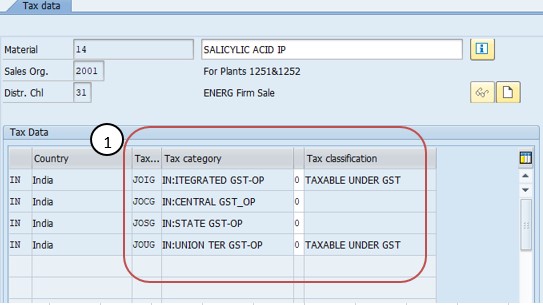
🔧 Follow Steps: Tax Data
Select Tax Data - 0 (Taxable under GST), or whichever tax classification correctly reflects the material's actual tax treatment.
✅ Overview of the Sales: General/Plant Tab
The Sales: General/Plant tab is where a handful of fields with a disproportionate impact on logistics processing are maintained. Accurate data entry in this tab is significant for successful sales and distribution processes, since several downstream shipping and handling decisions depend directly on what's set here.
1. Batch Management
Batch management allows a material's stock to be tracked and controlled at the level of individual batches or lots, rather than as one undifferentiated quantity. This is especially significant in industries like pharmaceuticals, where a specific production batch may need to be traced, recalled, or reported on independently of other batches of the same material. Batch management is set up directly in the Sales: General/Plant tab of MM01.
2. Transport Group
Transport group represents how a material is physically transported - for example, on pallets, in liquid form, or in containers - and is assigned to a material in the Sales: General/Plant tab. This information feeds directly into delivery and transportation planning, helping the system and logistics team anticipate what kind of handling and vehicle capacity a shipment will require.
3. Loading Group
Loading group specifies how a material is physically loaded - by crane, forklift, or manually - and is specified in the Sales: General/Plant tab. This information is relevant for effective material handling in the warehouse and for planning the resources needed to load a shipment correctly.
🔧 Follow Steps: Sales General/Plant Tab
Base Unit of Measure - KG, EA, etc.
Batch Management - tick the box if this material's stock should be tracked by batch.
Transport Group - 001 (on pallets), 002 (in liquid form), 003 (container), etc.
Loading Group - 0001 (crane), 0002 (forklift), 0003 (manual), etc.

✅ Foreign Trade Export
Foreign Trade Export is a field within the SAP MM01 transaction that holds crucial information about materials intended for export. When creating a material master record for an item to be exported, the Foreign Trade Export field must be accurately filled out to comply with international trade regulations and customs requirements.
🔧 Follow Steps: Foreign Trade Export
Enter the control code - for example, an HSN number such as 8471.

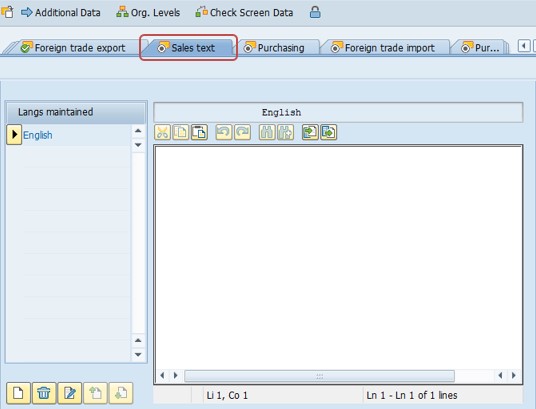
✅ Sales Text in SAP MM01
Sales Text is an essential feature in SAP MM01 that allows users to maintain relevant sales-related information for a material. This text provides valuable details for sales representatives, customers, and other stakeholders involved in the sales process. To add or modify the Sales Text during material creation, follow the steps below.
📋 Why These Fields Deserve Careful Attention
It's easy to treat batch management, transport group, loading group, and foreign trade export as minor checkbox-level details compared to material type or pricing, but each one directly shapes a real operational process once the material is live.
| Field | Downstream Impact if Incorrect |
|---|---|
| Batch Management | Stock cannot be traced by batch, undermining recall and traceability processes required in regulated industries. |
| Transport Group | Shipment planning may not correctly anticipate handling requirements, leading to delivery scheduling mismatches. |
| Loading Group | Warehouse teams may not have the correct equipment planned for loading, causing delays at dispatch. |
| Tax Classification | Incorrect tax determined on sales documents, requiring correction of already-processed billing documents. |
| Foreign Trade Export | Export documentation may fail customs compliance checks, delaying or blocking cross-border shipments. |
None of these fields are difficult to fill in correctly - the challenge is simply remembering to treat them with the same care as the more obviously important fields like material type and pricing data.
💼 Real-World Scenario: Preparing a Pharmaceutical Material for Export
Pooja Mishra, an SAP MM consultant at Learn Pharmaceuticals, was completing the material master setup for a new pharmaceutical product that needed to be both sold domestically and exported to a partner distributor overseas. Sales manager Rajesh Patil stressed that the product's batch-level traceability was non-negotiable, given regulatory requirements in the pharmaceutical industry.
Working with functional consultant Praiya Patil,Pooja completed the organizational data - assigning the correct plant, storage location, sales organization, distribution channel, and division - before moving into the Basic Data and Sales Organization views. He ticked batch management in the Sales: General/Plant tab, assigned transport group 002 (liquid form, since the product was a liquid formulation), and loading group 0002 (forklift), reflecting how the warehouse team actually handled this product's packaging.
Business analyst Anita Saw then confirmed the correct tax classification for domestic sales, and Pooja completed the Foreign Trade Export field with the product's HSN control code, ensuring export documentation would generate correctly. Once tested with a sample sales order and a sample export delivery, both domestic and export processes ran smoothly - confirming that the careful, field-by-field attention paid to organizational data and the Sales: General/Plant tab had avoided the kind of downstream compliance and logistics issues that incomplete master data commonly causes.
❗ Common Mistakes in This Stage of Material Creation
- Skipping or rushing through organizational data entry, resulting in a material assigned to the wrong plant or sales organization.
- Leaving batch management unticked for a material that genuinely requires lot-level traceability, particularly in regulated industries.
- Assigning an incorrect transport or loading group that doesn't reflect how the material is actually packaged or handled.
- Selecting the wrong tax classification, leading to incorrect tax calculation on sales documents that must be corrected later.
- Forgetting to complete the Foreign Trade Export field for materials that will genuinely be exported, risking customs compliance issues.
- Leaving Sales Text blank when sales representatives or customers genuinely need that contextual information at the point of sale.
✅ Best Practices for This Stage of Material Creation
- Confirm the correct plant, sales organization, and distribution channel with the relevant business team before entering organizational data.
- Decide on batch management requirements upfront, based on the material's regulatory or traceability needs, rather than defaulting to off.
- Choose transport and loading groups that genuinely reflect how the material is packaged and handled, coordinating with the warehouse team if uncertain.
- Confirm tax classification with the finance or tax team, particularly for materials with unusual or regionally specific tax treatment.
- Complete Foreign Trade Export fields for any material with genuine export potential, even if export isn't the primary use case at creation time.
- Maintain meaningful Sales Text where sales representatives or customers would genuinely benefit from the additional context.
✅ Validating This Stage Before Moving Forward
Before continuing to the remaining views in the material master creation process, it's worth confirming this stage's data is correct. Display the material (MM03) and confirm the organizational data - plant, storage location, sales organization, distribution channel, division - matches what was intended. Confirm batch management, transport group, and loading group reflect the material's actual handling requirements. Create a test sales order and confirm tax is calculated correctly based on the tax classification entered. If the material will be exported, confirm the Foreign Trade Export control code is present and correctly formatted.
Skipping this check before moving on to the remaining views - Accounting, MRP, and Storage, covered later in this series - risks carrying an early mistake forward into a longer, more time-consuming correction once the material is already referenced by live transactions.
📱 This Configuration in SAP S/4HANA
The organizational data structure and Sales view fields covered in this guide work the same way in SAP S/4HANA as in classic ECC, since these remain foundational elements of material master data. Batch management, transport group, and loading group continue to function identically, and tax classification and Foreign Trade Export data continue to feed the same downstream sales and compliance processes. As with material creation generally, S/4HANA increasingly offers Fiori-based apps as an alternative to the classic MM01 screens for maintaining this data, though the underlying fields and their business meaning remain unchanged.
📋 Related SAP Transactions
| Transaction | Purpose |
|---|---|
| MM01 | Create a new Material Master record, including organizational data and Sales views. |
| MM02 | Change an existing Material Master record. |
| MM03 | Display a Material Master record without allowing changes. |
| OX10 | Define plants, one of the organizational levels entered during material creation. |
| OVXK | Assign distribution channel to sales organization, relevant to the sales organization data entered here. |
| MSC1N | Create a batch record, relevant once batch management is enabled on a material. |
🎓 Interview-Style Questions and Answers
Q: What is the difference between plant and storage location in material master organizational data?
Plant represents the broader physical location where the material is produced or stored, while storage location is a more granular sub-level within that plant, indicating specifically where the material is kept or issued from.
Q: Why is batch management particularly important in industries like pharmaceuticals?
Because regulatory requirements often demand that specific production batches be traceable and recallable independently, and batch management is the SAP functionality that makes this level of tracking possible.
Q: What downstream process depends on the loading group field?
Warehouse and shipping planning depends on loading group to anticipate what handling equipment - crane, forklift, or manual handling - a shipment of that material will require.
Q: Why does the Foreign Trade Export field matter even for materials not currently being exported?
Because completing it proactively avoids having to revisit the material master under time pressure once an export opportunity does arise, and keeps the data consistent for materials that share similar characteristics.
📚 Quick Glossary of Terms Used in This Guide
- Organizational Data: The plant, storage location, sales organization, distribution channel, and division assigned to a material, defining where it's managed and sold.
- Basic Data View: The material master view containing general information like material type, industry sector, and base unit of measure.
- Batch Management: Functionality allowing a material's stock to be tracked and controlled at the individual batch or lot level.
- Transport Group: A classification of how a material is physically transported, such as on pallets or in liquid form.
- Loading Group: A classification of how a material is physically loaded, such as by crane or forklift.
- Foreign Trade Export: Material master data, including a control code, required for compliance when a material is exported internationally.
📝 Governance for Organizational and Sales Data Entry
Because organizational data and the Sales: General/Plant tab fields feed directly into logistics and compliance processes, most organizations maintain a creation checklist covering exactly which fields must be reviewed for every new material, tailored by material type where relevant - a pharmaceutical finished product, for instance, almost always requiring batch management review, while a simple office supply item may not.
Governance also matters for tax classification and Foreign Trade Export data specifically, since errors here have compliance implications beyond simple data quality - incorrect tax treatment or missing export documentation can create real regulatory exposure. Involving finance and trade compliance stakeholders in reviewing these fields, rather than leaving them entirely to the SD or MM consultant's judgment, is standard practice in mature implementations.
🎯 Conclusion
Organizational data and the Sales views covered in this part of the MM01 series carry more operational weight than their position partway through material creation might suggest - plant and sales organization determine where a material lives in the enterprise structure, while batch management, transport group, loading group, tax classification, and Foreign Trade Export data each shape a distinct downstream process, from warehouse handling to customs compliance. Taking the time to get these fields right, coordinating with the business teams who actually understand the material's handling and regulatory needs, is what makes the difference at this stage. Continue with Part 3 of this series to complete the remaining material master views.