How to Delete a Production Order in SAP PP Using CO02 (Set and Undo the Deletion Flag)
Sooner or later every plant creates a production order that should not exist: a duplicate, a wrong material, an order for a product that was cancelled. SAP does not simply erase it. Instead it uses a two-stage process, a reversible deletion flag set in CO02 and a permanent deletion indicator that comes later through archiving. This guide walks through the CO02 steps, shows how to undo the flag, explains the checks to do first, and covers how the order is finally removed. If you run into any errors while following along, feel free to send a screenshot to pramod@learntosap.com for help.
✅ Can You Really Delete a Production Order in SAP?
In everyday speech people say "delete the production order," but SAP treats this as a controlled life-cycle step rather than an instant action. An order carries cost, stock and planning information, so removing it carelessly could leave gaps in controlling and inventory. For that reason SAP separates deletion into stages.
The first stage is the deletion flag, status DLFL. You set it yourself in transaction CO02. It marks the order as no longer needed and blocks further processing, but it can be removed again. The second stage is the deletion indicator, status DLT. It is normally set by an archiving preparation program after a defined waiting period, and once set it cannot be reversed. The third stage is archiving and deletion, where the order data is written to an archive and removed from the database.
For most users, "deleting" a production order simply means setting the deletion flag in CO02. That is what the steps in this tutorial cover, followed by a clear explanation of what happens afterwards.
📋 The Stages of Deleting a Production Order
| Stage | Status | How It Is Done | Reversible? |
|---|---|---|---|
| 1. Deletion flag | DLFL | Set in CO02, or by program in CO78. | Yes, revoke it in CO02. |
| 2. Deletion indicator | DLT | Set by the archiving preparation run after a residence time. | No. |
| 3. Archiving | Order archived | Archiving program writes the order to an archive. | Only by reloading from archive, if your system allows it. |
| 4. Deletion | Removed from database | Deletion program removes archived orders. | No. |
Everything up to stage one is within a planner's reach. Stages two to four are normally handled by a scheduled background job under the control of the SAP basis or archiving team, in line with the company's data retention policy.
💡 Why the Deletion Flag Is Useful
The deletion flag does more than label an order. SAP documentation explains that orders with status DLFL are left out of the period-end closing process in cost object controlling, which improves performance. That is one reason many plants flag completed and settled orders regularly, rather than letting thousands of old orders accumulate in the month-end runs.
- Prevents further processing: an order with the flag should not be released, confirmed or booked against any more.
- Cleans up work lists: flagged orders disappear from most daily worklists, which keeps planners focused on live orders.
- Speeds up period-end: flagged orders are skipped during closing, which reduces run times.
- Reversible: if a mistake is spotted, the flag can be removed again while no deletion indicator has been set.
- Prepares for archiving: an order can only be archived after the deletion flag has been set, either manually or by a background program.
📝 Checks to Make Before You Set the Deletion Flag
Setting the flag is quick, but the checks beforehand decide whether it succeeds and whether you cause problems later. Work through these in order.
- Check the order status. Open the order in CO02 and read the status line. An order that is still released and being worked on should not be flagged. The status also tells you whether it is already technically complete or closed.
- Check for confirmations. If operations were confirmed, decide whether they should be cancelled. Confirmations are reversed with CO13.
- Check for goods movements. Goods issues to the order and goods receipts from it are real stock postings. Reverse them where appropriate, for example with CORS or by cancelling the material document, so stock and value stay correct.
- Check for costs. If the order carries actual costs, they normally need to be settled before the flag is set. In a standard system the flag can usually be set when the order balance is zero.
- Check for open follow-up documents. Open purchase requisitions, purchase orders for subcontracting or reservations linked to the order may need to be cleared first.
- Check who else depends on the order. Sales orders, project items or other orders that reference it should be informed.
🔧 Step-by-Step: Setting the Deletion Flag in CO02
The steps follow the original example, using production order 60004985.
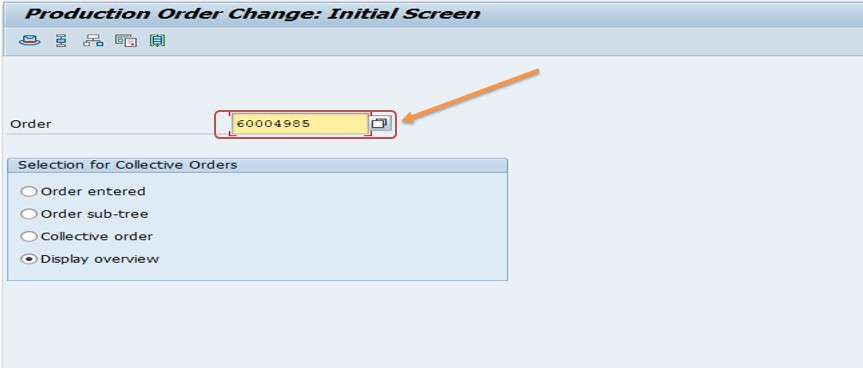
Run transaction CO02, enter the production order number, for example 60004985, and press Enter. The order header opens in change mode.
Check the order status in the header. Confirm the order is not still in active use, meaning it is not released and partly processed in a way you did not expect.
If the order has confirmations, cancel them using CO13. This reverses the posted yield, scrap and activity values.
If the order has goods movements, reverse them, for example with CORS for the order's goods movements or by cancelling the material document. This restores stock and removes the order's consumption and receipt.
In the order header, open the Functions menu and choose Deletion Flag → Set. In some releases this entry is found under Restrict Processing. The order now receives the status DLFL.
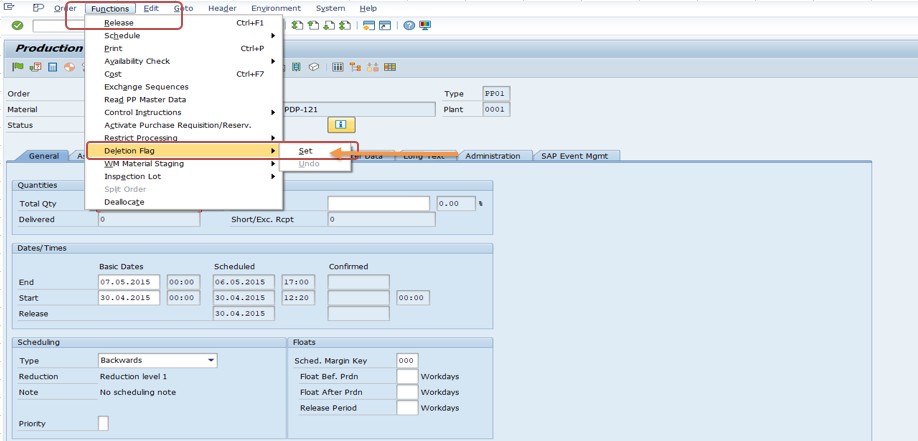
Save the order. The deletion flag is now stored. The order can no longer be processed in the normal way, and the system will treat it as a candidate for archiving.
🔄 How to Undo the Deletion Flag (Revoke)
If the flag was set by mistake, or the order turns out to be needed after all, you can reverse it. The path is the same as setting it, but you choose the opposite option.
Open the order in CO02. Because the order has status DLFL, make sure you are in change mode.
Choose Functions → Deletion Flag → Revoke (also described as Undo). The DLFL status is removed.
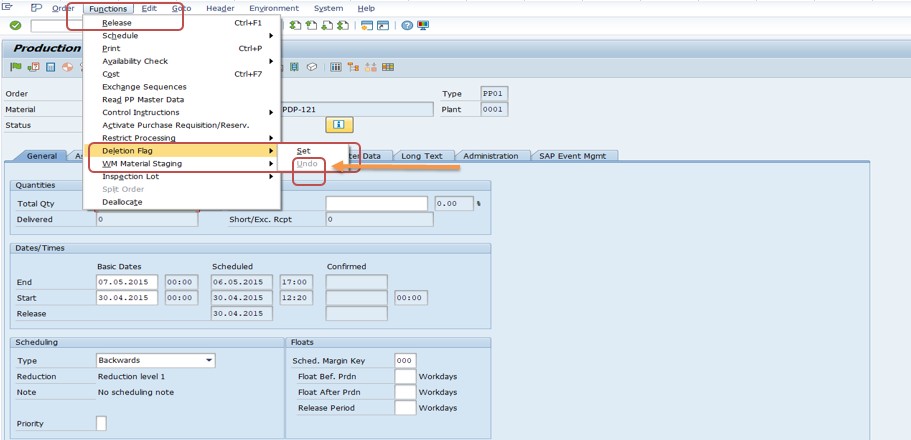
Save the order. It is back in normal processing and will be picked up by period-end closing again.
⚙ Order Statuses You Will Meet on the Way
| Status | Meaning | Typical Reason to Use It |
|---|---|---|
| CRTD | Created | Order exists but is not released. |
| REL | Released | Order may be worked on, confirmed and goods posted. |
| TECO | Technically complete | No more production work is expected; can be reset. |
| CLSD | Closed | Order finished and settled at period end. |
| DLFL | Deletion flag | Order marked for deletion, reversible. |
| DLT | Deletion indicator | Order prepared for archiving, not reversible. |
In normal operations an order moves from created to released, then through confirmation and goods receipt, to technically complete, then to closed after settlement, and only then to the deletion flag. An order created in error can skip most of these steps and be flagged straight away, provided nothing has been posted to it.
📋 Deletion Flag vs Technically Complete vs Closed
These three are often mixed up, but they answer different questions. Technically complete (TECO) says "no more production work is expected on this order." It can be reset if the order has to be reopened. Closed (CLSD) says "the order is finished and its costs are settled." It belongs to the period-end process in controlling. The deletion flag (DLFL) says "this order should be removed from the system eventually."
If an order simply finished normally, you do not need to delete it at all. TECO and CLSD are the right statuses, and the order can later be archived under your retention rules. The deletion flag is for orders that should not remain in the system, either because they were created in error or because they are old enough to be cleaned up.
🔍 What Happens After You Set the Flag: CO78 and Archiving
Setting DLFL in CO02 is only the first stage. The rest is usually done in bulk. Transaction CO78 is the central entry point for production order archiving. Behind it sit programs that are often scheduled as background jobs in the following sequence.
| Step | Program | Purpose |
|---|---|---|
| 1 | PPARCHP1 | Set the deletion flag in bulk, for orders that qualify. |
| 2 | PPARCHP1 | Set the deletion indicator after the residence time. Cannot be revoked. |
| 3 | PPARCHA1 | Archive orders that carry the deletion indicator. |
| 4 | PPARCHD1 | Delete the archived orders from the database. |
Two waiting periods, called residence times, control the timing: the deletion indicator can only be set once the first residence time has passed after the flag, and archiving follows after the second. The values are defined in Customizing, so check with your consultant before promising a deadline.
Archiving also depends on storage settings maintained by the basis team. Without an archive destination, the archiving step cannot run. Many smaller plants never complete the archiving stage and simply keep flagged orders in the database.
💡 Do You Need the Deletion Indicator at All?
A common question is whether you must continue to the deletion indicator after setting the flag. The answer is no. SAP community guidance confirms that it is not mandatory to set the deletion indicator after the flag. Many plants flag orders to remove them from daily use and from period-end processing and stop there.
The indicator becomes relevant only if you intend to archive and physically delete orders to free database space. Because it cannot be revoked, set it only for orders where no further costs or postings are expected, and only after the business agrees the retention period.
If your company has no archiving system yet, you can still use the flag safely. If archiving is introduced later, the existing flagged orders can be selected for the next stage at that time.
💼 Real-World Scenario: A Duplicate Order Created by Mistake
Pradnya Pawar, an SAP PP consultant working with a beverage manufacturer in Pune, received a call from a planner on a Monday morning. A production order for a bottled product had been created twice, and the duplicate, number 60004985, was already visible in the stock and requirements list, inflating planned supply.
Anand Rathi, the production supervisor, wanted it gone before the morning meeting. Pradnya opened the order in CO02 and checked the status: it had been created but not released, with no confirmations and no goods movements. That meant no reversal was needed. She chose Functions, then Deletion Flag, then Set, and the status changed to DLFL. She saved the order and asked the planner to refresh the stock and requirements list, where the duplicate supply no longer appeared.
An hour later Anand called back: the original order had a printing problem and the team wanted to reuse the duplicate after all. Because the deletion indicator had not been set, Pradnya reopened the order in CO02, chose Functions, Deletion Flag, Revoke, and saved. The order returned to normal. She used the moment to explain why the flag is safe to try but the deletion indicator is not, and agreed with Anand that the archiving job would only be run by the basis team at month end, after a review of the list of flagged orders.
❗ Common Mistakes When Deleting Production Orders
- Setting the flag on an order that still has open confirmations or goods movements, leaving stock and cost data inconsistent.
- Expecting the order to disappear immediately, when it only receives status DLFL.
- Flagging orders that still carry actual costs that have not been settled.
- Setting the deletion indicator too early, then discovering it cannot be revoked.
- Running archiving jobs without agreeing the retention period with finance and the business.
- Forgetting to inform sales or project teams that reference the order.
- Using the flag as a substitute for technically completing and closing normal orders.
- Not checking whether the order is an assembly order, for which the system controls the flag.
✅ Best Practices for Deleting Production Orders
- Write a short company rule: which orders may be flagged, by whom, and after which status.
- Use TECO and CLSD for normal completion, and reserve the flag for orders that truly should go.
- Reverse confirmations and goods movements before flagging, and keep a note of what was reversed.
- Settle orders with costs before flagging, following your period-end process.
- Agree the residence times and the archiving calendar with finance and basis.
- Select orders in bulk with CO78 or the order information system, rather than flagging dozens by hand.
- Review the list of flagged orders before the deletion indicator is set.
- Train planners on how to revoke the flag, and on the fact that DLT is final.
🔒 Authorization Considerations
Changing an order's status is controlled by the authorization for order maintenance, normally checked by order type and plant. Many companies allow planners to flag orders they created, but restrict the bulk archiving transactions to a small group, since running them has lasting effects.
Reversing confirmations and goods movements requires its own authorizations, for example for confirmation cancellation and for material document reversal. If a planner can set the flag but not reverse the postings, the order will stay stuck, so test the full sequence with a real user before relying on it.
🔧 Troubleshooting Common Deletion Flag Issues
The "Set" option for the deletion flag is greyed out
The order status may not allow it. Check for open balances, unsettled costs or an assembly order. Community discussions note that for static assembly orders the system controls the flag, and that technically completing the order first can help in other cases.
The order opens in display mode only
The deletion indicator (DLT) has probably been set by an archiving run. It cannot be revoked in standard SAP, so a new order has to be created if work is still needed.
The flag was set but the order still shows in the stock and requirements list
Refresh MD04 and check the order status. If the order has other active statuses or the list was not refreshed, it may still appear. Also confirm the save was successful.
CO78 does not set the flag for some orders
The program selects orders based on its selection criteria and status conditions. Check the selection profile, the order type and whether the orders meet the required status, for example closed.
Costs remain on the order after flagging
The flag does not settle costs. Settle the order following your period-end procedure before flagging, or revoke the flag if follow-up costs must still be charged.
You need to delete many orders
Use the order archiving transaction CO78 rather than CO02, and agree the selection with your consultant so only the right orders are included.
🏢 How Different Plants Handle Order Clean-Up
- High-volume manufacturers: schedule bulk flagging and archiving every month, so the database and period-end runs stay lean.
- Make-to-order plants: flag orders when the linked sales order is cancelled, and review links first.
- Process industries: use the process order equivalent, with extra conditions such as batch records that must be archived before the flag.
- Small plants without archiving: use the flag only, and keep the orders in the database.
The common thread is a clear, written rule that everyone follows, so deleted orders are the intended ones and nothing is lost by accident.
📋 Pre-Deletion Checklist
- Confirm the order number and material.
- Read the order status in CO02.
- Check for confirmations and cancel with CO13 if needed.
- Check for goods movements and reverse them if needed.
- Check for unsettled costs and settle them if needed.
- Check for linked sales orders, projects or purchase documents.
- Set the deletion flag and save.
- Confirm status DLFL and refresh the stock and requirements list.
- Record the reason for deletion.
🔍 Confirming the Result in MD04 and the Order Information System
After saving, it is good practice to confirm the effect. Open the stock and requirements list for the material with MD04 and check that the order's planned receipt no longer appears as supply. If it still does, refresh the list and re-check the order status.
To see all flagged orders together, use the production order information system, COOIS, and select by status DLFL. This gives a quick list for review meetings, and it is the natural input for a later archiving run.
📱 Deleting Production Orders in SAP S/4HANA
The deletion flag concept and the CO02 steps in this guide apply in SAP S/4HANA as well, since production order status management is unchanged. In S/4HANA, data archiving remains available, and SAP encourages regular clean-up because large volumes of old orders affect period-end runs and database size.
Some newer releases add Fiori apps for managing production orders, but classic CO02 continues to work. Confirm the available options in your own release and test the flag, revoke and archive flow in a non-production client before changing your standard process.
📋 Related SAP Transactions
| Transaction | Purpose |
|---|---|
| CO01 / CO02 / CO03 | Create, change and display production orders. |
| CO13 | Cancel confirmations of a production order. |
| CORS | Reverse goods movements for an order. |
| KO88 | Settle a production order. |
| CO78 | Archive production orders and set deletion flag and indicator in bulk. |
| COOIS | Production order information system, to list orders by status. |
| MD04 | Stock and requirements list. |
🎓 Interview-Style Questions and Answers
Q: Can a production order be deleted directly?
Not directly. You set the deletion flag, and removal from the database happens later through the deletion indicator and archiving.
Q: What is the difference between DLFL and DLT?
DLFL is the reversible deletion flag set in CO02. DLT is the deletion indicator set by archiving preparation, which cannot be revoked.
Q: How do you undo a deletion flag?
In CO02, choose Functions, Deletion Flag, Revoke, and save.
Q: Which transaction archives production orders?
CO78.
Q: Why do plants set the flag regularly?
Flagged orders are excluded from period-end closing in cost object controlling, which improves performance.
Q: What should be done before flagging an order with postings?
Reverse confirmations and goods movements where appropriate, and settle costs.
📚 Quick Glossary
- DLFL: Deletion flag status on an order, set in CO02 and reversible.
- DLT: Deletion indicator status, set by archiving preparation and not reversible.
- TECO: Technically complete status.
- CLSD: Closed status, after settlement.
- Residence time: A waiting period before the next archiving stage may be reached.
- Archiving: Writing order data to an archive and removing it from the database.
- CO78: The transaction for production order archiving.
📝 Governance for Order Deletion
Deletion is easy to underestimate. Because the later stages cannot be undone, a short written procedure protects the business. State which statuses qualify, who may set the flag, how long flagged orders wait before the indicator is set, and who approves each archiving run.
Keep a log of archiving runs, with the date, the selection used and the number of orders affected. If someone later asks where an old order went, the log and the archive give a clear answer.
💡 Quick Decision Guide: Flag, TECO or Leave the Order Alone?
Not every unwanted order needs the deletion flag. This short guide helps choose the right action.
| Situation | Recommended Action |
|---|---|
| Order created by mistake, nothing posted. | Set the deletion flag in CO02. |
| Order partly produced, remaining quantity no longer needed. | Set technically complete (TECO) so no more work is expected. |
| Order finished and costs settled. | Let it be closed in the period-end process; archive later under the retention rule. |
| Very old closed orders cluttering the system. | Use CO78 to flag and archive in bulk, after agreement with finance. |
| Order has postings that need correcting. | Reverse the postings first, then decide between TECO and the flag. |
If you are unsure, TECO is the safer choice, because it can be reset. The deletion flag is also reversible, but it removes the order from period-end processing, which may hide a cost problem.
🔄 What Happens to Related Documents
A production order rarely stands alone. Before flagging, think about what is connected to it, because each link may need attention.
- Reservations: component reservations belong to the order. Check that they are cleared or no longer needed, so stock is not held for an order that will not run.
- Planned orders: if the order was converted from a planned order, MRP may create a new one in the next run if demand still exists.
- Sales orders and projects: an order linked to a sales order item or a project element should be discussed with the owner of that document first.
- Purchase documents: subcontracting or external processing may have purchase requisitions or orders that need to be closed.
- Capacity load: removing the order frees capacity at the work centers, which planners may want to reuse.
Taking a minute to review these links prevents the common surprise where an order is flagged, but its demand quietly returns in the next planning run.
📦 Handling Many Orders at Once
Flagging one order in CO02 is simple, but cleaning up hundreds is not a job for manual work. Use the order information system, COOIS, to list orders by plant, order type and status, and review the list with the business. Then use the archiving transaction CO78 to set the deletion flag in bulk for the approved selection.
Test the selection first in production mode only after a test run, and keep a copy of the list. The deletion indicator step is final, so it should be run only after the list has been signed off. A small amount of care here avoids the situation in which orders that were still needed are archived by a schedule nobody remembered.
🎯 Conclusion
Deleting a production order in SAP is a staged process, and the part most users handle is the first one: setting the deletion flag in CO02. Check the status, reverse confirmations and goods movements if needed, settle costs, then choose Functions, Deletion Flag, Set, and save. If you change your mind, revoke it the same way while the deletion indicator has not been set. Leave the deletion indicator and archiving to a planned, approved run through CO78, and keep this guide handy the next time an order needs to go.