SAP SOP Tutorial: Standard Sales & Operations Planning Step by Step (ECC and S/4HANA)
Sales and Operations Planning (SOP) is where sales and production first agree on a number. Instead of planning every material separately, planners work with a product group, decide how much will be sold and produced each month, and let SAP pass the detail on to MRP. This guide follows the whole standard SOP flow from start to finish: creating a product group, planning sales and production, disaggregating the plan, activating the version, transferring it to demand management and checking the result. If you run into any errors while following along, feel free to send a screenshot to pramod@learntosap.com for help.
✅ What Is Sales and Operations Planning (SOP) in SAP?
Sales and Operations Planning is a forecasting and planning tool in SAP Production Planning that lets a company set realistic targets for sales, production, stock and other key figures. It sits between strategic planning and detailed MRP. At this stage, the business is asking one question: how do we balance what customers are expected to want with what we can actually supply?
SOP works at an aggregated level, usually the product group. A planner enters a sales plan for the group, derives a production plan from it, checks that the plan looks reasonable, and only then lets the system break it down to individual materials and pass it to demand management as planned independent requirements. From there, MRP takes over and plans components, purchasing and production orders in detail.
SAP offers two flavors. Standard SOP uses SAP-delivered structures, mainly the information structure S076, and fixed planning tables, so it can be used with very little configuration. Flexible planning lets you define your own information structures, key figures and planning types. This tutorial covers standard SOP, which is the best place to learn the process before moving to flexible planning.
📋 The Standard SOP Process at a Glance
The flow has five main steps, followed by a check. Each step has its own transaction, and each depends on the one before it.
| Step | What You Do | Transaction |
|---|---|---|
| 1 | Create a product group with members and proportional factors. | MC84 |
| 2 | Create the sales plan and the production plan for the group. | MC81 |
| 3 | Disaggregate the group plan to the member materials. | MC76 |
| 4 | Copy the inactive version to the active version. | MC78 |
| 5 | Transfer the active plan to demand management. | MC75 |
| 6 | Check the planned independent requirements. | MD62 / MD63 |
The example used throughout is a product group called LIQUID in plant 1254, with materials 400080 and 21 as members. The sales plan is 200 pieces for March, 300 for April and 100 for May, taken from the original tutorial.
📝 What You Need Before You Start
- Materials with MRP data: the member materials must exist in the plant, with MRP views maintained, because the plan will become planned independent requirements for them.
- A planning strategy: the materials need a strategy group or strategy that allows planned independent requirements, such as make-to-stock planning.
- The standard information structure: S076 is delivered by SAP for standard SOP and is used in these steps.
- Authorizations: access to product group maintenance, SOP planning and demand management.
- Agreement on the plan: sales and production teams should agree on the planning horizon and period unit before anyone starts typing numbers.
If the product group or the information structure does not exist yet, create them first. The companion tutorials on product groups with MC84 and information structures with MC21 explain those steps in detail.
🔧 Step 1: Create the Product Group (MC84)
The product group is the object you plan with, so it comes first. Follow the SOP menu path Logistics → Production → SOP → Product Group → Create or run MC84 directly.
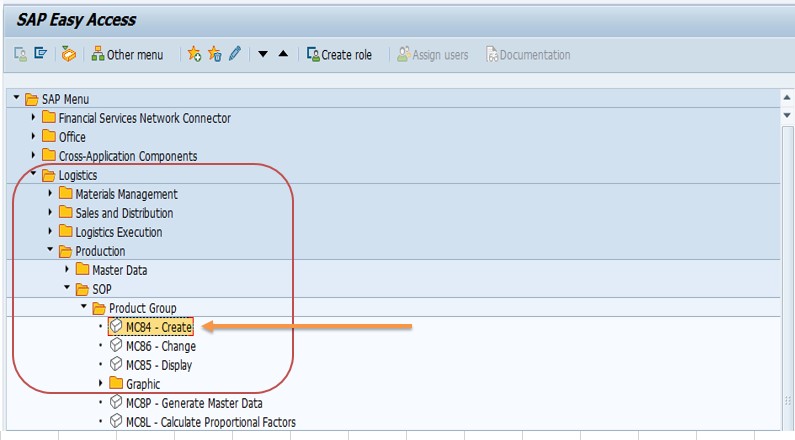
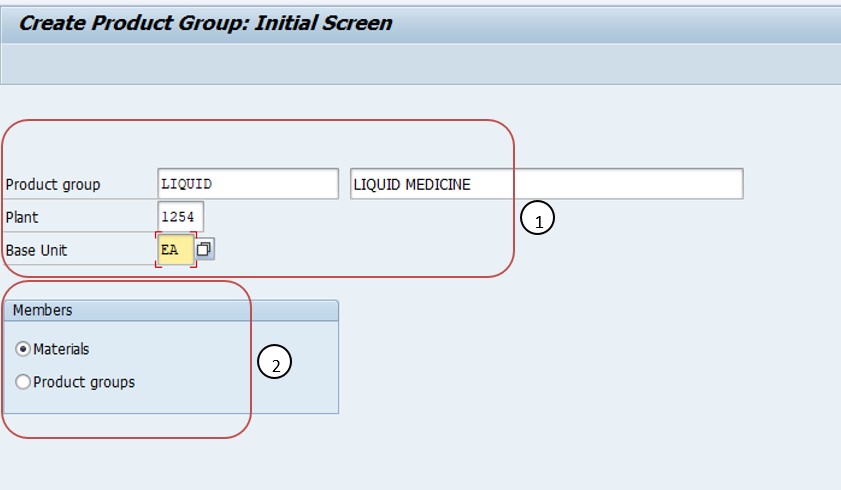
Enter transaction MC84 in the command field and press Enter.
Enter the basic details: Product group LIQUID, Plant 1254 and Base unit EA. Choose materials as the member type and press Enter.
On the product group members screen, enter the materials that belong to the group, here 400080 and 21, and define the proportional factors, 50 percent each, so they total 100 percent.
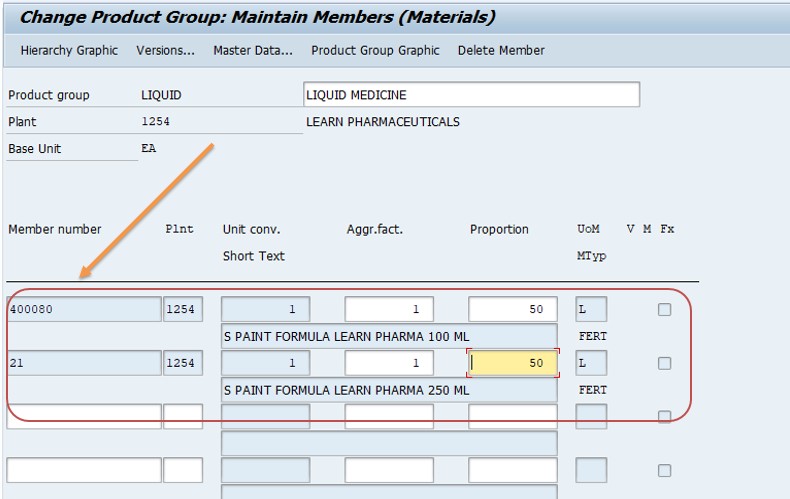
Save the group. It can be changed with MC86 and displayed with MC85.
📊 Step 2: Create the Sales and Production Plan (MC81)
With the group in place, create the plan for it with MC81. This is the heart of SOP: you enter expected sales and let SAP derive the production plan.
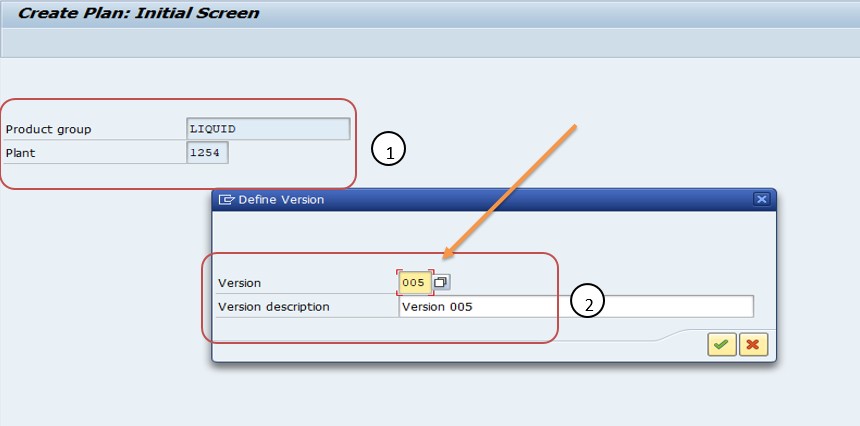
On the initial screen, select the Product group LIQUID and the Plant 1254. The Version, in the example 005, is assigned automatically by SAP for a new inactive version.
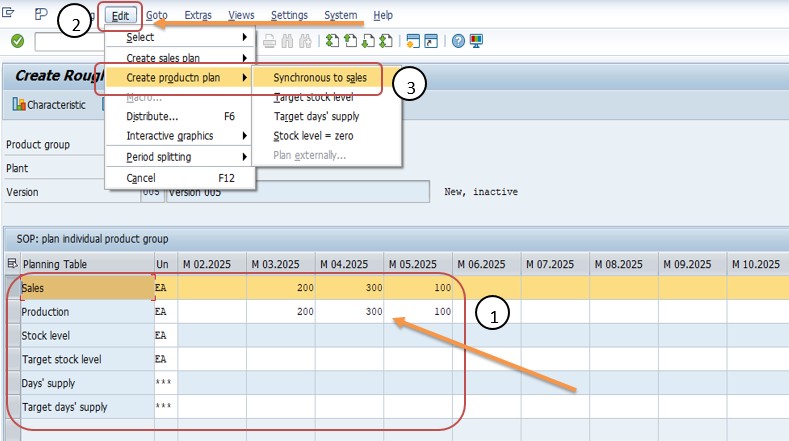
In the planning table, enter the sales plan for the future periods: March 200, April 300, May 100.
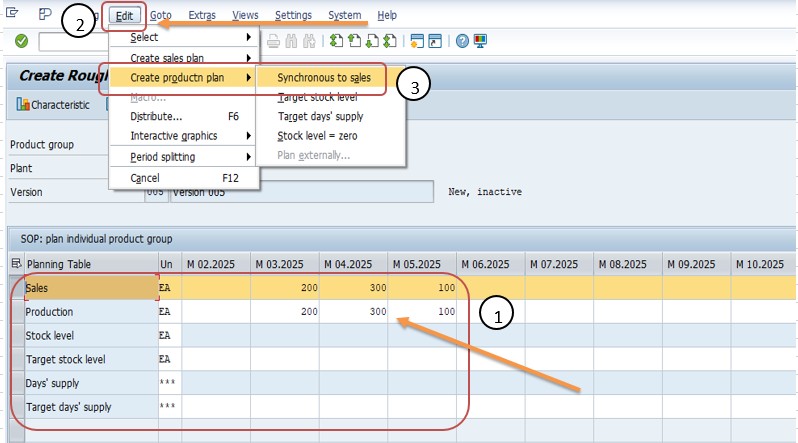
Open the Edit menu and choose Create production plan, then select Synchronous to sales. SAP fills the production row automatically with the same quantities as sales. You do not need to type the production figures by hand.
Save the plan. It now exists as an inactive version, which means it is a working draft that has not yet been released to demand management.
🔄 Step 3: Disaggregate the Plan (MC76)
A plan made at group level is not yet useful to MRP, which needs quantities per material. MC76 splits the group plan into plans for the members, using the proportional factors from Step 1.
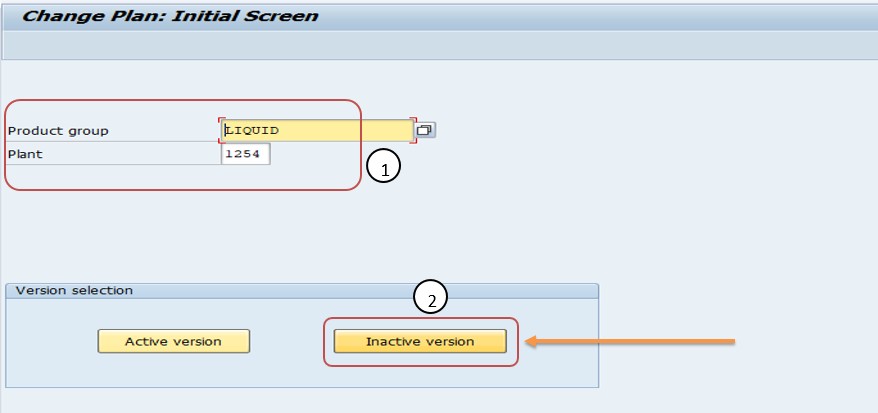
Run MC76. Select the Product group LIQUID and the Plant 1254, then choose the inactive version button so the draft plan is the one being split.
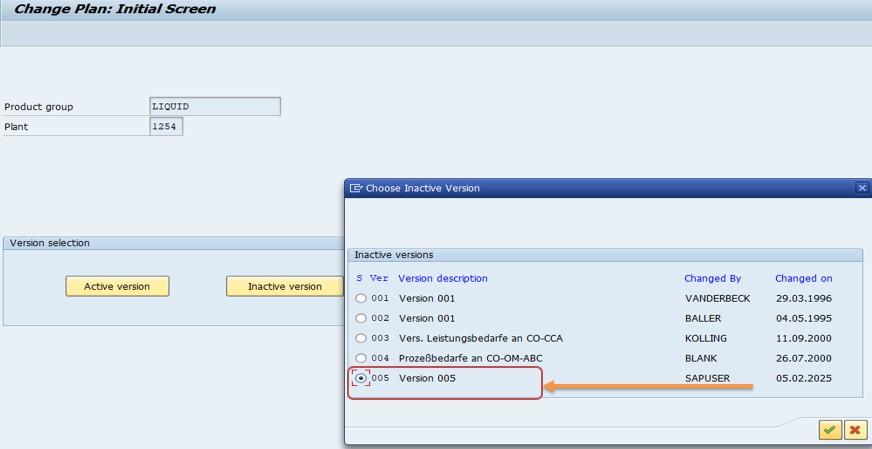
Select version 005 and confirm. In the options, choose to create the sales plan and to disaggregate the production plan, and select the stock balance option so stock is carried correctly between periods, then confirm.
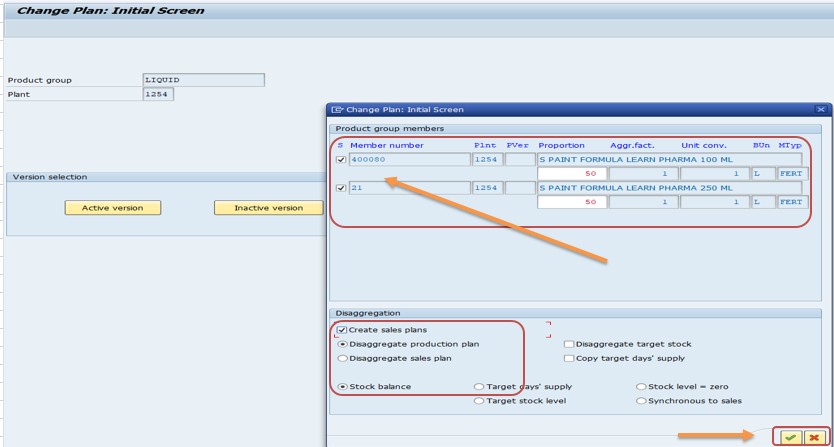
In the result, open Edit → Create production plan and use the synchronous-to-sales option for the member level if required. The production quantities appear automatically. Save.
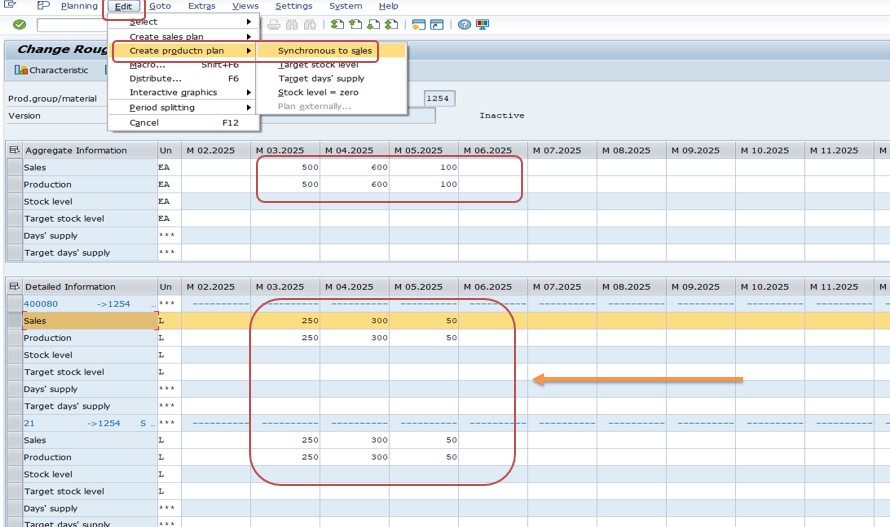
With 50 percent each, the March plan of 200 becomes 100 for material 400080 and 100 for material 21. April gives 150 each and May gives 50 each. If the proportions were changed in MC86 to 60 and 40 percent, the same group plan would give 120 and 80 for March.
✅ Step 4: Convert the Inactive Version to the Active Version (MC78)
SOP uses planning versions so a plan can be tested before it affects MRP. A new plan lives in an inactive version. Only the active version, called A00 in standard SOP, can be transferred to demand management. MC78 copies one version to another, and here it is used to make the draft plan active.
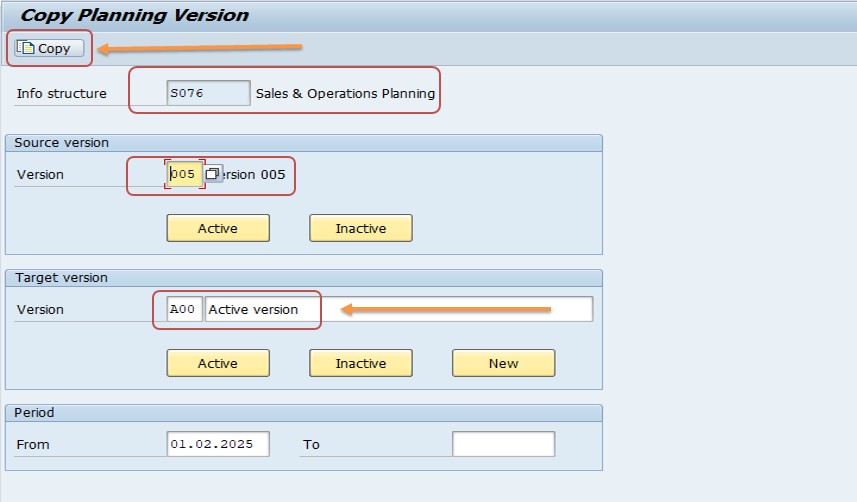
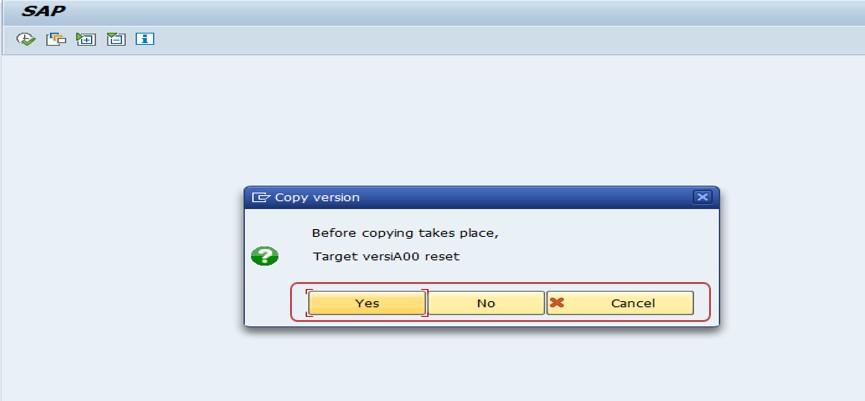
Run MC78 and select the information structure S076, the standard SOP structure.
Select the source version 005, the inactive draft, and the target version A00, the active version.
Enter the date range to copy, in the example starting from 01.02.2025. Select the active option for A00, then choose the Copy button.
📦 Step 5: Transfer the SOP Plan to Demand Management (MC75)
This is the handover from SOP to the rest of production planning. MC75 transfers the plan to demand management, where it becomes planned independent requirements that MRP will use.
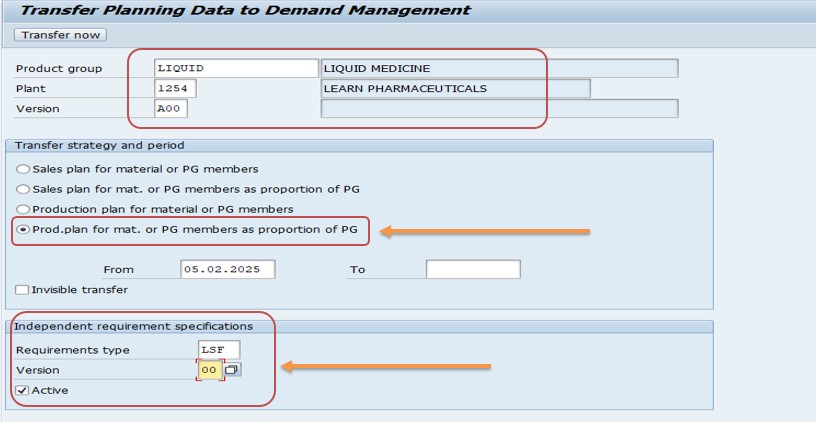
Run MC75 and select the requirement type, in the example LSF, which is commonly used for make-to-stock planned independent requirements.
Select the version 00, which is the active version in demand management, and select the active option.
Choose the member materials and plant if prompted, then execute the transfer. SAP creates planned independent requirements for each material and period.
🔍 Step 6: Check the Transferred Plan (MD62 / MD63)
Always confirm that the plan arrived. Use the planned independent requirements transactions: MD62 to change and MD63 to display. Enter the material and plant, and the requirements for each period appear, with the requirement type and version.
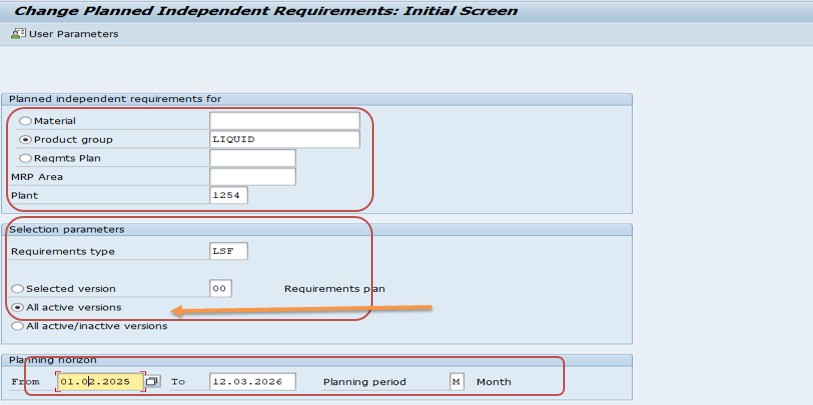
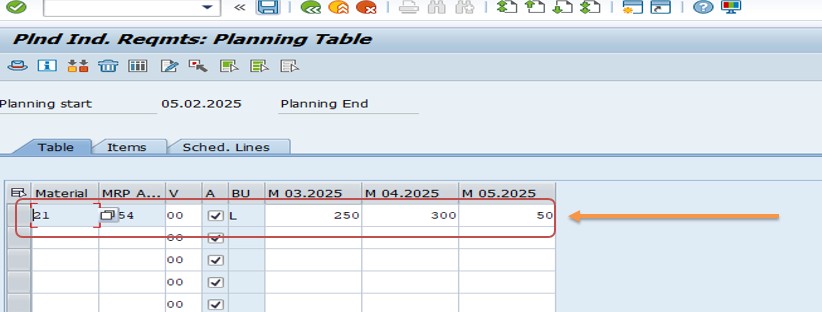
You should see, for material 400080, 100 in March, 150 in April and 50 in May, and the same for material 21. From here the normal MRP run, for example MD01 or MD02, can plan components and production orders, and the stock and requirements list shows the new demand alongside stock and receipts.
⚙ Understanding the Standard SOP Planning Table
The planning table in MC81 is where most of the thinking happens, so it helps to know its rows. A standard SOP table typically contains sales, production, stock level and, depending on the layout, targets for stock level and days' supply.
| Row | Meaning | Who Normally Fills It |
|---|---|---|
| Sales | The expected sales quantity per period. | Sales planners, or copied from a forecast. |
| Production | The quantity to be produced per period. | Derived by SAP using a production strategy, or typed by planners. |
| Stock level | Calculated stock at the end of each period. | Calculated by SAP. |
| Target stock level | The stock the business wants to hold. | Planners, if that strategy is used. |
| Days' supply | How many days the stock will cover, based on sales. | Calculated by SAP. |
Because stock level is calculated from sales and production, changing either one immediately changes the stock row. That makes the table a quick way to test ideas: increase sales for April and watch the stock level fall, then raise production until it recovers.
Planners can also use a forecast to propose sales figures, based on past values, instead of typing them. The forecast result is only a proposal, and the planner still decides what goes into the plan.
💡 Choosing a Production Strategy in SOP
How you derive production from sales is one of the most important decisions in SOP. The table below summarizes the usual options.
| Strategy | How Production Is Set | Best When |
|---|---|---|
| Synchronous to sales | Production equals sales in each period. | Demand is stable and stock is not a concern. |
| Target stock level | Production is set so that stock reaches the target at period end. | You need a safety buffer. |
| Target days' supply | Production is set so that stock covers a target number of days of sales. | Stock should move with demand. |
| Level production | Production is spread evenly over the planning horizon. | Capacity is limited or demand is seasonal. |
The example in this guide uses synchronous to sales because it keeps the numbers easy to follow. In real plants, seasonal products often use level production, so the plant does not swing between idle and overloaded.
🔍 What Happens Behind the Scenes
Standard SOP stores its data in the information structure S076. When you enter a plan for a product group, the values are stored against the group, the plant, the period and the planning version. Because versions are part of the key, several plans can coexist without disturbing each other.
Disaggregation reads the group's members and proportional factors, applies them to the group plan, and writes plans for the members. When the plan is copied to the active version and transferred, SAP converts the member plans into planned independent requirements in demand management. Those requirements are what MRP reads, together with sales orders and other demand, when it calculates net requirements.
This chain explains why a wrong number early on travels far. A mistake in the proportional factors, for example, produces wrong member plans, wrong requirements and ultimately wrong purchase and production proposals. Checking each step before moving to the next saves a lot of time.
💼 Real-World Scenario: A First SOP Cycle for a Bottling Plant
Pradnya Pawar, an SAP PP consultant working with a beverage manufacturer in Pune, was asked to run the first SOP cycle for the liquid products. Until then the plant had relied on spreadsheets and a last-minute phone call between sales and production.
Anand Rathi, the head of planning, gave her the sales expectation: 200 pieces for March, 300 for April and 100 for May. Pradnya created the product group LIQUID in MC84 with materials 400080 and 21 at 50 percent each. In MC81 she entered the sales plan, created a production plan synchronous to sales, and saved it as inactive version 005.
Anand reviewed the draft and asked for a quick check of the split. Pradnya ran MC76 and showed him the plans for each material. After he approved, she used MC78 to copy version 005 into the active version A00, then ran MC75 with requirement type LSF to transfer the plan. Finally she opened the planned independent requirements and confirmed that both materials showed the expected quantities. When MRP ran that night, the planners saw proposals for components and production orders based on the agreed plan instead of a rough guess. The first cycle took an afternoon, and from then on the monthly update took minutes.
❗ Common Mistakes in SOP
- Proportional factors that do not total 100 percent, so quantities are lost or duplicated.
- Forgetting to disaggregate, so the plan never reaches the member materials.
- Trying to transfer an inactive version instead of copying it to the active version first.
- Choosing a requirement type that does not match the planning strategy of the material.
- Materials without MRP views or a suitable strategy group, so the transfer finds nothing to update.
- Overwriting the active version without keeping a copy of the previous plan.
- Using the change transaction to check requirements and modifying them by accident.
- Not agreeing the planning horizon and period unit before starting.
✅ Best Practices for Running SOP
- Run SOP as a regular, calendar-driven cycle, for example monthly, with a fixed meeting between sales and production.
- Keep several inactive versions for scenarios such as optimistic, expected and cautious, and only activate the agreed one.
- Review proportional factors every cycle, because the product mix drifts over time.
- Check the stock level row in every plan before approving it.
- Document which version was activated, by whom and when.
- Verify the transfer in demand management every time, at least for key materials.
- Keep the group structure simple, with groups that match how the business talks about products.
- Train planners on the difference between inactive and active versions.
🔒 Authorization Considerations
SOP touches several areas, so authorizations are usually split. Planners need access to product group maintenance, planning and disaggregation. Fewer people should be allowed to copy versions to the active version and to transfer plans to demand management, because those steps change what MRP will plan.
Many companies keep a clear separation: sales planners can edit the sales row, production planners the production row, and only a planning manager can activate and transfer. After setting up new roles, test with real users so that nobody discovers a missing authorization on the day of the first cycle.
🔧 Troubleshooting Common SOP Issues
Nothing arrives in demand management after MC75
Check that the plan is in the active version, that the requirement type fits the material's planning strategy, and that the materials have MRP data in the plant. Also check the date range you selected.
Disaggregated quantities look wrong
Display the product group with MC85 and check the proportional factors and their total. Also confirm the base unit and member units.
The production row is empty
The production plan has to be created from the Edit menu, for example synchronous to sales, after the sales plan has been entered.
Version cannot be activated
Check the source and target version in MC78, the information structure and the date range. Make sure the source version actually contains data for those dates.
Stock level row shows negative values
Production is lower than sales in some periods. Adjust the production strategy, for example target stock level, or increase production.
Requirements show the wrong quantity in MD62
Compare with the member plans from MC76 and check whether the active version was updated after the last change. A later change to the draft does not appear until it is copied and transferred again.
🏢 How Different Industries Use SOP
- Consumer goods: monthly SOP by brand or pack type, with level production for seasonal peaks.
- Discrete manufacturing: SOP by product family to prepare capacity before configurations are known.
- Electronics: SOP by model line with a variant mix expressed in proportional factors.
- Process industries: SOP by recipe family, with attention to campaign sizes and cleaning times.
The principle is the same everywhere: agree on a number at the level where decisions are made, then let the system carry it down to the detail.
📋 SOP Cycle Checklist
- Confirm the planning horizon and period unit.
- Check the product group and its proportional factors.
- Create or update the sales plan.
- Create the production plan with the agreed strategy.
- Review stock level and days' supply.
- Disaggregate to the member materials.
- Get approval from sales and production.
- Copy the inactive version to the active version.
- Transfer the plan to demand management.
- Verify the requirements and run MRP.
📊 KPIs That Show Whether SOP Is Working
- Forecast accuracy: compares planned sales with actual sales by group.
- Plan adherence: compares planned production with actual production.
- Stock coverage: shows days' supply against the target.
- Mix accuracy: compares proportional factors with actual member shares.
- Plan stability: measures how much the plan changes between cycles.
Reviewing these numbers at each SOP meeting turns the process from a data entry exercise into a real management tool.
🔄 Standard SOP vs Flexible Planning
Standard SOP is the quickest way to get started. It uses the delivered information structure S076, fixed key figures such as sales, production and stock level, and a standard planning table. It needs little configuration, which makes it ideal for learning and for plants with simple requirements.
Flexible planning is the choice when the standard structure is not enough. You create your own information structure with MC21, choose your own characteristics and key figures, set the planning method with MC7F, and build your own planning type. It takes more effort but fits almost any planning requirement, such as planning by customer group, region or production line. See the related tutorials on MC21 and MC7F for the details.
📱 SOP in SAP S/4HANA
Classic SOP, including MC84, MC81, MC76, MC78 and MC75, remains available in many SAP S/4HANA on-premise systems, and the steps in this guide still apply. SAP positions newer planning solutions as the strategic direction for new projects, so check with your SAP team whether classic SOP is still the right choice for you.
For existing implementations nothing about the process needs to change simply because the system moves to S/4HANA, but confirm compatibility for your release and test the full flow, including the transfer to demand management, after any upgrade.
📋 Related SAP Transactions
| Transaction | Purpose |
|---|---|
| MC84 / MC86 / MC85 | Create, change and display product groups. |
| MC81 | Create a standard SOP plan for a product group. |
| MC76 | Disaggregate a product group plan to its members. |
| MC78 | Copy a planning version, for example inactive to active. |
| MC75 | Transfer an SOP plan to demand management. |
| MD62 / MD63 | Change or display planned independent requirements. |
| MD01 / MD02 | Run MRP on the transferred requirements. |
🎓 Interview-Style Questions and Answers
Q: What is SOP?
A planning tool that sets sales, production and stock targets at an aggregated level, such as product group, before detailed MRP.
Q: Which information structure does standard SOP use?
S076.
Q: Why use inactive and active versions?
Inactive versions allow drafts and scenarios. Only the active version can be transferred to demand management.
Q: What does disaggregation do?
It splits a group plan to the member materials using proportional factors.
Q: How does the plan reach MRP?
It is transferred to demand management as planned independent requirements, which MRP reads.
Q: Which transaction displays planned independent requirements?
MD63 displays them and MD62 changes them.
📚 Quick Glossary
- SOP: Sales and Operations Planning.
- Product group: A set of materials planned together, with proportional factors.
- Disaggregation: Splitting a group plan down to its members.
- Planning version: A stored copy of a plan, either inactive or active.
- Active version A00: The version that can be transferred to demand management.
- Planned independent requirement: A planned demand quantity that MRP uses.
- S076: The standard SOP information structure.
📝 Governance for the SOP Process
SOP is as much a business process as a system function, so governance matters. Define who owns the sales plan, who owns the production plan, who approves the final version and when each step must be finished. A simple calendar, with a deadline for each step, keeps the cycle from slipping.
Keep a log of every activated version, with the date, the approver and a short note about what changed. When someone asks why MRP planned a particular quantity three months ago, the log gives the answer in moments.
🎯 Conclusion
Standard SOP turns a loose conversation between sales and production into a repeatable process. You create a product group with MC84, plan sales and production for it in MC81, split the plan to the materials with MC76, release it by copying to the active version with MC78, transfer it to demand management with MC75 and verify it in MD62 or MD63. Each step is quick on its own, but the value comes from doing them in order, checking the result and repeating the cycle regularly. Keep this guide handy the next time your team needs to agree on a plan.