SAP FICO TUTORIALS-
Create Outgoing Vendor Payment: A Step-by-Step Guide-
Introduction-
✅ F-53 in SAP Explained: Manual Vendor Payment Posting Tutorial
✅ CREATE OUTGOING VENDOR PAYMENT F-53 :-
F-53 is a standard SAP transaction code used to process outgoing payments to vendors. It plays a main role in maintaining accurate vendor accounts,clearing open items, and recording financial transactions.This guide provides a comprehensive, step-by-step guide of how to post outgoing vendor payments in SAP using Transaction Code F-53. Whether you’re an SAP beginner or an experienced finance professional, this article will help you understand the transaction flow, key fields, common errors, and best practices.
✅ GO TO TCODE -F-53
✅ Follow Path-
ACCOUNTING -> FINANCIAL ACCOUNTING -> ACCOUNT PAYABLE -> DOCUMENT ENTRY -> OUTGOING PAYMENT
SELECT -TCODE-F-53
✅ 1)SELECT DOCUMENT DATE-30.05.2020
✅ 1)SELECT POSTING DATE-30.05.2020
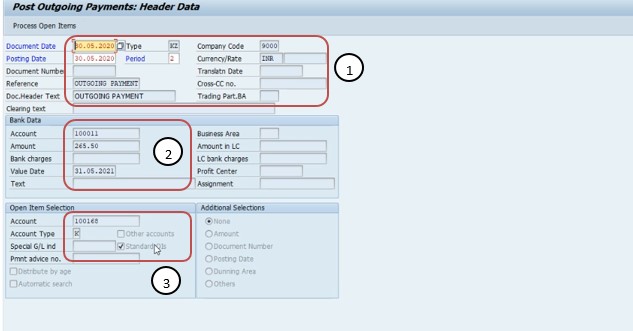
✅ 2)SELECT ACCOUNT-100011
✅ 2)SELECT AMOUNT-265.50
✅ 3)SELECT OPEN ITEM SELECTION-
✅ 3)SELECT ACCOUNT-100168-
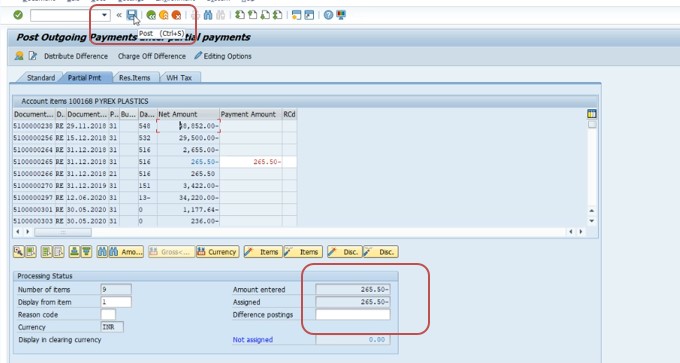
✅ *)SELECT PARTIAL PAYMENT-
✅ *)SELECT AMOUNT ENTERD-265.50-
✅ *)SELECT ASSIGNED-265.50-
✅ *)SELECT POST-
✅ *)SELECT -SAVE
-Specify a valid MRP Procedure
-Movement type 161 is not allowed