Deficit of BA Unrestricted-use 1 L : 400080 1254 LG01 LL01
This error appears when you try to issue, consume, or transfer stock that is not available in unrestricted-use status for the material, plant, storage location, and batch shown in the message. Follow the steps below to resolve it using MMBE, MB1C, and MIGO. This guide also explains what unrestricted-use stock actually means, walks through a real business scenario, compares SAP's stock categories, lists related transactions and error messages, and gives you a prevention checklist so the deficit does not keep coming back.
"if you encounter any errors in SAP, send me a screenshot at pramod@learntosap.com, and I will help you resolve the issue."
🔍 Understanding SAP Error M7021 in Detail
SAP common error message: you are trying to issue (consume or transfer) stock that is not available in Unrestricted-use stock for the material and location specified.
Note: The SAP error is stock that is not available in unrestricted-use stock for the material and location. In plain terms, whenever you post a goods issue to a production order, a delivery, a transfer posting, or a consumption entry, SAP checks how much freely usable stock actually exists in the system for that exact material, plant, storage location, and batch combination. If the quantity you are trying to move is greater than what SAP finds sitting in unrestricted-use status, the system stops the posting immediately and raises message M7021 rather than letting the stock quantity go negative.
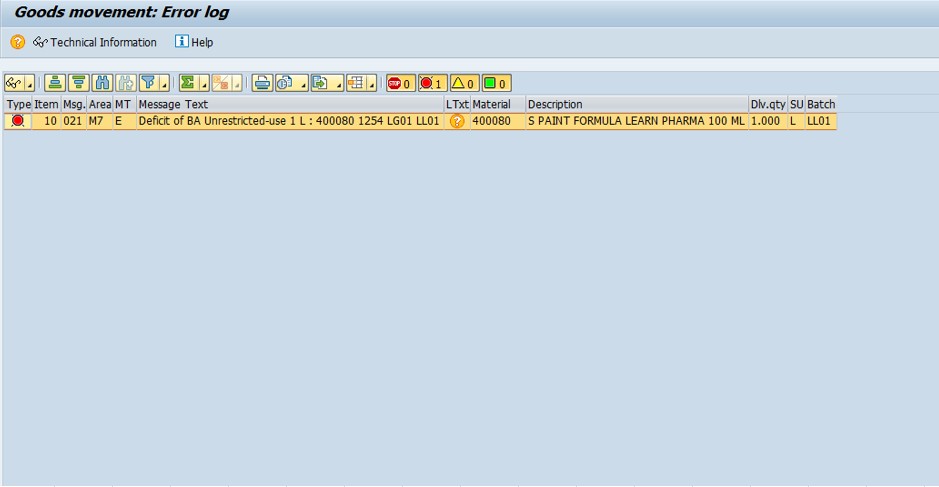
This is not a bug or a random glitch - it is a deliberate inventory control built into SAP MM. Unrestricted-use stock is the only category the system will automatically issue from without an extra approval or transfer step, so SAP refuses to let that number drop below zero. The error is effectively SAP telling you "the stock you are asking me to remove simply is not sitting where you expect it to be right now," and the fix is always some combination of checking where the stock actually is and either releasing it or genuinely adding it.
📦 SAP Stock Categories - Why "Unrestricted-Use" Matters
To understand M7021 properly, it helps to know that SAP MM tracks inventory across several distinct status categories for the same material, plant, and storage location. A material can physically exist in the warehouse and still trigger this deficit error if the stock sits in the wrong category.
| Stock Category | Meaning | Can It Be Issued Directly? |
|---|---|---|
| Unrestricted-use | Freely available stock, cleared for any business use | Yes |
| Quality inspection | Received but pending quality check before release | No - must transfer first |
| Blocked stock | Flagged as unusable, damaged, or under hold | No - must be released or scrapped |
| Stock in transit | Moving between plants or storage locations, not yet received | No - must complete the goods receipt first |
| Restricted-use | Batch-specific hold, often tied to shelf life or customer restriction | No - must be released at batch level |
M7021 fires specifically against the unrestricted-use bucket. If your material actually has plenty of stock, but that stock is parked in quality inspection or blocked status, MMBE will show a healthy total quantity while the unrestricted-use column reads zero or low - and that mismatch is exactly what causes confusion for users who assume "I have stock" automatically means "SAP will let me issue it."
💼 Real-World Scenario: How Pooja mishra Hit the M7021 Error
Pooja mishra, a stores executive at Learn Pharma in Pune, was processing a goods issue for a production order that needed material 400080 from plant 1254, storage location LG01, batch LL01. The moment she confirmed the quantity of 1 L (litre), SAP threw message M7021 - "Deficit of BA Unrestricted-use 1 L: 400080 1254 LG01 LL01." She was confused because the goods receipt for that exact batch had been posted only two days earlier, so surely the stock should be sitting right there.
Her supervisor, Vikram Nair, asked her to run MMBE for material 400080 at plant 1254. The stock overview showed the total quantity was correct, but almost all of it was sitting in quality inspection stock, not unrestricted-use - the batch had not yet been released after incoming quality inspection. Rather than manually creating new stock, Vikram guided Anita to use MIGO with transfer posting movement type 321 to move the inspected batch from quality into unrestricted-use. Once that transfer posted, the original production order goods issue went through without any error. This is the most common real-world pattern behind M7021: the stock exists, but it is sitting in the wrong status category, and the fix is a transfer posting rather than a stock creation.
⚠ SAP Error Common Reasons
- No stock available in unrestricted-use stock
- Stock not available at the specified storage location
Beyond these two headline reasons, a few less obvious situations commonly sit behind them. The batch may exist but still be waiting on quality inspection release, which keeps it out of unrestricted-use even though the material master and total quantity look fine. Stock may have been received into a different storage location or plant than the one referenced in your transaction, which is easy to miss when a company runs several storage locations for the same material. And if the material is batch-managed, a typo in the batch number during data entry will make SAP look for stock in a batch that genuinely has zero unrestricted quantity, even while the correct batch sits fully stocked one row away in MMBE.
✅ How to Solve This Error - Solution
First Check Stock - MMBE or MB52
- Enter Material No = 400080
- Enter Plant = 1254
- Enter Storage location = LG01
- Enter Batch = LL01
- Execute - stock is 0 or less than 1 L → that's the issue of error.
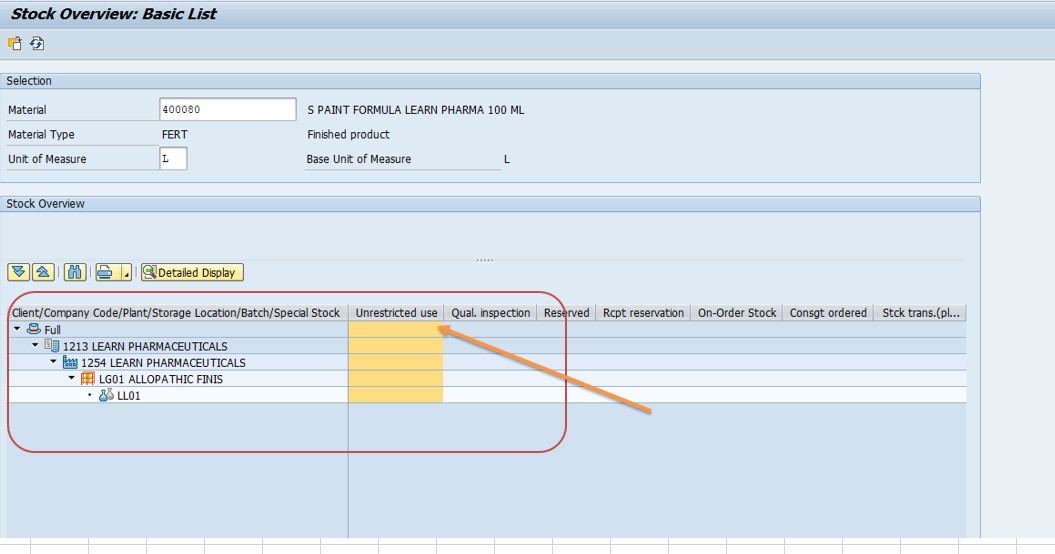
MMBE gives you a full stock overview across plants, storage locations, and batches, broken down by category - unrestricted, quality inspection, blocked, and in-transit - in a single screen, which makes it the fastest first stop for diagnosing M7021. MB52 is the report-style alternative and is more convenient when you need to check several materials at once, for example if a batch job or interface just processed a large number of goods movements and you want to identify every material that now shows a deficit. Whichever transaction you use, the key number to look at is specifically the unrestricted-use column - total stock across all categories can look healthy while unrestricted-use alone reads zero, and that gap is the actual root cause of the error.
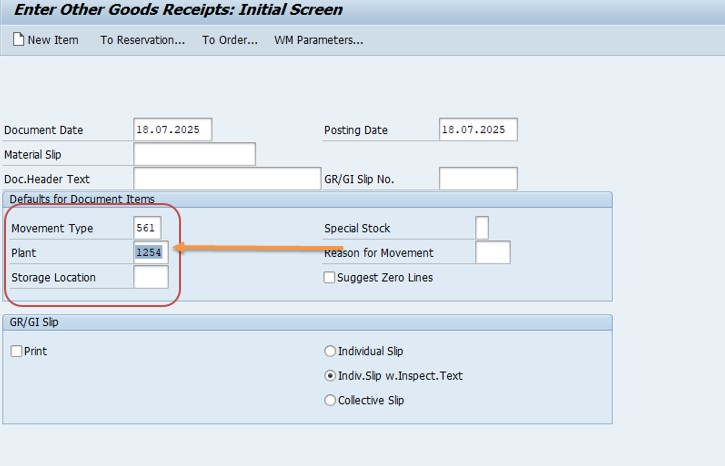
Add Stock Manually - MB1C
- Enter Movement Type = 561
- Enter Plant = 1254
- Enter Material No = 400080
- Enter Qty = 25
- Enter Storage location = LG01
- Enter Batch = LL01
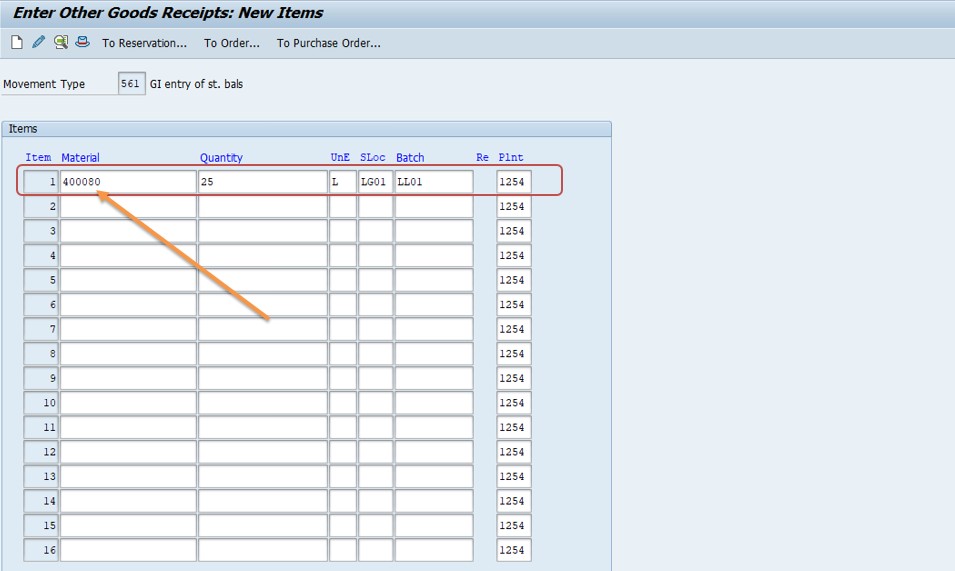
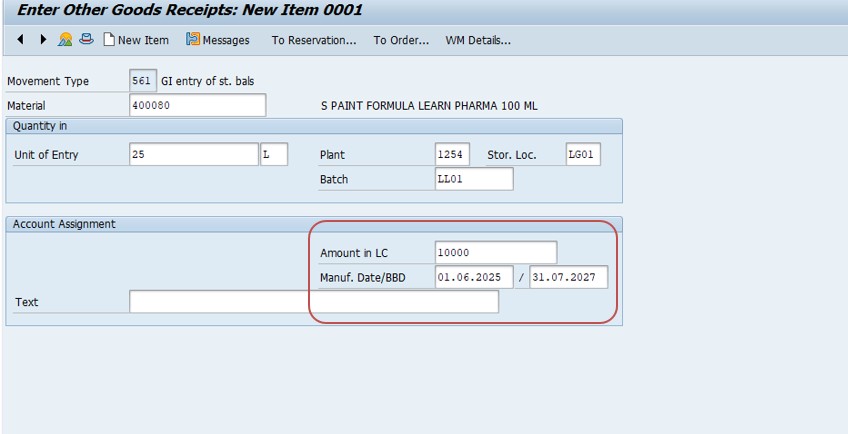
Then check stock added or not - go to transaction MMBE.
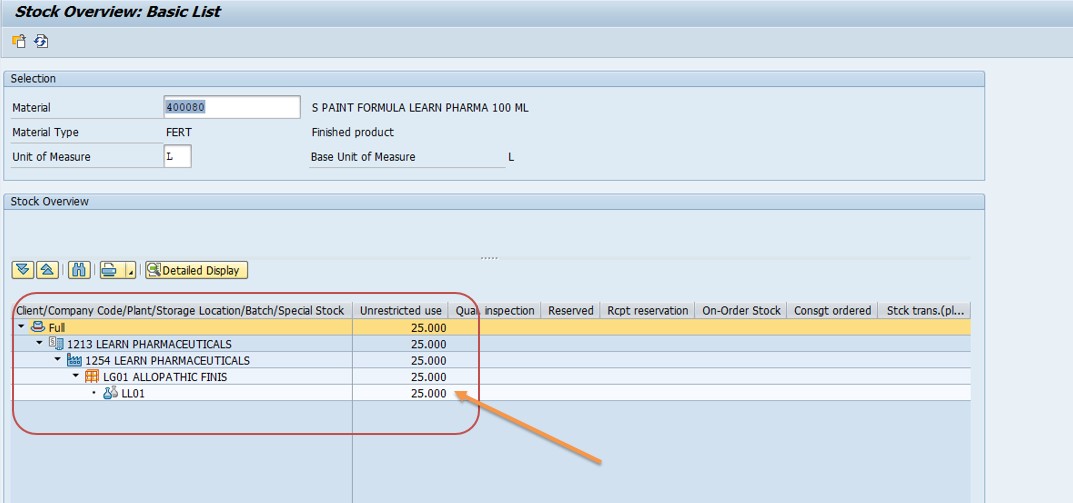
Movement type 561 posts stock directly into unrestricted-use without any reference to a purchase order, production order, or goods receipt document. This makes it powerful for correcting genuine inventory discrepancies or loading opening balances during a system cutover, but it should be used carefully - every 561 posting creates real inventory value on the books, so it needs to be backed by an actual physical stock count or an approved correction process, not used as a routine shortcut to make an error disappear.
Transfer from Quality to Unrestricted Use - MIGO
- Select Transfer Posting
- Movement Type: 321 (Quality → Unrestricted)
- Material: 400080
- Enter Batch = LL01
- Plant: 1254, SLoc: LG01 and Quantity: 1 - Post
In most real-world cases, this is the correct fix rather than Step 2, because the stock already physically exists - it is simply sitting in quality inspection status waiting for release. Movement type 321 reclassifies the batch from quality inspection into unrestricted-use without creating any new inventory value, which keeps your stock ledger accurate. If your organization uses formal quality management with inspection lots (transaction QA32 or QA33), the usage decision recorded there may need to be completed first before MIGO will allow the 321 transfer; check the inspection lot status if the transfer posting itself gets blocked.
📋 Related and Alternative Transactions Every MM User Should Know
MMBE, MB1C, and MIGO solve most M7021 cases, but a well-rounded SAP MM user should also recognize these related transactions, since they come up constantly when diagnosing why stock is not sitting where a posting expects it.
| Transaction | Purpose |
|---|---|
| MMBE | Stock overview across plants, storage locations, and batches, broken down by stock category. |
| MB52 | Warehouse stock list report, useful for checking multiple materials at once. |
| MB1C | Post an initial entry or correction directly into stock, most often with movement type 561. |
| MIGO | Universal goods movement transaction - used here for transfer postings such as movement type 321. |
| MB1B | Transfer posting between storage locations, plants, or stock categories using a movement type screen instead of MIGO. |
| MB1A | Goods issue for a reservation or cost center, another common trigger point for M7021. |
| QA32 / QA33 | Display or process a quality inspection lot; the usage decision here often gates the 321 transfer. |
| MSC3N | Display batch master record to check batch status, shelf life, and classification data. |
| MB5B | Stock on posting date report, useful for confirming exactly when a batch's unrestricted quantity changed. |
If your organization runs frequent stock corrections, keeping a short reference list like this on hand saves significant time compared to searching for the right movement type each time a deficit error appears.
❗ Common Mistakes That Cause M7021 to Reappear
- Using MB1C to manually create stock when the real fix was a transfer posting from quality or blocked stock - this inflates inventory value without a matching physical basis.
- Checking total stock instead of the unrestricted-use column specifically, and concluding stock is available when it is actually sitting in quality inspection or blocked status.
- Entering the wrong storage location or plant on the transaction, especially in multi-storage-location plants where similar materials are split across several SLocs.
- Mistyping the batch number, which causes SAP to check an entirely different (and empty) batch than the one that actually has stock.
- Attempting the 321 transfer posting before the quality inspection lot's usage decision has been completed, which MIGO will block.
- Forgetting that stock in transit between plants is not yet available for issue at the destination plant until the receiving goods movement is posted.
🔧 Root Cause Categories Behind a Stock Deficit
| Root Cause | How to Confirm | Typical Fix |
|---|---|---|
| Batch pending quality release | MMBE shows quantity in quality inspection stock | MIGO transfer posting, movement type 321 |
| Batch or material genuinely short | MMBE shows zero or low total quantity across all categories | Trigger procurement, or MB1C correction if a physical count confirms the stock exists |
| Wrong storage location entered | Stock exists at a different SLoc for the same plant and material | Re-enter the correct storage location, or MB1B transfer between locations |
| Batch number mismatch | MSC3N shows the correct batch has stock but a different batch was referenced | Correct the batch entry on the original transaction |
| Stock in transit not yet received | Stock overview shows quantity "in transit" rather than at the destination plant | Complete the goods receipt at the destination plant first |
| Blocked stock due to hold or damage | MMBE shows quantity in blocked stock category | Release the block per company policy, or scrap if genuinely unusable |
📋 Related SAP Error Messages You May Also Encounter
| Message No. | Short Text | Typical Cause |
|---|---|---|
| M7021 | Deficit of BA Unrestricted-use | Not enough unrestricted-use stock for the posted quantity |
| M7020 | Deficit of stock (general) | Insufficient total stock, not category-specific |
| M7022 | Deficit of SL Unrestricted-use | Same deficit issue, referencing a specific special stock indicator |
| M7024 | Deficit of stock in transfer | Insufficient stock in transfer/blocked status for the movement |
| M7053 | Negative stock not allowed for this material/plant | Negative stock configuration disabled and quantity would drop below zero |
If you land on this page after searching for one of these related codes, the troubleshooting mindset stays the same: confirm exactly which stock category and batch is short using MMBE or MB52, then either release existing stock through the correct transfer posting or add genuinely missing stock through an approved correction.
💡 Best Practices to Prevent M7021 From Recurring
- Run a daily or shift-wise quality inspection lot review so batches do not sit in quality status longer than necessary before being released to unrestricted-use.
- Train stores and production staff to check the unrestricted-use column specifically in MMBE, not just the total quantity, before attempting a consumption or issue posting.
- Restrict MB1C movement type 561 postings to authorized inventory-control staff, with a documented reason for every manual stock correction.
- Standardize storage location naming and material master settings across plants to reduce data-entry mismatches on multi-location sites.
- Set up a periodic batch reconciliation report comparing MSC3N batch status against MMBE stock category to catch quality-hold batches proactively.
- Where volumes are high, consider a background job that flags any batch sitting in quality inspection beyond an agreed SLA, so it gets released before it blocks a downstream posting.
📈 Business Impact If M7021 Is Left Unresolved
A stock deficit error is easy to dismiss as a minor speed bump, but a recurring M7021 across a production line or dispatch operation has real downstream consequences. On the shop floor, a production order that cannot post its component goods issue cannot be confirmed, which stalls the entire order and can cascade into a missed production schedule if the same material feeds multiple work centers. In distribution, a delivery that cannot consume stock for picking or goods issue directly delays customer shipments, and repeated occurrences on the same material often point to a systemic quality-release bottleneck rather than a one-off data entry mistake.
There is also an inventory-accuracy angle worth taking seriously. Every time a team reaches for MB1C to "just add the stock" instead of diagnosing where the real stock is sitting, the on-hand inventory value in SAP grows disconnected from the physical warehouse. Over a few months, this kind of habitual shortcut is exactly what causes large, hard-to-explain variances during a physical inventory count or cycle count reconciliation, and it is far more time-consuming to unwind after the fact than it would have been to diagnose the root cause correctly the first time.
Finance and controlling teams should also care about this error pattern, even though it surfaces as an MM message. Every unrestricted-use deficit that gets "solved" with an unjustified MB1C stock creation quietly inflates inventory valuation on the balance sheet, since SAP posts a corresponding value entry the moment the movement is confirmed. If this happens repeatedly across a plant without a documented reason code, month-end inventory valuation reports and standard cost variance analysis can both start drifting away from physical reality, and auditors reviewing inventory controls will typically flag a pattern of unexplained 561 postings as a control weakness. Building the habit of diagnosing root cause first - checking whether stock is simply sitting in quality or blocked status - protects both the shop floor schedule and the accuracy of the books.
🧠 A Quick Troubleshooting Decision Tree for M7021
When M7021 appears, work through these questions in order rather than jumping straight to MB1C - the majority of cases are resolved by question two or three.
- Step A - Does the material have any stock at all in MMBE for this plant? If total stock across all categories is genuinely zero, this is a real supply shortage, not a status issue - check procurement or production status instead.
- Step B - If total stock exists, which category is it sitting in? Expand the MMBE stock category breakdown. If it is in quality inspection, use MIGO movement type 321 to transfer it. If it is blocked, follow your site's block-release process.
- Step C - Is the batch number on your transaction correct? Cross-check with MSC3N; a simple typo in the batch field is one of the most common and fastest-to-fix causes.
- Step D - Is the storage location correct? Multi-SLoc plants often split the same material across two or three storage locations; confirm the one referenced in your posting actually holds the stock.
- Step E - If none of the above explains it, is the stock currently in transit between plants or storage locations? Check the stock-in-transit category and complete the receiving movement first if so.
- Step F - Only if all of the above are ruled out, and a physical count confirms real stock exists that SAP does not reflect, use MB1C with an approved, documented correction.
Walking through these six checkpoints in sequence turns M7021 from a confusing red error into a quick diagnostic checklist, and keeps manual stock corrections limited to the cases that genuinely need them.
✅ How to Verify the Fix and Test It Properly
Once you have either transferred stock with MIGO or added a correction with MB1C, do not simply assume the deficit is cleared - verify it the way an experienced SAP consultant would before closing the ticket. Re-run MMBE for the same material, plant, storage location, and batch, and confirm that unrestricted-use stock now shows a quantity equal to or greater than what the original transaction needed. Only after that check passes should you retry the original goods issue, consumption, or transfer posting.
If you used a transfer posting from quality inspection, also confirm the quality inspection lot in QA33 shows the usage decision as complete, since an incomplete usage decision can sometimes allow a partial transfer while leaving a residual quantity stuck. If you used MB1C to add stock, cross-check the posting against a physical stock count or a signed correction request, and make sure the transaction was recorded with a clear reason code or note in the material document header, both for audit purposes and so the next person who investigates a related discrepancy can see why the correction was made.
Finally, if this material or batch has triggered M7021 more than once, treat that repetition as a signal worth escalating - either to the quality team if inspection releases are consistently slow, or to the MM configuration team if storage location or batch determination settings need review. A guide like this one solves the immediate error quickly, but a pattern of repeat deficits on the same material is usually pointing at a process gap upstream that is worth fixing once rather than working around every time.
🖥️ SAP S/4HANA vs SAP ECC - Does M7021 Behave Differently?
Message M7021 itself is a core inventory-management check that has not changed between SAP ECC and SAP S/4HANA - the system still refuses to let unrestricted-use stock go negative, and the message class and text are identical across both platforms. What has changed is how quickly and where you see the deficit reflected, and which screens you use to investigate it.
In classic ECC, stock quantities are read from aggregate tables such as MARD (storage-location stock) and MCHB (batch stock), which are updated synchronously but are still separate summary tables sitting alongside the material document line items in MSEG. In S/4HANA, SAP moved to a simplified data model where MARD, MCHB, and several related tables became compatibility views on top of a single line-item table, MATDOC. This means the moment a goods movement posts, the very next MMBE call or Fiori stock query is reading from the same real-time source, with no separate aggregate table to fall behind. In practice this rarely changes whether M7021 fires, but it does make near-real-time reconciliation between a 321 transfer posting and the retry of the original goods issue noticeably more reliable, since there is no window where an aggregate table has not yet caught up.
S/4HANA users also have Fiori-based alternatives to the classic transactions referenced throughout this guide. The Manage Stock app and Stock - Single Material app both present the same unrestricted-use, quality, and blocked breakdown that MMBE shows, and several S/4HANA Fiori catalogs let you launch a transfer posting directly from a stock line that shows a quality-inspection quantity, which shortens the Step 1 → Step 3 workflow described earlier in this guide into a single screen. MIGO and MB1C continue to work unchanged in the SAP GUI for S/4HANA, so this guide's steps remain fully valid whether your organization runs ECC 6.0 or the latest S/4HANA release - the transaction codes, movement types, and underlying stock-category logic are the same.
📦 M7021 With Special Stock: Consignment, Project, and Sales-Order Stock
Everything covered so far assumes standard, plant-level unrestricted-use stock, but SAP MM also tracks several categories of special stock - consignment stock owned by a vendor, project stock tied to a WBS element, and sales-order stock reserved for a specific sales order line. Each of these carries its own unrestricted-use bucket that is completely separate from plant stock, even though the material, plant, and storage location may look identical in MMBE.
A deficit against consignment stock typically shows a special stock indicator "K" alongside the material and vendor, and the fix is different from a normal M7021 case: since the material technically still belongs to the vendor until it is consumed, you cannot simply create stock with MB1C in the same way - instead you need to confirm the consignment stock actually exists for that vendor using MB54 or the special-stock view in MMBE, and if it does not, the resolution usually involves a consignment goods receipt (movement type 101 with special stock indicator K) rather than a generic correction. Project stock (special stock indicator "Q") and sales-order stock (special stock indicator "E") behave similarly - MMBE's special stock overview will show the WBS element or sales order/item that owns the shortage, and the correct fix is almost always to confirm the reservation or receipt against that specific object rather than posting a plant-level MB1C entry, since a plant-level correction will not resolve a deficit that is scoped to a particular sales order or project.
The practical takeaway is that before reaching for MB1C or a standard MIGO transfer, it is worth glancing at whether the material line in the original error involves a special stock indicator at all. If it does, treat it as a distinct diagnostic path - the movement types, ownership rules, and even the accounting entries behind special stock are different enough from standard unrestricted-use stock that applying the standard M7021 fix without checking for a special stock indicator first is one of the more common mistakes intermediate SAP MM users make.
🔒 Configuration and Authorization Behind MB1C Movement Type 561
Because a 561 posting creates unrestricted-use stock value out of nothing more than a manual entry, most well-governed SAP landscapes deliberately restrict who can execute it and under what circumstances. Two layers control this: authorization objects at the user-role level, and movement-type configuration at the customizing level.
On the authorization side, posting MB1C with movement type 561 requires the standard goods-movement authorization object for the plant and storage location, combined with an object controlling which specific movement types a user role may post - commonly M_MSEG_WMB (movement type/plant authorization) with activity 01 for create. Organizations that take inventory accuracy seriously typically grant this combination only to a small inventory-control or warehouse-management role, and require a documented reason or reference number in the material document header field for every 561 posting, so that a later audit or investigation can trace exactly why stock was manually created.
On the configuration side, transaction OMJJ lets a configuration team review and, where appropriate, restrict which movement types are available at all, including field-status control over which fields (such as a reason code) are mandatory for a given movement type. Some organizations configure a custom reason code specifically for M7021-driven 561 corrections, which then feeds into a monthly report reviewed by inventory control or internal audit - a lightweight governance layer that lets teams keep using MB1C as a legitimate tool for genuine corrections while still catching any pattern of overuse before it becomes a valuation problem, echoing the business-impact concerns raised earlier in this guide.
🧩 How Batch Management Configuration Shapes the M7021 Message
Whether M7021 references a batch number at all depends entirely on whether batch management is active for the material in question, and that setting can be controlled at more than one level in SAP. Batch management can be switched on centrally for an entire material type using transaction OMS2, or individually on the material master's Purchasing, Storage, or Work Scheduling view, and once it is active for a material that already has stock, SAP requires a formal batch-management conversion process rather than allowing a simple flip of the indicator - a detail that trips up many mid-project configuration teams.
For materials with batch management active, every one of the stock categories referenced throughout this guide - unrestricted-use, quality inspection, blocked, and in-transit - exists separately for each batch, not just for each plant and storage location. This is precisely why MMBE's default overview screen has an expandable batch-level view: two different batches of the exact same material, in the exact same plant and storage location, can have completely different unrestricted-use quantities, and a deficit against one batch says nothing about stock availability in another. This is also why, as mentioned earlier in the common-mistakes section, a simple batch number typo is one of the fastest and most frequently overlooked causes of M7021 - SAP is doing exactly what it is designed to do, checking the specific batch you typed, not the material as a whole.
Classification data tied to the batch - such as shelf-life expiration, potency, or a quality grade - does not directly cause M7021, but it often explains why a batch is sitting in quality inspection or blocked status in the first place, which is the real root cause behind the majority of deficit errors. Reviewing the batch master in MSC3N alongside MMBE gives a fuller picture: MMBE tells you where the quantity sits by stock category, and MSC3N tells you why that batch might be held there.
📶 M7021 in Automated, EDI, and Interface-Driven Postings
Not every goods movement in a modern SAP landscape is entered manually through MIGO or MB1C. Warehouse management systems, EDI connections with customers and 3PL providers, IoT-triggered production confirmations, and RFC or IDoc-based interfaces from adjacent systems all post goods movements programmatically, and every one of them is subject to exactly the same unrestricted-use stock check that triggers M7021 for a manual user.
When an automated interface hits this deficit, the failure usually surfaces differently than it does for a manual user staring at a dialog box. An inbound IDoc will typically land in a failed or error status in transaction WE02 or BD87 with the M7021 message text embedded in the IDoc's status record rather than shown as a pop-up, and a batch input session run through SM35 will stop processing that specific transaction and log the same message in the session's error log. Because these failures are asynchronous, they are easy to miss until someone notices a backlog of unprocessed IDocs or a batch job that completed with warnings, which is one more reason the daily quality-inspection-lot review recommended in the prevention checklist earlier in this guide matters - a batch sitting too long in quality status does not just risk a manual user hitting M7021, it risks silently stalling an automated interface that a warehouse team is relying on to keep pace with outbound shipments.
The fix itself is identical to the manual case - check stock with MMBE or MB52, resolve the category mismatch with MIGO movement type 321 or a genuine MB1C correction, and then reprocess the specific failed IDoc or batch input session rather than waiting for the next scheduled run, since most interfaces do not automatically retry a failed document on their own.
🏢 A Second Scenario: Multi-Plant Stock Transfer Deficit
Consider a different but equally common pattern than the single-plant example earlier in this guide. A logistics planner at a distribution company needs to move material 400080 from a central warehouse plant to a regional plant to cover a regional sales order. The stock transport order is created, the goods issue is posted at the sending plant, and the material shows correctly as stock-in-transit. Two days later, the regional warehouse team tries to post the goods receipt against the same stock transport order and, instead, a downstream consumption posting against that same material at the regional plant throws M7021 - because the stock is still sitting in transit and has not yet been formally received into the regional plant's unrestricted-use stock.
This is a subtly different root cause from the quality-inspection scenario covered earlier: the stock is not being withheld by a quality status, it simply has not arrived yet from SAP's perspective, even if the physical truck has already been unloaded. The fix here is not MIGO movement type 321 or an MB1C correction at all - it is completing the goods receipt against the stock transport order (commonly movement type 101 with reference to the STO, or 601/641 depending on the transfer configuration) at the receiving plant first. Only after that receipt posts does the quantity move out of the in-transit category and into unrestricted-use stock at the regional plant, at which point the original consumption posting can be retried successfully.
The lesson generalizes well beyond this specific example: M7021 is a symptom, and the fix always depends on correctly identifying which stock category is actually holding the quantity hostage. A planner who reflexively reaches for MB1C without first checking whether the shortfall is a quality hold, a blocked status, or - as in this case - stock still in transit between plants, risks creating duplicate stock value on the books for material that was, in fact, on its way the entire time.
🎓 Interview Preparation: Common Questions on Unrestricted-Use Stock
This error and the stock-category concepts behind it come up often in SAP MM functional consultant interviews and certification preparation. A few representative questions, beyond the FAQ section further down this page, are worth being able to answer confidently:
- "Walk me through the four main stock categories in SAP MM and how a material moves between them." A strong answer covers unrestricted-use, quality inspection, blocked, and stock-in-transit, with a concrete movement type for each transition - for example, 101 for a goods receipt into quality inspection when quality management is active, 321 for a quality-to-unrestricted transfer, and the block/unblock process for blocked stock.
- "Why would you use MIGO with movement type 321 instead of MB1C to resolve a stock shortage?" The key point interviewers look for is understanding that 321 reclassifies stock that already physically exists, keeping inventory valuation accurate, while MB1C's 561 movement creates new stock value and should be reserved for genuine corrections backed by a physical count.
- "What is the difference between MMBE and MB52, and when would you use each?" MMBE is best for a deep, single-material stock overview with a category breakdown, while MB52 is a report-style transaction better suited to scanning many materials at once, for example after a batch job.
- "How does batch management change how a stock deficit is diagnosed?" A good answer notes that with batch management active, every stock category exists at the batch level, so the same material can simultaneously have healthy stock in one batch and a genuine deficit in another.
- "What business risk does routine, undocumented use of MB1C movement type 561 create?" The expected answer touches on inventory valuation drift, inaccurate physical-count reconciliation, and audit control weaknesses - the same points raised in the Business Impact section of this guide.
📚 Quick Glossary of Terms Used in This Guide
- Unrestricted-use stock: Inventory freely available for any business transaction without an extra release step.
- Quality inspection stock: Stock received but pending a quality check before it can be released to unrestricted-use.
- Blocked stock: Stock flagged as unusable, damaged, or held pending a decision.
- Batch: A specific, traceable production or delivery lot of a material, tracked separately in SAP when batch management is active.
- Movement type: A three-digit code in SAP that defines the nature of a stock movement, such as 561 for stock entry or 321 for a quality-to-unrestricted transfer.
- Transfer posting: A stock movement that changes category, location, or plant without a purchase order or sales reference, typically posted through MIGO or MB1B.
- Special stock indicator: A single-character code (such as K for consignment, Q for project stock, or E for sales-order stock) that separates a stock quantity from normal plant stock and ties it to a specific vendor, WBS element, or sales order.
- Stock transport order (STO): A purchasing document used to move stock between two plants belonging to the same company, driving goods issue at the sending plant and goods receipt at the receiving plant.
- MATDOC: The simplified, line-item-level stock table introduced in SAP S/4HANA that replaced multiple separate aggregate tables (including MARD and MCHB) used in classic SAP ECC.
- Usage decision: A formal outcome recorded against a quality inspection lot (via QA32/QA33) confirming whether a batch is accepted, rejected, or partially usable, which often gates whether a 321 transfer posting is allowed to proceed.
- Authorization object: A named permission structure in SAP (such as M_MSEG_WMB) that a system administrator assigns to a user role to control exactly which transactions, movement types, plants, or storage locations that role may post against.
📱 M7021 on the Warehouse Floor: RF Scanning and Mobile Devices
In warehouses that use RF (radio frequency) scanning devices or SAP Extended Warehouse Management-style mobile transactions, a stock deficit does not show up as a desktop dialog box at all - it shows up as a scan that simply refuses to confirm, often with a short, cryptic message on a handheld device's small screen rather than the full descriptive text seen in SAP GUI. This gap between what the device shows and what actually caused the failure is one of the more frustrating operational realities of M7021 for warehouse staff who may not have direct SAP GUI access to run MMBE themselves.
The practical workaround most warehouse operations settle on is a simple escalation path: RF users capture the material, plant, storage location, batch, and quantity shown on the device screen (or in the scan's error log if the device retains one) and pass it to a supervisor or inventory-control team member with desktop access, who then runs the same MMBE and MIGO/MB1C diagnostic steps covered earlier in this guide. Some organizations streamline this further by building a simple Fiori app or Z-transaction that surfaces the unrestricted-use quantity for a scanned material directly on the handheld, letting warehouse staff self-diagnose a category mismatch before escalating - but even without that investment, training floor staff to recognize that a failed scan on a pick, putaway, or issue task is very likely a stock-category issue rather than a device malfunction saves significant troubleshooting time.
Because RF-driven operations tend to run at high transaction volume, a single quality-inspection bottleneck can generate many individual failed scans across a shift rather than one isolated error, which is another reason the daily quality-lot review discussed in the prevention checklist pays for itself quickly in RF-heavy environments - one unreleased batch can otherwise translate into dozens of repeated failed picks before anyone identifies the common root cause.
🧪 Pre-Go-Live Testing: Avoiding M7021 Surprises After a System Change
Stock-deficit errors have a habit of spiking right after a go-live, a major configuration change, or a data migration, simply because opening balances, batch conversions, and new movement-type customizing all touch the exact logic that M7021 depends on. A short, deliberate testing pass before go-live catches the majority of these issues before they reach end users.
- Validate opening balance loads in a test client first. After loading opening stock (often via MB1C-style movement types in a cutover program), run MMBE across a representative sample of materials and confirm the unrestricted-use quantity matches the source system or physical count, not just the total quantity.
- Test at least one full quality-inspection cycle end to end. Post a goods receipt into quality inspection, complete a usage decision in QA32, and confirm the 321 transfer posting in MIGO succeeds and lands the correct quantity in unrestricted-use - this exercises the exact chain most M7021 cases depend on.
- Confirm authorization roles behave as designed. Log in as a test user with the intended production authorization profile and confirm they can (or, just as importantly, cannot) post MB1C movement type 561, so the governance controls discussed earlier in this guide are actually enforced from day one.
- Run a stock transport order end to end if multi-plant transfers are in scope. Post the goods issue, leave stock in transit deliberately, attempt a downstream consumption posting at the receiving plant to confirm it correctly fails with M7021, then complete the goods receipt and confirm the retry succeeds.
- Include batch-managed and non-batch-managed materials in the same test pass. Since the message text and diagnostic steps differ slightly depending on whether batch management is active, testing both ensures support documentation and training materials reflect what end users will actually see.
Building this short checklist into a cutover or hypercare test plan is far cheaper than fielding a wave of confused support tickets in the first week after go-live, and it gives the support team confidence that when M7021 does appear post-go-live, it is a genuine data or process issue rather than a configuration gap introduced by the change itself.
🔗 Cross-Module Impact: How M7021 Touches PP, SD, and WM
Although M7021 is raised by the MM inventory-management component, the transaction that triggers it very often originates in a completely different module, which is why the same error message shows up in guides and forums tagged for production planning, sales and distribution, and warehouse management alike.
In Production Planning, a component goods issue against a production or process order (transactions such as MIGO, MB1A, or an automatic backflush at order confirmation) checks unrestricted-use stock for every component before it lets the issue post. A single component sitting in quality inspection can therefore stall an order confirmation even though every other component is fully available, and production supervisors who only look at the order confirmation screen - rather than the underlying MM stock check - sometimes misdiagnose this as a production-order configuration problem rather than the stock-category issue it actually is.
In Sales and Distribution, the connection is usually through delivery-related goods issue. A delivery document can be created and even picked in Warehouse Management, but the final goods issue step (commonly via VL02N or a background job) performs the same unrestricted-use check, and a deficit at that final step blocks the shipment even though the delivery itself looked complete moments earlier. This is precisely why the business-impact section earlier in this guide calls out delayed customer shipments as a consequence - the failure point is often invisible to a sales order desk that only sees delivery status, not the underlying stock category.
In Warehouse Management and Extended Warehouse Management, putaway and picking strategies operate on top of the same MM stock categories, so a warehouse task can be generated and even physically executed by a picker before the system-level goods issue confirms it against unrestricted-use stock - meaning the RF-scanning failure pattern discussed earlier in this guide is really this same cross-module dependency showing up at the point of physical execution rather than at data entry.
The practical implication for anyone supporting a live SAP landscape is that ownership of an M7021 ticket should not default automatically to the MM team simply because the message class is MM. The fastest resolution usually comes from whichever team is closest to the actual business process - production, sales, or warehouse operations - running the MMBE/MIGO diagnostic steps in this guide themselves, with MM or QM involvement reserved for cases that trace back to a genuine configuration gap rather than a one-off stock-category mismatch.
📑 Where to Go Next: SAP Notes and Further Reading
This guide covers the practical, day-to-day resolution of M7021, but a few situations genuinely warrant checking SAP's own support channels rather than relying solely on a functional fix. If the deficit appears despite MMBE clearly showing sufficient unrestricted-use stock for the exact material, plant, storage location, and batch in the error message, that mismatch can point to a database consistency issue rather than a genuine stock shortage, and it is worth searching the SAP Support Portal for OSS notes tied to message class M7 and your specific SAP release, since SAP periodically issues correction notes for edge cases in stock determination logic.
It is also worth distinguishing a one-off M7021 from a pattern that repeats across many materials or plants at once, since the latter is more often a configuration or interface problem than an individual user error. If M7021 starts appearing broadly right after a system upgrade, a batch-management conversion project, or a new EDI interface going live, loop in your Basis or functional configuration team early - reviewing recent transports, movement-type customizing changes in OMJJ, or interface mapping changes is usually far faster than troubleshooting each individual occurrence as if it were unrelated to the others.
Finally, if your organization is early in an S/4HANA migration or considering one, it is worth having your functional team walk through how existing custom Z-programs or legacy interfaces read stock data - programs written against the older MARD/MCHB structure generally continue to work through S/4HANA's compatibility views, but a migration project is a reasonable point to confirm that any custom stock-deficit handling logic your organization built around M7021 still behaves as expected on the new data model.
🎯 Conclusion
SAP message M7021 looks alarming the first time it appears, but it almost always comes down to one simple fact: the stock you are trying to issue is either genuinely short, or it exists but is sitting in the wrong category. By working through the steps in this guide - checking stock with MMBE or MB52, and then either transferring existing quality or blocked stock with MIGO or, where truly justified, correcting stock with MB1C - you resolve the vast majority of cases in under fifteen minutes. Keep the related transactions, root-cause table, and prevention checklist above bookmarked, and this error will move from being a recurring interruption to a quick, confident routine check.
This guide is written for the full range of people who typically land on this page: stores and production executives like Pooja mishra who need a fast fix during daily operations, SAP MM and QM functional consultants configuring plant and quality settings, SAP end users preparing for interview questions on inventory management, and students learning stock categories for the first time. Whichever group you fall into, the same core principle applies - M7021 is SAP's way of protecting inventory accuracy by refusing to issue stock that is not genuinely free to use, and diagnosing exactly where that stock sits is, in almost every case, all it takes to move forward.
❓ Frequently Asked Questions
📝 Practice - Yes/No Quiz
1. Can you extend a material to a new plant using MM02?
2. Can one material have multiple material types?
3. Is MARA the table for general material data?