Check and Configure Incoterms in SAP MM (T-code OMSQ) — Step-by-Step Guide
Every cross-border shipment SAP tracks needs a clear answer to one question: who is responsible for cost, insurance, and risk at each stage of the journey. Incoterms answer that automatically. This guide walks through the OMSQ configuration path, the full Incoterms 2020 framework, and the mistakes that cause shipping disputes later.
⚠ What Are Incoterms in SAP MM?
Incoterms, short for International Commercial Terms, are a globally standardized set of trade rules published by the International Chamber of Commerce, defining exactly which party - buyer or seller - bears responsibility for transport cost, insurance, and risk transfer during the movement of goods. In SAP, each Incoterm is represented by a short code stored in a central table, checked and maintained through transaction OMSQ, and then assigned on vendor master and customer master records so it defaults automatically onto purchase orders, sales orders, and shipping documents.
Because Incoterms carry real legal and financial weight in international trade contracts, getting the code and its accompanying named place correct on a document isn't a cosmetic detail - it directly determines who pays freight, who arranges insurance, and at what precise point liability for loss or damage shifts from seller to buyer.
Why Incoterms Matter Beyond Simple Shipping Labels
Newcomers to SAP sometimes treat the Incoterm field as a minor shipping note, similar to a delivery instruction. In practice, it's closer to a legal boundary line. Two nearly identical purchase orders with different Incoterm codes can carry completely different cost and risk implications for the buying company - one might mean the seller pays for ocean freight and insurance all the way to the buyer's warehouse, while another means the buyer takes on that entire cost and risk the moment goods leave the seller's factory gate. Configuring and assigning the correct Incoterm consistently protects both finance's cost forecasting and procurement's risk management.
📋 Where Incoterms Fit in the Procurement and Sales Cycle
Incoterms sit alongside terms of payment as shared master data referenced throughout both the purchasing and sales processes.
| Stage | How Incoterms Are Used |
|---|---|
| Vendor / Customer Master | A default Incoterm code and named place are assigned on the purchasing or sales view, proposed automatically for new documents |
| Purchase Order / Sales Order | The Incoterm inherited from master data (or manually overridden) is stored on the document header, clarifying cost and risk responsibility |
| Shipping / Delivery Document | Logistics teams reference the Incoterm to determine who arranges and pays for transport at each leg of the journey |
| Invoice | Freight and insurance charges are billed or excluded depending on which party the Incoterm assigns responsibility to |
Because the same code travels through every one of these stages, an incorrect or missing Incoterm configuration in OMSQ can create confusion about who owes freight charges long after a shipment has already left the warehouse.
💼 Business Scenario: Why Incoterms Configuration Matters
Picture a manufacturing company importing components from an overseas supplier under an agreement where the supplier delivers goods to the buyer's named port, but the buyer takes over responsibility for import clearance, duties, and onward transport from that point. Without the correct Incoterm code - in this case a rule like DAP, Delivered At Place - configured and assigned to that vendor's purchasing data, a purchase order could default to an entirely different Incoterm implying the supplier is responsible for costs the business never actually negotiated for.
This kind of mismatch typically surfaces at the worst possible moment - during a customs clearance delay or freight cost dispute - when both parties pull up their respective purchase order and find the Incoterm field doesn't match the commercial agreement they believed was in place. Maintaining the correct Incoterms table through OMSQ and assigning the right code consistently on master data prevents this entirely.
✅ Prerequisites Before Running OMSQ
- Confirm which Incoterms rules the business actually uses in its commercial agreements with vendors and customers before reviewing the table
- Check whether the required Incoterm code already exists in the standard delivered list before assuming a new entry is needed
- Agree with procurement and logistics teams on any non-standard delivery arrangement, such as cash on delivery, that needs to be tracked alongside the official Incoterms 2020 rules
- Hold authorization to edit client-level customizing tables, since OMSQ is a cross-client configuration change
- Understand whether the Incoterm will be used for vendors, customers, or both, since the table is shared across purchasing and sales
🛠️ Step-by-Step: Checking and Configuring Incoterms Using OMSQ
Open the Configuration Path
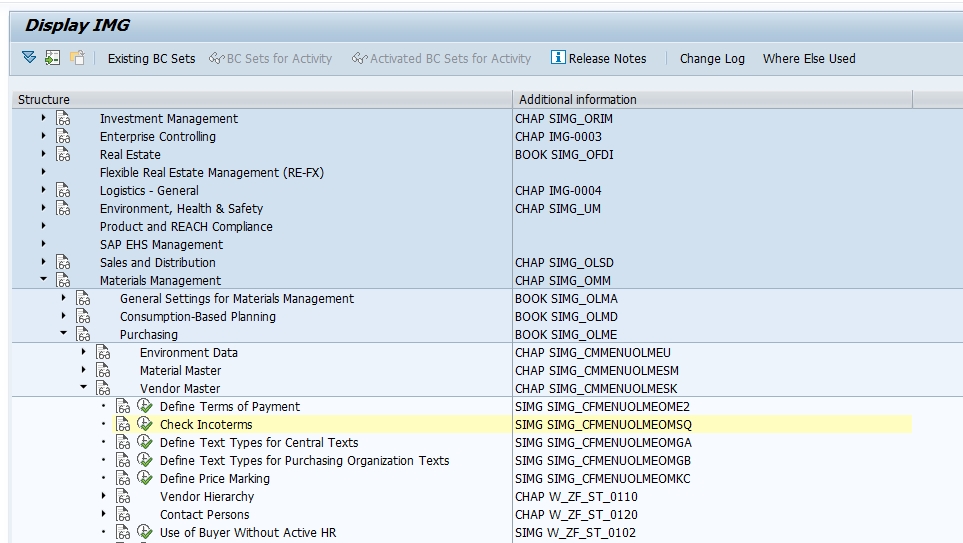
Log in with customizing access, then type OMSQ directly into the transaction box, or follow SPRO > Materials Management > Purchasing > Master Data > Vendor Master > Check Incoterms.
Review the Existing Incoterms Table
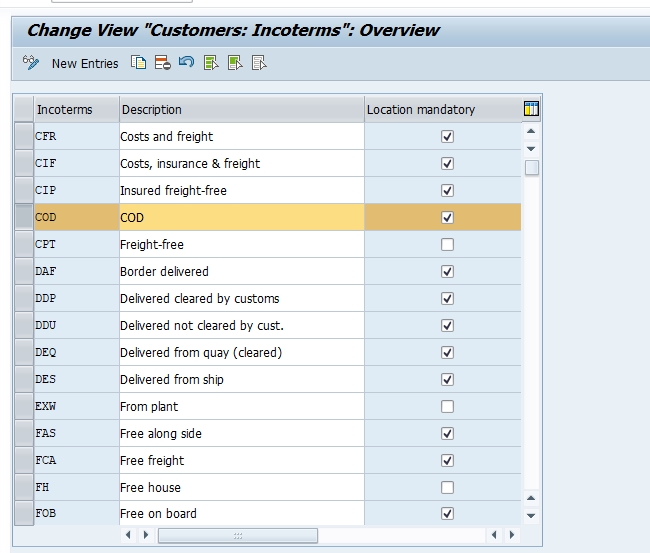
The overview screen lists every Incoterm code already available in the system, each with its short code and description. Review this list first to confirm whether the rule your business needs is already present before adding anything new.
Add a New Entry If Required
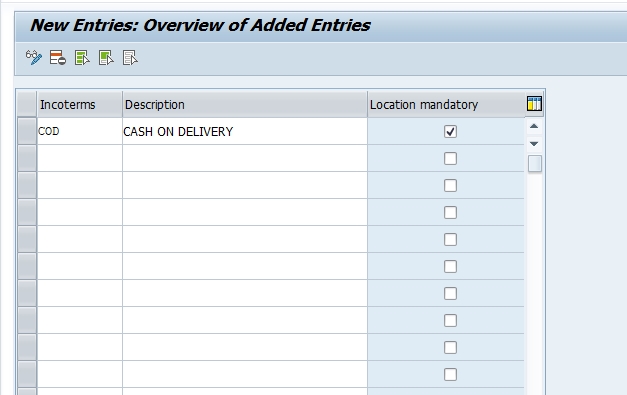
If a required code is missing - for example COD, Cash on Delivery, a delivery arrangement some businesses track alongside the official Incoterms list for domestic transactions - select New Entries and add the code and description to represent that arrangement.
Maintain the Named Place Description If Needed
For Incoterm rules that require a named location - a port, warehouse, or delivery point - maintain the additional descriptive text so the requirement is documented consistently rather than left to free-text entry on every individual document.
Save and Assign to a Transport Request
Click Save. SAP prompts you to capture the change under a customizing transport request. Assign it with a clear description, for example "Add Incoterm COD for domestic cash-on-delivery vendors," and release it once testing is complete.
Assign the Incoterm to Vendor or Customer Master
Once confirmed in OMSQ, assign the Incoterm code and named place on the relevant vendor or customer master purchasing/sales view so it defaults automatically onto new purchase orders, sales orders, and shipping documents going forward.
📦 The Eleven Incoterms 2020 Rules
The Incoterms 2020 framework organizes its eleven rules into two groups - seven that apply to any mode of transport, and four reserved specifically for sea and inland waterway transport.
Rules for Any Mode of Transport
| Code | Meaning |
|---|---|
| EXW | Ex Works - buyer takes on nearly all cost and risk from the seller's premises onward |
| FCA | Free Carrier - seller delivers goods to a carrier nominated by the buyer |
| CPT | Carriage Paid To - seller pays freight to the named destination, but risk transfers earlier |
| CIP | Carriage and Insurance Paid To - like CPT, with seller also arranging insurance |
| DAP | Delivered At Place - seller delivers, ready for unloading, at the named destination |
| DPU | Delivered at Place Unloaded - seller delivers and unloads goods at the named destination |
| DDP | Delivered Duty Paid - seller bears all cost and risk including import duties, to the buyer's door |
Rules for Sea and Inland Waterway Transport
| Code | Meaning |
|---|---|
| FAS | Free Alongside Ship - seller delivers goods alongside the vessel at the named port |
| FOB | Free On Board - seller delivers goods on board the vessel, risk transfers at that point |
| CFR | Cost and Freight - seller pays freight to the destination port, risk transfers earlier at loading |
| CIF | Cost, Insurance and Freight - like CFR, with seller also arranging marine insurance |
Each of these standard codes can be created once as an OMSQ entry and reused consistently across every vendor and customer master record that needs it, rather than being retyped inconsistently on individual documents.
⚠️ Common Errors and How to Resolve Them
"Incoterm code already exists"
Another consultant may have already created an entry with the same code, possibly with a different description. Search the existing table first before assuming a new entry is genuinely needed.
Incoterm field blank on a new purchase order
This usually means no Incoterm has been assigned on the vendor master purchasing view, so nothing defaults automatically. Update the vendor master rather than expecting the OMSQ table entry alone to populate documents.
Wrong Incoterm still appearing after correction
Check whether a user manually overrode the Incoterm on a specific purchase order or whether an outdated info record is still driving the default, since either can override the vendor master's standard assignment.
Entry saves without a transport request
In a sandbox or standalone client, changes may save locally. In a proper landscape, always confirm the change was captured in a transport request, otherwise it won't migrate forward to quality assurance or production.
🔗 Related SAP Transaction Codes
| T-code | Purpose |
|---|---|
| OMSQ | Check and maintain Incoterms |
| OME2 | Define terms of payment, often maintained alongside Incoterms |
| XK01/XK02 | Create or change vendor master, where a default Incoterm is assigned |
| XD01/XD02 | Create or change customer master, where a default Incoterm is assigned |
| ME21N | Create purchase order, where the Incoterm defaults from the vendor master |
| VA01 | Create sales order, where the Incoterm defaults from the customer master |
| ME11 | Create purchasing info record, which can also carry a specific Incoterm override |
Reviewing this table alongside your project's blueprint confirms every dependent configuration node has been completed before vendor and customer master data loading begins.
🏢 Incoterms vs Terms of Payment - Two Different Jobs
What Incoterms Control
Incoterms answer questions about physical logistics and risk - who pays for freight, who arranges insurance, and at what geographic point responsibility for the goods passes from seller to buyer. They have nothing to do with when an invoice is due.
What Terms of Payment Control
Terms of payment, configured separately through OME2, answer questions about cash flow timing - when an invoice becomes due and whether a discount applies for early settlement. They have nothing to do with who arranges shipping.
Why the Distinction Matters
Both fields sit on the same vendor and customer master records and often get configured in the same project phase, which is exactly why consultants new to SAP sometimes conflate them. Keeping the two concepts clearly separate in project documentation and training materials avoids confusion during vendor master data loading and user acceptance testing.
🔒 Authorization Considerations for Maintaining OMSQ
Because Incoterms affect cost allocation, insurance responsibility, and legal risk transfer, access to this configuration should be restricted to functional consultants or configuration leads with a documented change process behind every edit. An incorrect or inconsistent Incoterm entry can silently create commercial disputes with vendors or customers over who owes freight charges, long before anyone in procurement or logistics notices the pattern.
📅 How OMSQ Fits Into a Broader Implementation Timeline
Incoterms configuration typically happens early in the Materials Management and Sales and Distribution work streams, alongside terms of payment setup, and well before vendor or customer master data loading begins. Because Incoterms are referenced by virtually every international purchase order and sales order created afterward, most project plans treat this table as a quick but important dependency to finalize before master data migration.
This configuration also resurfaces whenever a business begins trading with a new region or renegotiates shipping responsibility with a major supplier or customer, requiring the correct Incoterm code to be reassigned on the relevant master data record without disturbing the codes already stored on historical documents.
✅ Testing Checklist After Configuring OMSQ
- Assign the confirmed Incoterm code and named place to a test vendor master record and confirm it defaults correctly onto a new purchase order
- Repeat the same check on a test customer master record and a new sales order
- Confirm the named place text field displays and prints correctly on purchase order and sales order output forms
- Verify that freight and insurance charge determination behaves as expected for the assigned Incoterm during pricing
- Ask a business user with standard access to raise a live test transaction, confirming the defaulting works outside the developer's own profile
❓ Common Misconceptions About Incoterms Configuration
- "Incoterms and terms of payment are the same setting" - they're not; Incoterms control shipping risk and cost, terms of payment control invoice due dates
- "Any code can represent any shipping arrangement" - the eleven official Incoterms 2020 rules carry specific, legally recognized meanings that shouldn't be reassigned loosely
- "OMSQ automatically populates every document" - the table only holds valid codes; the Incoterm still needs to be assigned on vendor or customer master data to default anywhere
- "Changing an Incoterm retroactively updates old purchase orders" - it doesn't; historical documents keep whatever code was active when they were created
📖 Glossary of Key Terms
| Term | Meaning |
|---|---|
| Incoterms | Standardized international trade rules defining cost, insurance, and risk responsibility between buyer and seller |
| Named Place | The specific port, warehouse, or delivery point referenced alongside an Incoterm code |
| Risk Transfer Point | The precise stage in a shipment where liability for loss or damage passes from seller to buyer |
| Freight Collect / Freight Prepaid | Common shipping industry terms describing which party pays transport cost, closely related to Incoterm selection |
| International Chamber of Commerce (ICC) | The organization that publishes and periodically updates the official Incoterms rules |
| Transport Request | The change-tracking mechanism used to move customizing settings between SAP systems |
🔍 Case Study: Resolving a Freight Cost Dispute Traced to a Missing Incoterm
An electronics distributor importing components from an overseas manufacturer received an unexpected freight invoice from their logistics provider after a shipment arrived, despite believing the supplier's quoted price already included delivery to their warehouse. Investigation of the purchase order showed the Incoterm field was blank rather than reflecting the DAP (Delivered At Place) arrangement both parties believed they had agreed to, because the vendor master record had never been updated with an Incoterm after the vendor was originally created during a rushed go-live.
With no Incoterm defaulting onto purchase orders for that vendor, the logistics team defaulted to their own standard freight-collect assumption, generating the unexpected invoice. The fix involved updating the vendor master with the correct DAP Incoterm and named warehouse location, confirmed against the OMSQ table entry, after which every new purchase order for that vendor correctly reflected the agreed shipping responsibility. This case illustrates why Incoterms deserve the same attention during vendor master setup as pricing and payment terms, since a blank field defaults to nobody's expectations rather than a safe fallback.
💡 Key Takeaways
- Incoterms define who bears shipping cost, insurance, and risk at each stage of a goods movement, separate from payment timing
- OMSQ is used to check the existing table of Incoterm codes and add new entries when a required code is missing
- The eleven official Incoterms 2020 rules cover most international trade scenarios; custom entries like COD should be reserved for genuinely distinct domestic arrangements
- An Incoterm code only defaults onto documents once it's assigned on the relevant vendor or customer master record
- Test with a real purchase order and sales order before signing off on any new Incoterm entry
- Every configuration change should move through a transport request and a proper change management process