Define Purchasing Value Key in SAP MM (T-code OME1) -Step-by-Step Guide
Every material a buyer procures needs a consistent answer to two recurring questions: when should a vendor be reminded about a late delivery, and how much price or quantity variance is acceptable before an invoice gets blocked? Purchasing value keys answer both automatically. This guide walks through the OME1 configuration path, the reminder and tolerance logic behind each key, and the mistakes that cause missed reminders or unnecessary invoice blocks later.
⚠ What Is a Purchasing Value Key in SAP MM?
A purchasing value key is a small but powerful configuration object assigned on the purchasing view of a material master record. It bundles together a set of purchasing control defaults - primarily reminder levels for chasing overdue vendor deliveries and tolerance percentages for order price and quantity variance - so buyers don't have to configure these values manually on every single purchase order or invoice. Instead, the key is set up once through transaction OME1 and then reused across every material that needs the same purchasing behavior.
Think of it as a purchasing rulebook attached quietly to a material: how many days after the promised delivery date should the system flag a reminder letter to the vendor, and how far can an invoiced price or quantity drift from what was ordered before someone in accounts payable needs to look at it. Without a purchasing value key, these checks either rely entirely on system-wide defaults or require manual attention on every transaction, both of which slow down a high-volume procurement operation.
Why This Configuration Matters Beyond a Convenience Setting
It's tempting to treat purchasing value keys as a minor administrative shortcut, but in practice they directly influence two areas that matter to procurement performance: on-time delivery follow-up and invoice accuracy control. A material with no reminder levels configured might never trigger an automatic follow-up letter when a vendor misses a delivery date, quietly extending lead times without anyone noticing until stock runs low. A material with tolerance limits set too wide might let genuinely incorrect invoices pass straight through without review, creating a slow financial leak that's difficult to trace back to its source.
📋 Where OME1 Fits in the Material Master and Procurement Cycle
The purchasing value key sits on the purchasing view of the material master, alongside other purchasing-specific defaults like purchasing group and order unit. Once assigned, it quietly influences behavior at two distinct points later in the procure-to-pay cycle.
| Stage | How the Purchasing Value Key Is Used |
|---|---|
| Material Master (Purchasing View) | The key is assigned once, carrying its reminder and tolerance settings for every future transaction involving that material |
| Purchase Order Follow-Up | SAP proposes reminder letters to the vendor at the configured day intervals when a delivery becomes overdue |
| Invoice Verification | The system compares the invoiced price and quantity against the purchase order, applying the configured tolerance percentages to decide whether the invoice needs manual review |
Because the key is referenced automatically at both of these points, a single well-designed purchasing value key can save a procurement team from dozens of manual reminder calls and invoice queries every month.
💼 Business Scenario: Why Purchasing Value Keys Matter
Picture a manufacturing company sourcing a critical raw material from a vendor with a history of occasionally slipping delivery dates. Without a purchasing value key configured with sensible reminder levels, the procurement team relies on someone manually tracking delivery dates in a spreadsheet and calling the vendor when a shipment looks late - a process that's easy to forget during a busy week. By configuring a purchasing value key with staged reminder levels, for example at 5, 10, and 15 days overdue, SAP automatically proposes increasingly urgent reminder letters to the vendor without anyone needing to track the date manually.
On the invoice side, the same company might negotiate a small acceptable variance in price due to currency fluctuation, but wants anything beyond 2% flagged for review before payment is released. Configuring that tolerance once in the purchasing value key, rather than trusting every accounts payable clerk to remember the acceptable threshold, keeps invoice verification consistent and defensible during an audit.
✅ Prerequisites Before Running OME1
- Agree with procurement leadership on the reminder day intervals that reflect realistic vendor follow-up practice for the business
- Agree with finance on acceptable price and quantity variance tolerance percentages before configuring any key, since this affects invoice blocking behavior
- Check whether an existing purchasing value key already matches the required pattern, since reusing a key across similar materials keeps configuration lean
- Hold authorization to edit client-level customizing tables, since OME1 is a cross-client configuration change
- Confirm which materials or material groups the new key is intended for, so it can be assigned consistently during material master maintenance
🛠️ Step-by-Step: Defining a Purchasing Value Key Using OME1
Open the Configuration Path
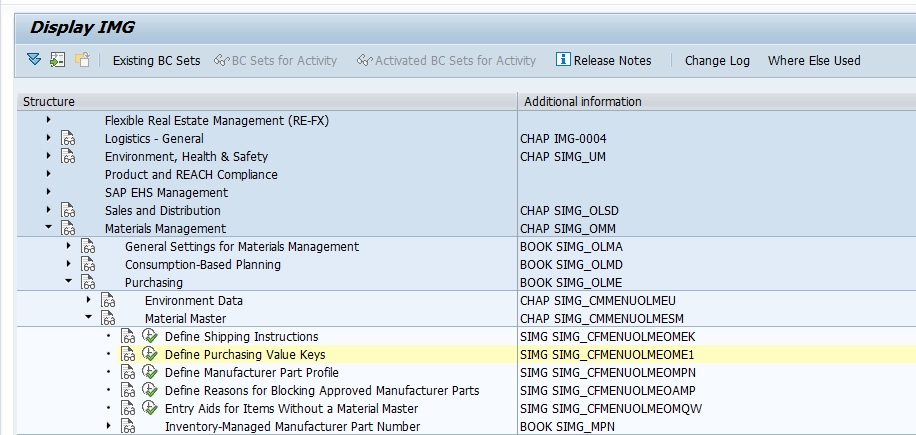
Log in with customizing access, then type OME1 directly into the transaction box, or follow SPRO > Materials Management > Purchasing > Material Master > Define Purchasing Value Key.
Select New Entries
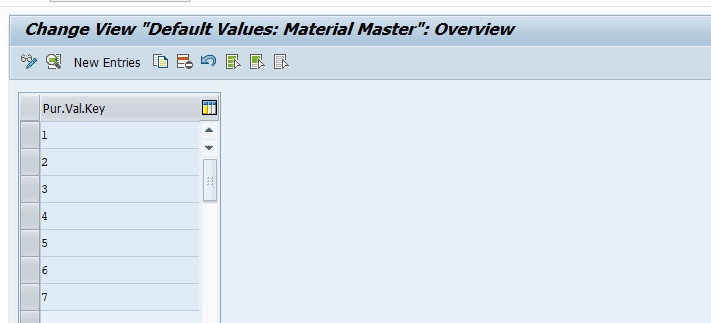
On the overview screen listing every existing purchasing value key, click New Entries to build a fresh key. Assign a short, two-character code - for example key 8 - to represent this new set of reminder and tolerance defaults.
Configure Reminder Levels and Tolerance Settings
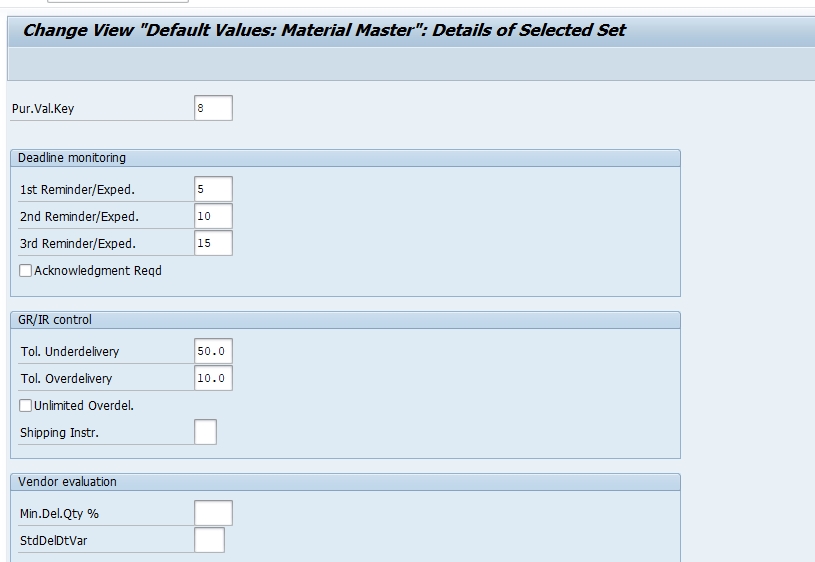
For purchasing value key 8, set the first reminder at 5 days, the second reminder at 10 days, and the third reminder at 15 days overdue, staging progressively more urgent follow-up communication with the vendor. Alongside these reminder levels, configure the order price and quantity variance tolerance percentages that determine when an invoice should be flagged for manual review.
Save and Assign to a Transport Request
Click Save. SAP prompts you to capture the change under a customizing transport request. Assign it with a clear description, for example "Create purchasing value key 8 with 5/10/15 day reminders," and release it once testing is complete.
Assign the Key to Relevant Material Master Records
Once confirmed in OME1, assign the purchasing value key on the purchasing view of every material master record that should follow this reminder and tolerance pattern, so it defaults automatically onto future purchase orders and invoice checks for those materials.
⚙️ Understanding the Fields Inside a Purchasing Value Key
| Field | Purpose |
|---|---|
| Purchasing Value Key | The two-character code representing this specific combination of reminder and tolerance settings |
| 1st Reminder / Urging | Number of days after the delivery due date at which SAP proposes the first reminder letter to the vendor |
| 2nd Reminder / Urging | Number of days for the second, more urgent reminder if the delivery is still outstanding |
| 3rd Reminder / Urging | Number of days for the final reminder level before further escalation is typically handled manually |
| Order Price Quantity Variance | The permitted percentage deviation between invoiced and ordered price or quantity before the invoice is blocked for review |
| Shipping Instructions | An optional default indicating packaging or shipping notes relevant to materials using this key |
Using the example from the screenshots above, purchasing value key 8 with reminders at 5, 10, and 15 days gives the procurement team a clear, automatically staged follow-up schedule for every material assigned to that key, without requiring any manual date tracking.
📦 Where a Purchasing Value Key Gets Used Once Assigned
After a purchasing value key is configured and assigned to a material master record, its effects show up in a few distinct places during day-to-day procurement operations.
- Reminder letters (also called expediters or urging letters) proposed automatically through the purchase order follow-up reports once a delivery date passes without a goods receipt
- Invoice blocking logic during invoice verification, comparing the invoiced amount against the purchase order within the configured tolerance
- Vendor evaluation reporting, where consistent reminder history can feed into broader delivery performance scoring for that vendor
- Purchasing reports that group materials by their assigned purchasing value key to review reminder and tolerance policy consistency across a material category
⚠️ Common Errors and How to Resolve Them
"Purchasing value key already exists"
Another consultant may have already created a key with the same code, possibly with different reminder or tolerance settings. Search the existing table first before assuming a new key is genuinely needed.
Vendor reminders not being generated as expected
Check whether the purchasing value key is actually assigned on the material master purchasing view, since the key configured in OME1 has no effect until it's referenced by a material. Also confirm the reminder proposal report is being run regularly by the procurement team.
Invoices blocking too frequently, or not blocking when they should
This almost always traces back to the order price and quantity variance tolerance percentages configured in the key rather than a problem in invoice verification itself. Review the tolerance values against what finance actually agreed to before assuming a system defect.
Entry saves without a transport request
In a sandbox or standalone client, changes may save locally. In a proper landscape, always confirm the change was captured in a transport request, otherwise it won't migrate forward to quality assurance or production.
🔗 Related SAP MM Transaction Codes
| T-code | Purpose |
|---|---|
| OME1 | Define purchasing value key |
| MM02 | Change material master record, where the purchasing value key is assigned on the purchasing view |
| ME21N | Create purchase order, indirectly influenced by the purchasing value key's reminder settings |
| MIRO | Enter incoming invoice, where the tolerance settings from the purchasing value key are checked |
| OMR6 | Configure system-wide tolerance keys used alongside material-specific purchasing value key settings |
| ME91F | Print or generate purchase order reminder letters based on configured reminder levels |
Reviewing this table alongside your project's blueprint confirms every dependent configuration node has been completed before material master data loading begins.
🏢 Purchasing Value Key vs Vendor Evaluation - Two Different Purposes
What Purchasing Value Key Controls
A purchasing value key operates at the material level, defining reminder timing and tolerance limits that apply consistently to every transaction involving that specific material, regardless of which vendor supplies it.
What Vendor Evaluation Controls
Vendor evaluation, configured through a separate set of transactions, scores a vendor's overall performance across criteria like price, quality, delivery timeliness, and service, aggregated across all the materials and transactions tied to that vendor rather than any single material.
How They Complement Each Other
In practice, the reminder history generated because of a purchasing value key's settings can indirectly feed into a vendor's delivery performance score under vendor evaluation, making the two features complementary rather than competing. A material with a tightly configured purchasing value key helps ensure vendor evaluation data is captured consistently, since reminders and variances are flagged the same way every time rather than depending on manual attention.
🔒 Authorization Considerations for Maintaining OME1
Because purchasing value keys affect both vendor communication timing and invoice blocking behavior, access to this configuration should be restricted to functional consultants or configuration leads with a documented change process behind every edit. Tolerance percentages set too loosely can silently let incorrect invoices through for months before finance notices a pattern in vendor overbilling.
📅 How OME1 Fits Into a Broader Implementation Timeline
Purchasing value key configuration typically happens during the Materials Management purchasing setup phase, alongside terms of payment, Incoterms, and material type configuration, well before material master data loading begins. Because a purchasing value key can be assigned across many materials at once, most project plans define only a handful of keys representing common reminder and tolerance patterns rather than a unique key per material.
This configuration also resurfaces when a business renegotiates delivery expectations or invoice tolerance policy with a category of vendors, requiring either a new purchasing value key or an adjustment to an existing one, followed by reassignment across the relevant material master records.
✅ Testing Checklist After Configuring OME1
- Assign the new purchasing value key to a test material master record and confirm it saves correctly on the purchasing view
- Create a test purchase order for that material with a deliberately overdue delivery date and confirm the reminder proposal report picks it up at the configured day intervals
- Post a test invoice with a price or quantity slightly outside the configured tolerance and confirm the invoice is blocked as expected
- Post a test invoice within tolerance and confirm it passes through without being blocked
- Ask a business user with standard access to raise a live test transaction, confirming the behavior works outside the developer's own profile
❓ Common Misconceptions About Purchasing Value Key Configuration
- "A purchasing value key is mandatory on every material" - it's optional; materials without one simply rely on system-wide default tolerances
- "Purchasing value key and vendor evaluation are the same feature" - they're not; one operates at material level, the other scores overall vendor performance
- "Reminder levels automatically send letters without any manual step" - reminders are proposed by SAP but typically still require a buyer to run the reminder report and confirm dispatch
- "Tighter tolerance is always better" - overly tight tolerance can generate excessive invoice blocks for routine, explainable variances, creating unnecessary manual review workload
📖 Glossary of Key Terms
| Term | Meaning |
|---|---|
| Purchasing Value Key | A configuration key bundling reminder levels and tolerance settings, assigned on the material master purchasing view |
| Reminder Level / Urging Level | The number of days after a delivery due date at which SAP proposes a follow-up letter to the vendor |
| Order Price Variance | The difference between the invoiced price and the price stated on the purchase order |
| Quantity Variance | The difference between the invoiced quantity and the quantity stated on the purchase order or goods receipt |
| Invoice Block | A hold placed on an invoice during verification when a discrepancy exceeds configured tolerance |
| Vendor Evaluation | A separate SAP MM function scoring overall vendor performance across price, quality, delivery, and service |
🔍 Case Study: Reducing Late Deliveries Traced to Missing Reminder Configuration
A packaging materials company noticed a recurring pattern of stock-outs on a specific raw material despite purchase orders being placed well ahead of the required date. Investigation revealed that the material master record for that item had no purchasing value key assigned at all, meaning no automatic reminder letters were ever proposed when the vendor's deliveries slipped past the agreed date. Buyers were relying entirely on memory to notice late shipments, and with dozens of open purchase orders active at any time, this particular vendor's slow but recurring delays kept going unnoticed until stock ran critically low.
The fix involved creating a purchasing value key with reminder levels staged at 5, 10, and 15 days overdue, then assigning it to the affected material and several others sourced from the same vendor. Within the following month, the automatically generated reminder letters gave the procurement team a consistent, system-driven prompt to follow up, and the frequency of stock-outs for that material dropped noticeably. This case illustrates why reviewing which materials have a purchasing value key assigned is worth doing periodically, not just during initial project configuration.
💡 Key Takeaways
- A purchasing value key bundles reminder levels and tolerance settings, assigned once on the material master and reused across transactions
- Reminder levels automate vendor follow-up on overdue deliveries at staged day intervals such as 5, 10, and 15 days
- Order price and quantity variance tolerance settings control when an invoice gets blocked for manual review during verification
- A single purchasing value key can be reused across many materials sharing the same reminder and tolerance policy
- Test with a real overdue purchase order and a real out-of-tolerance invoice before signing off on any new key
- Every configuration change should move through a transport request and a proper change management process