SAP Error KI280: "Create Account 500061 for 10.03.2025 as a Cost Element in Controlling Area 1213" – Causes and Step-by-Step Fix
A buyer posts an invoice, a store keeper issues material to a cost center, or an accountant books an expense, and SAP refuses to save the document with message KI280. The cost center is valid, the amounts are right and the account looks correct in the general ledger. Yet SAP says that the account must be created as a cost element in the controlling area for the posting date. The reason is a simple rule of FI and CO integration: a profit and loss account that is posted together with a cost object must also exist as a cost element. This guide explains what KI280 means, how to check and create the GL account in FS00, how to create the cost element in KA01 with the right category and validity dates, and how to prevent the error for every new expense account. If you run into any errors while following along, feel free to send a screenshot to pramod@learntosap.com for help.
❌ The Error Message at a Glance
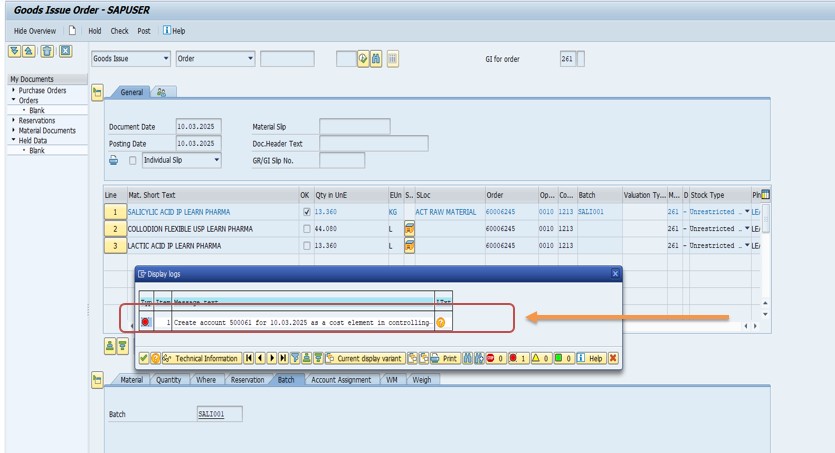
| Item | Value in This Example |
|---|---|
| Message number | KI280 |
| Message text | Create account 500061 for 10.03.2025 as a cost element in controlling area 1213 |
| GL account | 500061 |
| Controlling area | 1213 |
| Company code | 1254 |
| Posting date | 10.03.2025 |
| Where to fix it | FS00 (GL account) and KA01 (cost element) |
| Message type | Error: the posting cannot be saved |
The message means that GL account 500061 is missing as a cost element in controlling area 1213 and has to be created for postings on 10.03.2025. The account number, the date and the controlling area in your own message may differ. The steps below still apply, and you simply replace the example values with yours.
📑 What You Will Learn in This Guide
- What KI280 means
- GL accounts and cost elements
- Cost element categories
- Why the error appears
- Where you meet the error
- Diagnose the problem
- Solution: create the account and cost element
- Validity dates explained
- Verify the fix
- Real-world scenario
- Master data and transports
- Common mistakes
- Troubleshooting
- How to prevent KI280
- Frequently asked questions
✅ What Does SAP Error KI280 Mean?
SAP Financial Accounting and SAP Controlling work on the same business transactions, but they look at them in different ways. Financial Accounting records postings on general ledger accounts. Controlling records the same costs on cost objects such as cost centers, internal orders and projects. To connect the two worlds, SAP requires that every profit and loss account that is posted together with a cost object also exists as a cost element in Controlling.
KI280 appears when this rule is broken. You posted to account 500061 with a cost object, but the account is not a cost element in controlling area 1213 on the posting date 10.03.2025. SAP cannot pass the cost to Controlling, so it stops the posting and tells you what to create.
The message is not a sign that something is broken. It is a safeguard. If the posting were allowed without a cost element, the general ledger and the cost reports would show different totals, and the difference would be very hard to find at month end. Stopping the posting at once keeps both worlds in agreement.
📝 GL Accounts and Cost Elements: How They Work Together
The two objects are linked, but they are not the same thing. Understanding the difference makes the fix easy to follow.
| Point | GL Account | Cost Element |
|---|---|---|
| Belongs to | Chart of accounts and company code | Controlling area |
| Used for | Financial statements and the ledger | Cost reports and cost allocation |
| Created in | FS00 | KA01 (primary cost elements) |
| Has a validity period | No, but it can be blocked | Yes, with a start and end date |
| Needed when | Any posting in Financial Accounting | A profit and loss account is posted with a cost object |
A primary cost element has the same number as its GL account. That is why the fix has two parts. First the account must exist in the chart of accounts and in the company code. Then the cost element with the same number is created in the controlling area. The controlling area and the company code must share the same chart of accounts, and the company code must be assigned to the controlling area. If this link is missing, the problem is in the organizational structure and not in the account.
💡 Cost Element Categories: Which One to Choose?
When you create a cost element, you must choose a category. The category tells SAP what kind of posting the cost element is used for, and it controls which transactions may use it.
| Category | Meaning | Typical Use |
|---|---|---|
| 01 | Primary costs or cost-reducing revenues | Normal expense accounts posted from FI or MM |
| 11 | Revenues | Revenue accounts used in cost accounting |
| 12 | Sales deductions | Discounts and rebates |
| 22 | External settlement | Settlement to objects outside Controlling |
| 41 | Overheads | Overhead surcharges |
| 42 | Assessment | Cost allocation by assessment |
| 43 | Internal activity allocation | Allocation of activities between cost centers |
For the account in this example, 500061, an expense account for the consumption of raw material, the right choice is category 01. It is the standard category for expense accounts that receive costs from invoices, goods issues and other postings from other components. The other categories are mostly secondary cost elements, which are used only inside Controlling and are not posted from Financial Accounting.
💡 Why Does KI280 Appear? Common Causes
- A new expense account: the GL account was created recently, but nobody created the cost element for it.
- The cost element is missing in this controlling area: it exists in another controlling area, but not in 1213.
- The validity does not cover the posting date: a cost element exists, but starts after 10.03.2025 or ended before it.
- The GL account does not exist in this company code: the account is in the chart of accounts, but was never extended to company code 1254.
- A system refresh or copy: master data was loaded for the general ledger but not for Controlling.
- The wrong account was used: a user chose a similar account by mistake, and the correct one has the cost element.
📋 Where You Meet KI280 in Daily Work
| Activity | Typical Transaction |
|---|---|
| Posting a vendor invoice with a cost center | MIRO, FB60 |
| Posting a general ledger document with a cost object | FB50, FB01 |
| Goods issue to a cost center or order | MIGO |
| Purchase order or requisition with account assignment | ME21N, ME51N |
| Posting a travel expense or a petty cash payment | FBCJ |
In some cases the message appears already in the purchase order, because SAP checks the account assignment early. In others it appears only at posting. In both cases the fix is identical.
🔧 Step-by-Step: Diagnose the Problem
Read the message. Note the account 500061, the controlling area 1213 and the date 10.03.2025. The date is the posting date, and it matters for the validity.
Check whether the GL account exists. Go to transaction FS00, enter the GL account 500061 and the company code 1254, and display it.
Check whether the cost element exists. Display it in KA03 for controlling area 1213. If it exists, look at its validity dates.
Check the organizational link. Confirm that company code 1254 is assigned to controlling area 1213 (OX19) and that both use the same chart of accounts.
🔧 Solution: Create the GL Account and the Cost Element
The fix has two parts. Part one creates the GL account if it is missing. Part two creates the cost element.
Part 1: Create the GL account in FS00
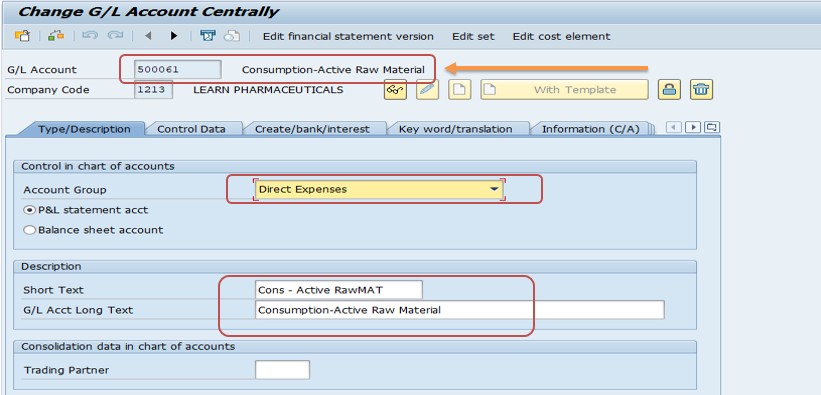
Run transaction FS00 (G/L Account Centrally). Enter G/L account 500061 and company code 1254.
Choose the account group for direct expenses and enter the short text, in the example Cons Active RawMat. Mark the account as a profit and loss statement account.
Save the account.
Part 2: Create the cost element in KA01
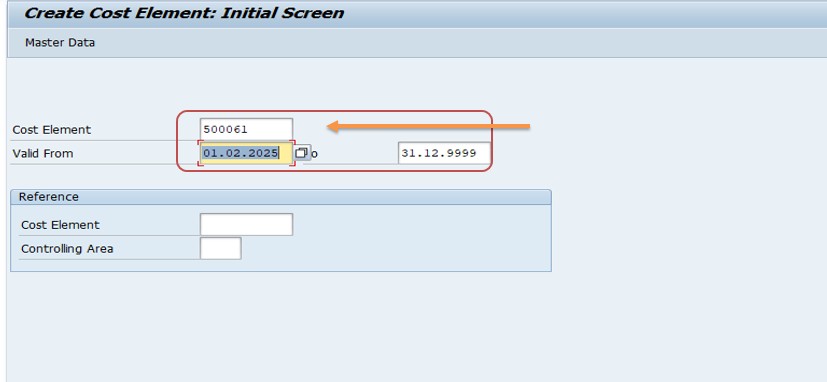
Run transaction KA01 (Create Primary Cost Element). Enter G/L account 500061 as the cost element and the validity period 01.02.2025 to 31.12.9999.
Select the cost element category 01, primary costs or cost-reducing revenues. Check the name and description that SAP proposes from the GL account.
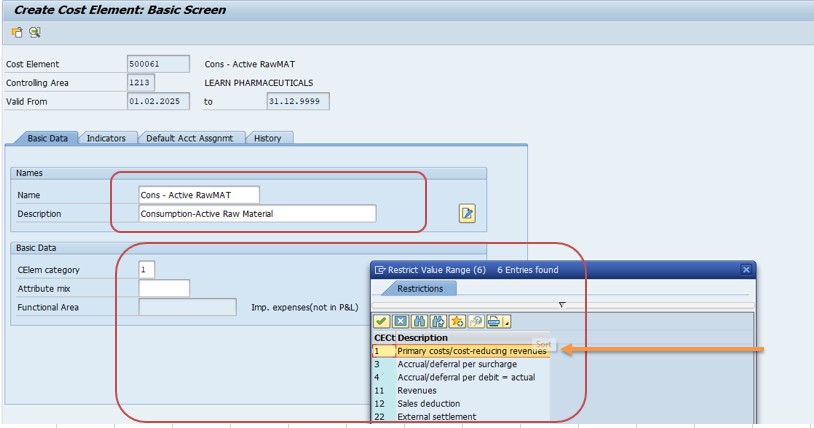
Save the cost element, and then repeat the posting that raised KI280.
📅 Validity Dates Explained
A cost element is not valid forever by default. It has a start date and an end date, and a posting is only accepted if its posting date falls inside this period. This is why the message names the date 10.03.2025 and not only the account.
| Posting Date | Cost Element Valid From 01.02.2025 to 31.12.9999 |
|---|---|
| 15.01.2025 | Rejected: before the start of validity |
| 01.02.2025 | Accepted: first day of validity |
| 10.03.2025 | Accepted: inside the period |
| 30.11.2026 | Accepted: the end date 31.12.9999 means no practical end |
In the example the validity starts on 01.02.2025, which is before the posting date of 10.03.2025, so the posting will work. But a document dated January 2025 would still fail. When you create a cost element, think about which dates will be posted. Starting at the beginning of the fiscal year, or earlier if you load old data, avoids a second round of the same error.
The end date 31.12.9999 is the standard way of saying that the cost element has no planned end. You can shorten it later if the account is retired, but only after you have checked that no later postings are expected.
✅ How to Verify That the Fix Worked
- Display the cost element in KA03 and confirm the number, category and validity dates.
- Repeat the posting that failed, for example the invoice or the goods issue.
- Save the document. The message should no longer appear.
- Open the cost center line items in KSB1 to see that the cost reached the cost object.
- Check the account balance in FS10N to confirm that the ledger shows the same posting.
- Test one more posting with a different date inside the validity period.
If a different message appears, the first one was hiding the next. Typical examples are a missing default cost center, a blocked account or a closed posting period. Handle each message in turn.
💼 Real-World Scenario: A New Raw Material Account Goes Live
This is an illustrative example based on a typical support case. A manufacturer in Pune introduced a new expense account for the consumption of active raw material. The finance team created the account in the chart of accounts and in company code 1254 and told purchasing to start using it. On the first invoice of March, the buyer received the message that account 500061 must be created as a cost element in controlling area 1213.
The SAP CO consultant opened FS00 and confirmed that the account existed. She then opened KA03 and found no cost element. In KA01 she created the cost element for 500061, chose category 01, and set the validity from the start of the fiscal quarter to 31.12.9999. She saved it and asked the buyer to repeat the invoice, which now posted without error. In KSB1 the cost appeared on the right cost center.
The team then changed its process: whenever a new expense account is requested, the request form includes a line for the cost element, with the category and the validity start date. Finance and controlling now create both objects on the same day, and the error has not returned.
🔄 Master Data and Transports: Why It Works in One System Only
GL accounts and cost elements are master data. They are normally not moved by a Customizing transport. A new account created in the development system does not appear in quality or production by itself, and the same is true for the cost element. This is why a posting can work in one system and fail in another with the same message.
| Situation | Recommended Action |
|---|---|
| Sandbox or training system | Create the account and cost element directly and test. |
| Project landscape with DEV, QA and PROD | Create both objects in each system following your master data process, or load them with a migration tool. |
| Many accounts to create | Use a data load, such as the legacy system migration workbench, and check a small sample first. |
| Master data changes need approval | Send a request with the account, company code, category and validity dates. |
Keep the account numbers, categories and validity dates identical in all systems. Differences make testing unreliable and lead to surprises after go-live.
❗ Common Mistakes When Fixing KI280
- Trying to create the cost element before the GL account exists.
- Choosing the wrong cost element category, for example a secondary category for an expense account.
- Setting the validity start after the posting date, so that the error remains.
- Creating the cost element in the wrong controlling area.
- Forgetting that the company code must be assigned to the controlling area.
- Fixing only one system, and being surprised when quality or production still fails.
- Ignoring the default account assignment, so that later postings miss a cost center.
- Not testing a real posting after the change.
🔧 Troubleshooting: When the Fix Does Not Work
KI280 still appears after saving the cost element
Check the validity dates against the posting date in the message. Then check that the cost element was created in the controlling area named in the message.
KA01 does not accept the account
The GL account may not exist in a company code of this controlling area, or the chart of accounts may differ. Compare the chart of accounts of the company code and the controlling area.
The category is not offered or cannot be used
Some categories are for secondary cost elements and are not created in KA01. Choose category 01 for primary costs.
A message about a missing cost center appears next
The posting now reaches Controlling, but the cost object is missing. Enter the cost center, or maintain a default account assignment for the cost element.
It works in quality but not in production
Master data is not transported. Create the account and the cost element in production as well.
The wrong cost element category was saved
Ask the controlling team before you change it. If postings already exist, a change can be restricted or can affect reports.
✅ How to Prevent KI280 in the Future
- Create the cost element on the same day as every new expense account.
- Use one request form for both objects, with the category and validity dates.
- Start the validity early enough to cover expected posting dates.
- Keep a checklist for new company codes and controlling areas, with account lists.
- Load master data for both FI and CO in every system after a copy or refresh.
- Test one posting with a cost center before releasing a new account to users.
- Train accountants and buyers to report the full message with account, date and area.
- Review expense accounts without cost elements once a year.
💡 Best Practices for Cost Element Master Data
Keep finance and controlling together
Many errors of this kind arise because the general ledger team and the controlling team work separately. A short joint process for new accounts, with one request and one approval, removes the gap. Both teams see the same information, and the cost element is created at the same time as the account.
Use a clear numbering concept
Group accounts and cost elements by number ranges, so that expenses, revenues and balance sheet accounts are easy to tell apart. A number such as 500061 then tells a user at once that it is an expense account. Document the concept and apply it to every new account.
Define default account assignment where it makes sense
For cost elements that normally belong to one cost center, a default account assignment saves users from entering it and reduces the number of rejected postings. Use it carefully, since a wrong default can hide mistakes.
Review the list regularly
Compare the list of expense accounts with the list of cost elements from time to time. Any expense account without a cost element is a future error, and finding it before users do saves support effort.
🔄 After the Fix: Default Account Assignment for the Cost Element
Once the cost element exists, the posting reaches Controlling. In many companies the user must then name a cost object such as a cost center or an order. If the user forgets, SAP reports a different message, asking for an account assignment. To make daily work smoother, you can maintain a default account assignment for the cost element, usually in transaction OKB9.
| Option | Effect | When to Use It |
|---|---|---|
| No default | The user must always enter a cost object | When the cost belongs to many different objects |
| Default cost center per company code | SAP proposes the cost center automatically | When the account usually belongs to one department |
| Default per business area or profit center | The default depends on another organizational unit | When different units have their own cost centers |
Use defaults with care. A default is convenient, but it can hide mistakes, because a posting that should go to another department lands on the default one without anybody noticing. Agree the rule with the controlling team, write it down and review it once a year. For an account such as the consumption of raw material, which is normally posted with a goods issue to a specific cost center or order, a default is often not needed.
🔒 Authorization Considerations
Creating GL accounts and cost elements changes the structure of reporting, so access is usually restricted. Many companies let only a master data team create accounts, and another group, often in controlling, create cost elements. If you cannot do it yourself, do not look for a way around the restriction. Send the support team the message, the account, the company code, the controlling area, the posting date and your proposed fix: "create cost element 500061 in controlling area 1213 with category 01, valid from 01.02.2025 to 31.12.9999". A precise request is processed faster than a screenshot alone.
📱 KI280 in SAP S/4HANA
In SAP S/4HANA, Financial Accounting and Controlling are more closely integrated, and primary cost elements are maintained as part of the GL account master. In recent releases you create the account with its cost element type in the same place, and the separate KA01 transaction is no longer used for primary cost elements. Secondary cost elements are still maintained separately. Messages about missing cost elements can still appear if the account is not set up with a cost element type for the posting date. Because names and apps change with each release, confirm the exact way of working in your own system. The principle is the same: a profit and loss account that is posted with a cost object needs a cost element valid on the posting date.
📋 Quick Fix Checklist
- Note the account, the controlling area and the posting date from message KI280.
- Check the GL account in FS00 for the company code.
- Create the GL account if it does not exist, with account group and short text.
- Check the link between the company code and the controlling area.
- Open KA01 and enter the account as the cost element.
- Set the validity so that it covers the posting date.
- Choose category 01 for a normal expense account.
- Save, then repeat the posting.
- Create the objects in every system where they are missing, and record what was done.
📋 Related SAP Transactions
| Transaction | Purpose |
|---|---|
| FS00 | Create, change or display a GL account centrally. |
| KA01 / KA02 / KA03 | Create, change or display a primary cost element. |
| KA06 | Create a secondary cost element. |
| OKB9 | Maintain default account assignment for cost elements. |
| OX19 | Assign a company code to a controlling area. |
| KSB1 | Display actual line items for cost centers. |
| FS10N | Display GL account balances. |
🎓 Interview-Style Questions and Answers
Q: What does KI280 mean?
The account used in a posting is not a cost element in the controlling area on the posting date.
Q: Which transactions fix it?
FS00 for the GL account and KA01 for the primary cost element.
Q: Which category is used for a normal expense account?
Category 01, primary costs or cost-reducing revenues.
Q: Why does the message include a date?
Because a cost element is valid only for a period, and the posting date must fall inside it.
Q: Is a cost element created per company code?
No, per controlling area.
Q: Do cost elements move with transports?
No. They are master data and must be created in each system.
📚 Quick Glossary
- GL account: An account in the general ledger of Financial Accounting.
- Cost element: The controlling object that describes the kind of cost or revenue.
- Primary cost element: A cost element that corresponds to a GL account.
- Secondary cost element: A cost element used only inside Controlling.
- Cost element category: Defines the kind of posting a cost element is used for.
- Controlling area: The organizational unit for internal cost accounting.
- Validity period: The dates between which a cost element may be used.
🎯 Conclusion
KI280 is a clear and helpful message once you know the rule behind it: an expense account posted with a cost object must also be a cost element in the controlling area on the posting date. Check the account in FS00, create it if it is missing, then create the cost element in KA01 with category 01 and a validity that covers the posting date, save it and repeat the posting. Remember that both objects are master data and must be created in every system. Create the account and the cost element together, and the error will not trouble you again. If something still blocks you, send the details to pramod@learntosap.com and we will help you find the next step.