SAP PP Planning Strategies Explained: Strategy 10, 11, 20, 30, 40, 50, 60 and 70
Every material in SAP is planned according to a planning strategy. It decides whether production follows forecasts or customer orders, whether stock is netted against demand, and what happens to a forecast when a real sales order arrives. Pick the wrong one and MRP plans too much, too little or nothing at all. This guide explains the main make-to-stock and make-to-order strategies in plain language, shows where to assign them in the material master, and walks through a hands-on example for strategies 10 and 11 using MM02, MD61, MD04 and MD02. If you run into any errors while following along, feel free to send a screenshot to pramod@learntosap.com for help.
✅ What Is a Planning Strategy in SAP PP?
A planning strategy is a set of rules that tells SAP how to plan the production or procurement of a material. It answers three practical questions. First, what triggers production: a forecast, a customer order, or both? Second, how should existing stock be treated: netted against demand or ignored? Third, how should a sales order relate to the forecast: should it use up part of it, or leave it untouched?
Technically, a planning strategy is a combination of requirement types. One requirement type is used for planned independent requirements in demand management, and another for customer requirements from sales orders. Each requirement type points to a requirement class, which holds control parameters such as whether the requirement is relevant for planning, whether an availability check is carried out, and whether consumption applies.
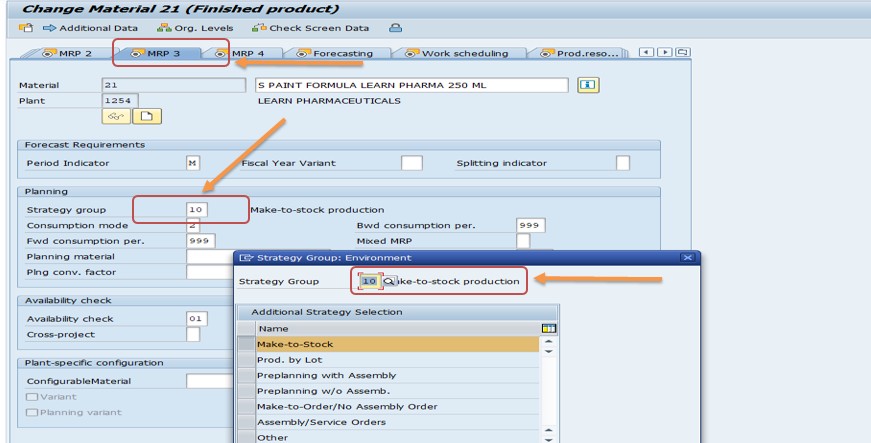
You do not give a strategy directly to a material. You assign a strategy group in the MRP 3 view of the material master. The group names a main strategy and can list alternative strategies, so the same material can be planned differently when needed. The strategies themselves are maintained in Customizing under Production → Production Planning → Demand Management → Planned Independent Requirements → Planning Strategy → Define Strategy.
📋 Make-to-Stock vs Make-to-Order: The Big Picture
Strategies fall into two broad families. Make-to-stock (MTS) strategies produce based on forecasts or plans and keep finished goods in stock for immediate delivery. Make-to-order (MTO) strategies start production only when a customer order arrives, and usually keep no free stock. Between them sit hybrid strategies, where components are planned in advance and final assembly waits for the order.
| Strategy | Name | Family | Typical Requirement Types |
|---|---|---|---|
| 10 | Net requirements planning | Make-to-stock | LSF (planned), KSL (customer) |
| 11 | Gross requirements planning | Make-to-stock | BSF, KSL |
| 20 | Make-to-order production | Make-to-order | KE (customer only) |
| 25 | Make-to-order for variants | Make-to-order | KEK (customer only) |
| 30 | Production by lot size | Make-to-stock | LSF, KL |
| 40 | Planning with final assembly | Make-to-stock | VSF, KSV |
| 50 | Planning without final assembly | Hybrid | VSE, KEV |
| 60 | Planning with planning material | Hybrid | VSEV, KEVV |
| 70 | Planning at assembly level | Component planning | VSFB |
The requirement type combinations come from the standard strategy definitions as described in SAP documentation and community references. Your own system may contain additional or modified strategies, so check Customizing before relying on a specific combination.
🔧 Where to Assign a Planning Strategy (MM02, MRP 3 View)
Whatever strategy you choose, you assign it the same way. The steps below use material 21, which also appears in the other tutorials in this series.
Run transaction MM02, enter the material number, here 21, and choose the MRP 3 view for the plant.
In the Strategy Group field, enter the group that points to the strategy you want, for example 10 for net requirements planning.
Check the related fields on the same view: the consumption mode and the backward and forward consumption periods, the availability check setting, and the mixed MRP indicator where relevant. Then save.
📦 Strategy 10: Net Requirements Planning (Make-to-Stock)
Strategy 10 is the classic make-to-stock strategy. Production is based on planned independent requirements, typically a forecast or a sales and operations plan, and MRP nets those requirements against available stock and existing receipts. In other words, MRP plans only what is missing.
- Sales orders do not trigger production: they do not consume the planned independent requirements, so the forecast stays in place.
- Planned independent requirements reduce on delivery: when goods are issued for a delivery, the planned requirement quantity is reduced.
- Stock and receipts are considered: available stock, planned orders, production orders, purchase orders and other firm receipts are all counted in the net calculation.
- Requirement type LSF is used for the planned independent requirements, with KSL for sales from stock.
It is widely used in consumer goods and for seasonal products, because it lets planners smooth the demand and produce at an even rate regardless of when individual orders arrive.
🔎 Worked Example: Strategy 10 with MD61, MD04 and MD02
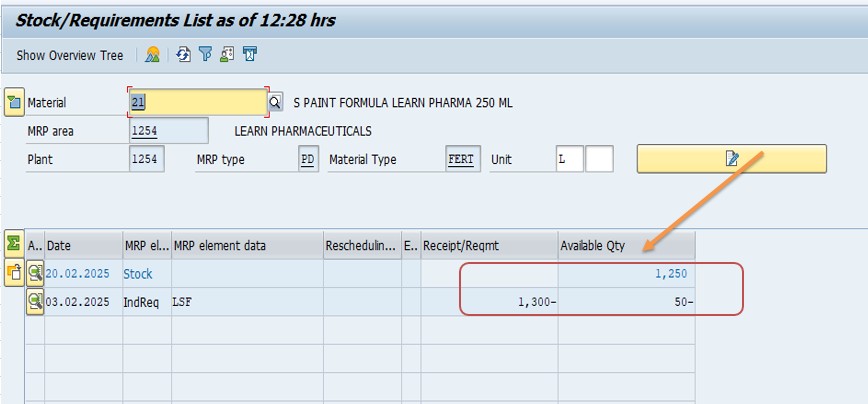
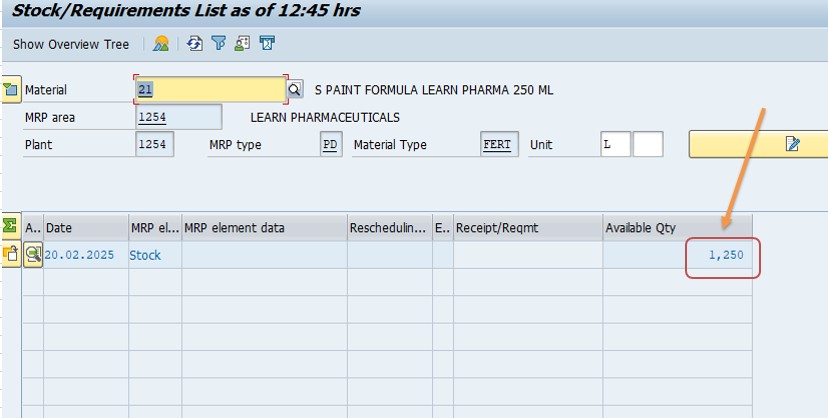
The example below tests what MRP does when the planned requirement is larger than the stock on hand. The numbers are taken from the original tutorial: stock of 1250 and a planned requirement of 1300 for February.
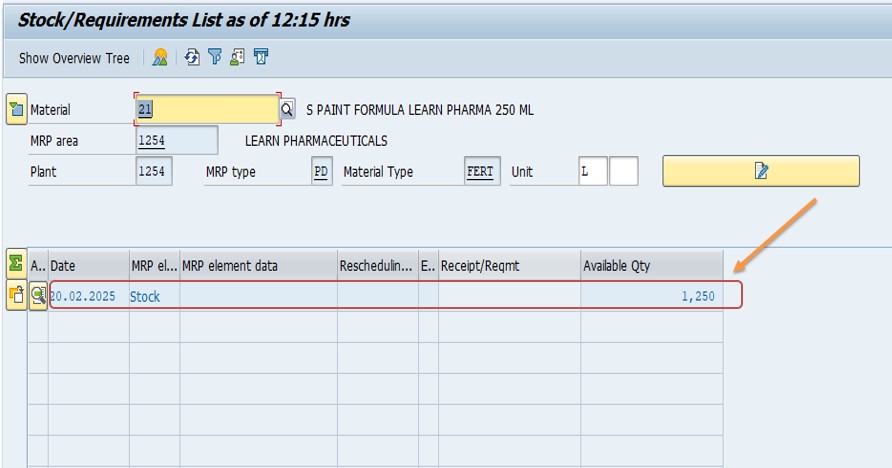
Confirm the available stock: 1250. This is the starting point for the net calculation.
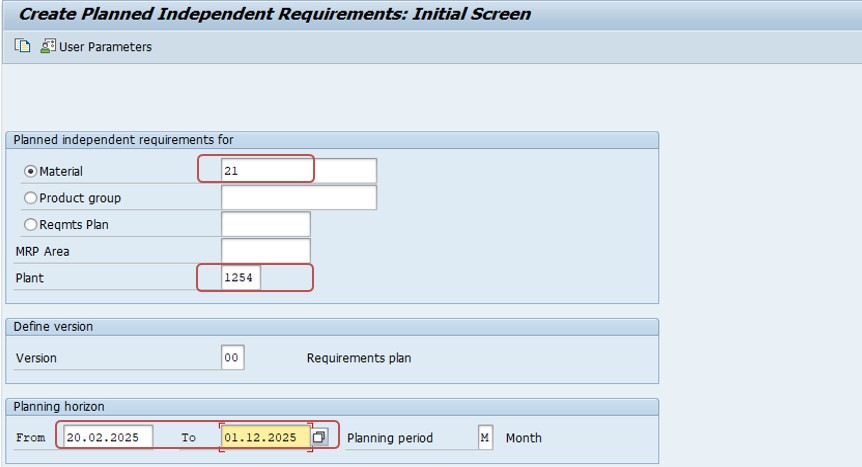
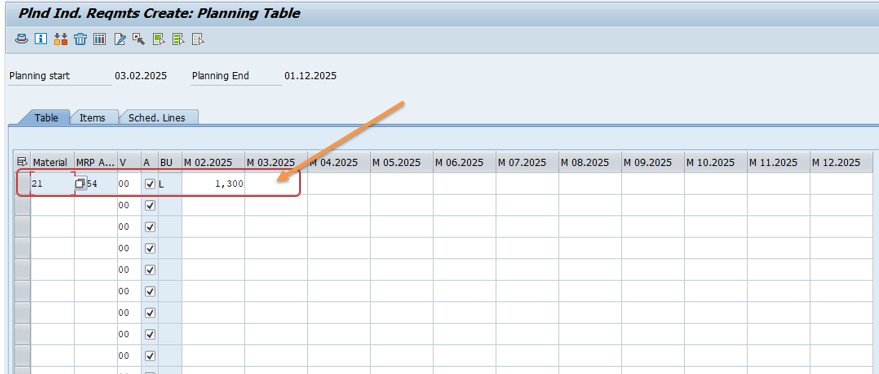
Run MD61 to create the planned independent requirement for the material and plant. Enter 1300 for the month of February and save. The requirement type for strategy 10 is LSF.
Open MD04, the stock and requirements list. You see the stock of 1250, the independent requirement of 1300, and a shortage of 50 as a negative available quantity. The system shows the gap, but it has not planned anything yet.
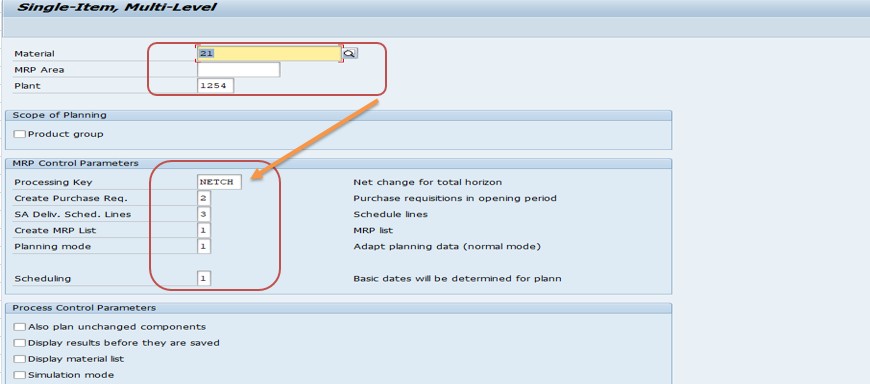
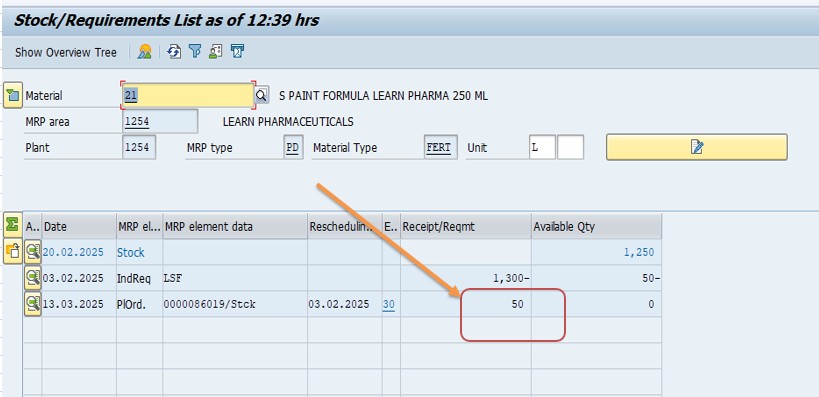
Run MD02, MRP for a single item with multi-level planning. Afterwards check the list again. MRP creates supply only for the missing 50, because strategy 10 nets the stock of 1250 against the demand of 1300.
🔄 Strategy 11: Gross Requirements Planning (Make-to-Stock)
Strategy 11 is also make-to-stock and also based on planned independent requirements, but it plans them gross. The planned requirement is covered in full by new supply, without netting the available stock against it. Stock is then available for other uses, such as sales orders, while the planned requirement is covered by fresh production or procurement.
- Always plans the full quantity: MRP generates supply for the whole planned requirement, regardless of stock.
- Sales orders have no influence on planning: as in strategy 10, there is no consumption of planned independent requirements.
- Requirement type BSF is used for the planned independent requirements, with KSL for sales from stock.
- Useful for mass production: it fits businesses that want to keep producing regardless of current inventory, for example when planning is driven by a master schedule.
It is also frequently combined with the mixed MRP indicator in the MRP 3 view. Setting that indicator to the value for gross requirements planning lets a higher-level assembly be planned gross while its components are still planned net.
🔎 Worked Example: Strategy 11 with the Same Numbers
Repeat the test with strategy 11 to see the difference. The stock is still 1250 and the planned requirement is still 1300.
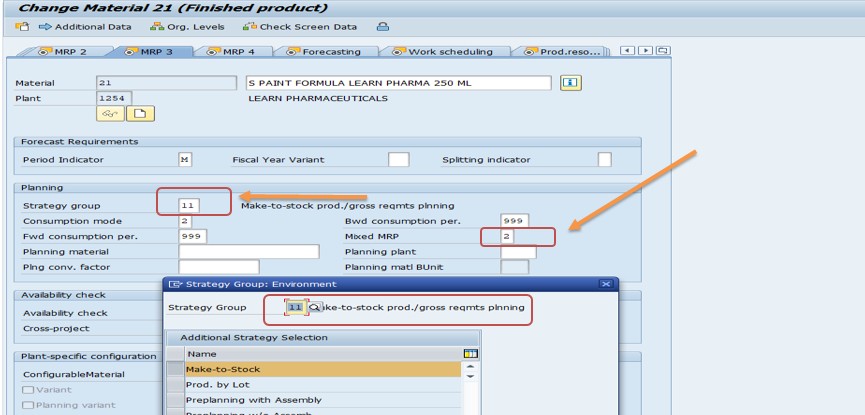
Run MM02 for material 21, open the MRP 3 view, and enter strategy group 11. Set the mixed MRP indicator to the value for gross requirements planning, shown as 2 in the original steps, then save.
Create the planned requirement of 1300 again with MD61. The stock of 1250 is still on hand.
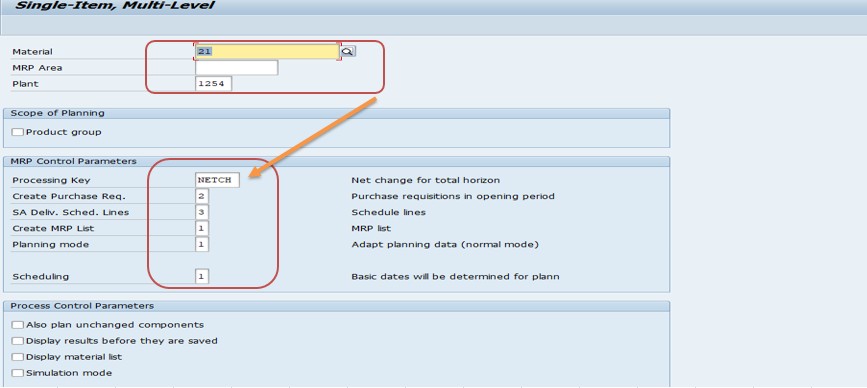
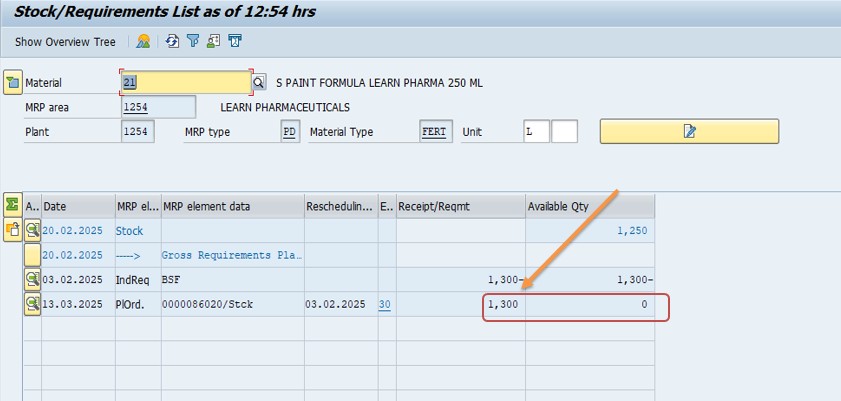
Run MD02 and check the stock and requirements list. MRP now creates a planned order for the full 1300, ignoring the existing stock of 1250.
| Test | Stock | Planned Requirement | Planned Order Created |
|---|---|---|---|
| Strategy 10 (net) | 1250 | 1300 | 50 |
| Strategy 11 (gross) | 1250 | 1300 | 1300 |
The comparison shows the practical difference in one line: strategy 10 plans the gap, strategy 11 plans the whole demand.
⚙ Strategy 30: Production by Lot Size
Strategy 30 is a make-to-stock strategy in which production is planned in lot sizes rather than being driven by individual forecasts. It uses requirement type LSF for planned independent requirements and is often chosen when the production lot size is more important than the exact demand profile, for example in processes where batches are fixed by equipment.
Note that strategy 30 is sometimes mistaken for planning without final assembly. That is strategy 50. Keeping the numbers straight matters, because choosing the wrong one changes how sales orders interact with planning.
💡 Strategy 40: Planning with Final Assembly
Strategy 40 is probably the most widely used make-to-stock strategy. Production is planned from forecasts, as in strategy 10, but real sales orders consume the planned independent requirements. In other words, when a customer order arrives, it uses up part of the forecast instead of adding to it, so total demand is not counted twice.
- Requirement types VSF and KSV: the planned requirement VSF is consumed by sales orders of type KSV.
- Consumption parameters matter: the consumption mode and the backward and forward consumption periods in the MRP 3 view decide which planned requirements a sales order can consume.
- Unconsumed forecast stays: the part of the forecast that no order consumes remains as planned demand.
- Common in mass production: it works when you can forecast quantities but also receive real orders, and want to avoid overplanning.
A simple illustration: the forecast for a month is 1000. A customer order for 300 arrives and consumes 300 of the forecast, leaving 700 planned requirement plus the 300 sales order, which still totals 1000. With strategy 10 the same order would not consume anything, so MRP would see demand of 1300.
💼 Strategies 20 and 25: Make-to-Order
Strategy 20 is make-to-order production. Production starts only after a customer order is received, and each sales order creates its own individual requirement, using requirement type KE. No planned independent requirements are used and no free stock is kept. Production is linked to the individual sales order, and the finished goods go to a sales-order-specific stock.
Strategy 25 is make-to-order for variants, using requirement type KEK. It fits products that exist in many configurations, so no planned stock can be built in advance.
These strategies suit customized products and machinery, where each order differs. The trade-off is lead time: the customer waits for the full production time, because nothing is built ahead.
🔄 Strategies 50, 60 and 70: Hybrid and Component Planning
Strategy 50: planning without final assembly. Components or assemblies are planned from forecasts, while final assembly starts only when a sales order arrives. It uses requirement type VSE, with sales order consumption. It suits configurable products such as computers or servers, where components can be stocked but the final configuration depends on the customer.
Strategy 60: planning with planning material. Production is planned using a planning material, a dummy material that represents a group of variants, and sales orders consume the planning material requirement. It uses requirement type VSEV for planning and KEVV for the customer requirement, and suits products with many variants that share common components.
Strategy 70: planning at assembly level. The assembly is planned at its own level, with requirement type VSFB, often so components can be procured through consumption-based planning or kanban. Components are then procured in line with assembly demand rather than from final product sales.
Related strategies exist, such as 52 and 63, which combine similar ideas with additional consumption or planning material rules. Check the strategy definitions in Customizing if your business needs them.
⚙ Consumption Explained: How Sales Orders Meet Forecasts
Consumption is the mechanism by which a customer order uses up planned independent requirements, so the forecast and the real demand are not added together. It only applies in strategies that define consumption, such as 40 and 50, and not in strategies 10 and 11.
| Setting | Meaning | Where Maintained |
|---|---|---|
| Consumption mode | Which direction SAP looks when searching for requirements to consume: backward, forward or both. | MM02, MRP 3 view |
| Backward consumption period | How many days before the sales order date SAP may look for planned requirements. | MM02, MRP 3 view |
| Forward consumption period | How many days after the sales order date SAP may look. | MM02, MRP 3 view |
If these parameters are left empty, a sales order can only consume a planned requirement on the same day. That surprises many consultants, because forecasts are normally entered at the start of a month while orders arrive throughout it. Setting realistic consumption periods is one of the most important steps when using strategy 40.
💡 How to Choose the Right Planning Strategy
| Business Situation | Suggested Strategy |
|---|---|
| Stable demand, forecast available, stock must be netted. | 10 |
| Production must continue at a fixed rate regardless of stock. | 11 |
| Forecast available, but real orders should consume it. | 40 |
| Everything is customer specific, no stock kept. | 20 |
| Many variants of the same product. | 25 or 60 |
| Components stocked, final assembly to order. | 50 |
| Assemblies planned separately, components on consumption basis. | 70 |
Ask three questions to narrow it down: Can I forecast? How long can the customer wait? What do I want to happen when a real order meets a forecast? The answers usually point to one or two candidate strategies, which you can then test with a few materials before rolling out.
💼 Real-World Scenario: Choosing Between Strategy 10 and 40 for a Bottled Product
Pradnya Pawar, an SAP PP consultant working with a beverage manufacturer in Pune, was asked why production of a popular bottled drink kept overshooting in the summer months. The material was planned with strategy 40, and the planners were entering a generous monthly forecast.
Anand Rathi, the head of planning, explained that orders came in throughout the month, yet MRP seemed to add them on top of the forecast. Pradnya checked the MRP 3 view and found that the consumption parameters were empty. Because of that, sales orders could only consume the forecast on their exact date, and since the forecast sat on the first day of each month, almost no order consumed anything. The result was double counting.
She set a consumption mode and backward and forward consumption periods of 30 days, so orders could use up the forecast anywhere in the month. Next, she ran a test with a single material: forecast of 1000, a sales order of 300, and MRP. The stock and requirements list showed 700 of forecast left plus the 300 order, exactly 1000. Anand's team ran MRP again for the whole product group and saw the overshoot disappear. The fix needed no new strategy, only a correct setting, which is a reminder that a strategy is only as good as its consumption parameters.
❗ Common Mistakes with Planning Strategies
- Confusing strategy 30 (production by lot size) with planning without final assembly, which is strategy 50.
- Using strategy 40 without consumption parameters, so sales orders never consume the forecast.
- Expecting sales orders to reduce forecasts under strategies 10 or 11, which do not use consumption.
- Using strategy 11 and wondering why MRP plans the full quantity despite stock on hand.
- Entering planned independent requirements in the wrong version or with the wrong requirement type.
- Changing the strategy group on a material that already has open requirements, without cleaning them up.
- Forgetting the mixed MRP indicator when using gross requirements planning at assembly level.
- Applying one strategy to every material instead of choosing by product and demand pattern.
✅ Best Practices for Planning Strategies
- Classify materials by demand pattern first, then assign strategies in groups.
- Test every new strategy with a pilot material using MD61, MD04 and MD02 before wide rollout.
- Document which strategy group each product family uses and why.
- Set consumption parameters deliberately, based on how orders actually arrive.
- Review the strategy of a material when its demand pattern changes, for example when a product moves from make-to-order to make-to-stock.
- Clear out planned independent requirements before changing a strategy group.
- Keep demand management and sales and operations planning aligned, so forecasts come from one source.
- Train planners on the difference between net and gross planning.
🔍 What Happens Behind the Scenes
When MRP runs, it reads the material's strategy group, finds the main strategy and looks up its requirement types. For planned independent requirements, the requirement type refers to a requirement class defined in Customizing, which says whether the requirement is relevant for planning and whether it is consumed. For customer requirements from sales orders, the SD requirement type and class do the same on the sales side.
MRP then builds the demand picture. Under strategy 10 it takes the planned independent requirements, the sales orders as separate demand against stock, and the available stock and receipts, and calculates net shortages. Under strategy 40 it additionally applies consumption, reducing planned requirements by the sales orders that fall within the consumption window.
The result is shown in the stock and requirements list, where each element has its own MRP element type, such as independent requirement, sales order or planned order. Reading this list carefully is the best way to understand what a strategy is doing.
🔧 Troubleshooting Common Planning Strategy Issues
MRP creates no planned order
Check that the material has an MRP type that allows planning, that the planned independent requirement exists in the active version, and that the strategy group is maintained in MRP 3.
MRP plans too much
Look for double counting. Under strategy 40, check the consumption parameters. Under strategy 11, remember that stock is not netted against planned requirements.
Sales orders do not consume the forecast
Check the strategy actually supports consumption, and that the consumption mode and periods in the material master are set. Compare the dates of the order and the planned requirement.
"Strategy group not defined" or similar error
The strategy group entered does not exist or is not valid for the plant. Check Customizing for the groups available.
Planned requirement is missing in MD04
It may be in an inactive version. Only active versions are planned by MRP, so make sure the requirement is entered in the active version.
Changing the strategy group has no effect
Existing requirements keep the requirement type they were created with. Delete or recreate them after changing the strategy group.
🏢 How Different Industries Use Planning Strategies
- Consumer goods: strategy 10 or 40 for stocked products, with consumption tuned to monthly order patterns.
- Machinery and equipment: strategy 20 for customized machines, and 50 for modular products with stocked components.
- Electronics and IT hardware: strategy 50 or 60, with components planned ahead and final configuration on order.
- Automotive suppliers: strategy 40 and 70, with kanban or consumption-based components.
- Process industries: strategy 10 or 30 for bulk products, depending on how batches are set.
The right strategy follows the demand pattern and the customer's tolerance for lead time, not the industry label.
📋 Planning Strategy Rollout Checklist
- Group materials by demand pattern and lead time tolerance.
- Choose a candidate strategy for each group.
- Confirm the strategy group exists in Customizing.
- Assign the strategy group in the MRP 3 view of the pilot material.
- Set consumption mode and periods if the strategy uses consumption.
- Create planned independent requirements with MD61 in the active version.
- Check the result in MD04 and run MRP with MD02.
- Compare the planned orders with expectations and adjust.
- Roll out to the full group and document the decision.
📊 KPIs That Show Whether the Strategy Fits
- Forecast accuracy: how close planned requirements are to actual demand.
- Service level: how often orders are delivered from stock or on time.
- Stock turns: whether the strategy ties up too much inventory.
- Plan stability: how many planned order changes MRP produces each run.
- Order lead time: especially important for make-to-order strategies.
If forecast accuracy is poor, a strategy that relies on forecasts, such as 10 or 40, will struggle. That is often the signal to move a product to a more order-driven strategy.
📱 Planning Strategies in SAP S/4HANA
The standard planning strategies, including 10, 11, 20, 30, 40, 50, 60 and 70, continue to exist in SAP S/4HANA, and the logic of requirement types, consumption and strategy groups is unchanged. What changes is mainly the planning engine and the user experience. MRP runs on the new, faster implementation, and Fiori apps help planners monitor shortages and exceptions.
If you are migrating, check whether any custom strategies or requirement types need review, and run a before and after comparison of planned orders for a sample of materials. A planning strategy that gave the right result in ECC should give the same result in S/4HANA, but testing is the only way to be sure.
📋 Related SAP Transactions
| Transaction | Purpose |
|---|---|
| MM02 | Change a material, including the MRP 3 view and strategy group. |
| MD61 / MD62 / MD63 | Create, change and display planned independent requirements. |
| MD04 | Stock and requirements list. |
| MD02 | MRP run for a single item with multi-level planning. |
| MD01 | MRP run for a plant. |
| OMPO | Define requirement classes. |
🎓 Interview-Style Questions and Answers
Q: What is the difference between strategy 10 and 11?
Strategy 10 nets stock against planned requirements. Strategy 11 plans them gross, without netting stock.
Q: What is strategy 40?
Planning with final assembly, where sales orders consume planned independent requirements.
Q: What is strategy 30?
Production by lot size, a make-to-stock strategy using requirement type LSF.
Q: Which strategy is pure make-to-order?
Strategy 20, with requirement type KE.
Q: Where is the strategy assigned?
In the MRP 3 view of the material master, via the strategy group.
Q: What decides whether a sales order consumes a forecast?
The strategy, plus the consumption mode and backward and forward consumption periods in the material master.
📚 Quick Glossary
- Planning strategy: A set of rules that defines how a material is planned.
- Strategy group: A grouping of a main strategy and alternatives, assigned in MRP 3.
- Requirement type: A code that links a requirement to a requirement class and its control parameters.
- PIR: Planned independent requirement, a forecast or planned demand quantity.
- Consumption: The reduction of planned requirements by real sales orders.
- MTS / MTO: Make-to-stock and make-to-order.
- Net / gross planning: Planning with or without netting available stock.
📝 Governance for Planning Strategies
Because a strategy shapes every MRP run, treat changes with care. Keep a register that lists each product family, the strategy group it uses, the reason, the consumption settings and the owner. When a planner asks why a product behaves differently from another, the register answers immediately.
Review it at least once a year, and whenever demand patterns change. A product that was once made to order may now sell steadily and deserve a make-to-stock strategy. The earlier you notice, the less stock and lead time you waste.
🎯 Conclusion
Planning strategies are the rules that turn demand into production. Strategy 10 plans what is missing, strategy 11 plans everything, strategy 40 lets real orders use up the forecast, strategy 20 builds only to order, and strategies 50, 60 and 70 mix stocked components with orders at the end. Assign the strategy group in the MRP 3 view, set the consumption parameters carefully, and always test with a pilot material using MD61, MD04 and MD02. Keep this guide handy the next time you need to decide how a product should be planned.