Maintain Source List with Validity Period at Plant Level in SAP – OME5 Guide
A source list is what keeps procurement pointed at approved vendors instead of leaving vendor selection to chance. This guide covers the full OME5 configuration path, how source list relates to info records and quota arrangements, and the mistakes that cause the most procurement friction later.
⚠ What is a Source List in SAP MM?
A source list is a record that specifies which vendors are approved to supply a particular material to a particular plant, during a defined validity period. Rather than leaving vendor selection open to whoever happens to be creating a purchase requisition or purchase order, a source list constrains procurement to a pre-approved set of suppliers — supporting quality control, negotiated pricing compliance, and supply chain governance.
Source lists become especially valuable once "Source List Requirement" is activated at the plant level (via OME5, this guide) — at that point, SAP can be configured to actively enforce that a valid source list entry exists before allowing procurement documents to be created for a given material and plant, rather than relying purely on user discipline to select the right vendor.
✅ Step-by-Step: Activating Source List Requirement at Plant Level Using OME5
Navigate to the Configuration Path
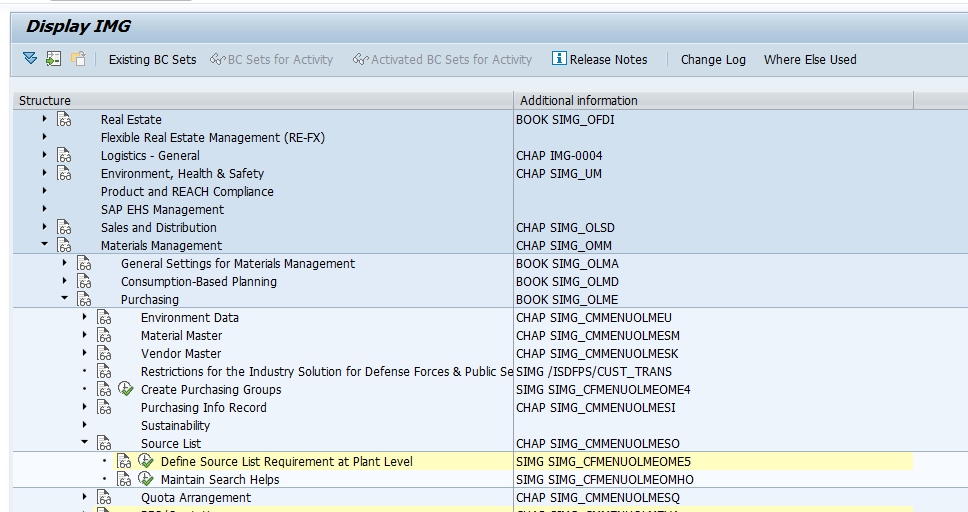
Go to SPRO > Materials Management > Purchasing > Master Data > Source List > Define Source List Requirement at Plant Level, or execute transaction OME5 directly.
Select the Plant and Tick Source List
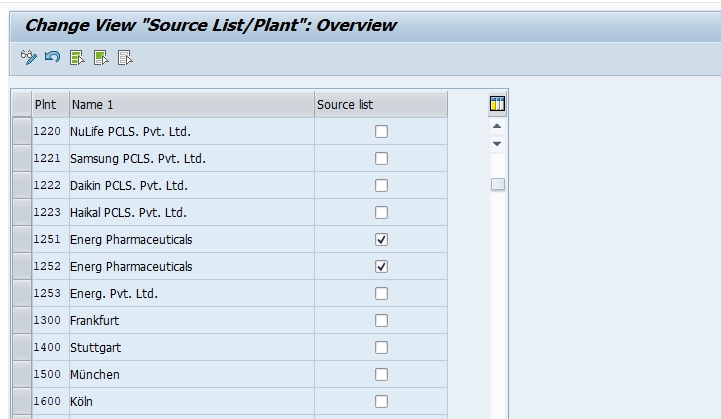
Select the relevant plants — for example, plant 1251 and plant 1252 — and tick the Source List indicator for each. This tells SAP that materials procured at these plants should be governed by source list entries.
Save and Assign to a Transport Request
Click Save. Since this is a configuration (customizing) change, SAP will prompt you to assign it to a transport request so the source list requirement moves correctly from development through quality assurance and into production.
📋 Key Fields in an Individual Source List Entry
Activating the plant-level requirement via OME5 is only the first step — individual source list entries (maintained via transaction ME01) are where the real vendor governance happens. Each entry includes:
| Field | Purpose |
|---|---|
| Validity Period (Valid From/To) | The date range during which this vendor is approved to supply the material |
| Vendor | The approved supplier for this material and plant combination |
| Fixed Source of Supply | An indicator marking this vendor as the default source, automatically proposed during requisition or scheduling agreement release |
| MRP Relevant Indicator | Controls whether this source list entry is considered during automatic requisition generation from a planning run |
| Blocked Indicator | Marks a vendor as blocked for this material/plant, preventing it from being selected even though a source list entry technically exists |
A material at a source-list-active plant can have multiple source list entries — for example, a primary approved vendor and a backup vendor with overlapping validity periods — with the fixed source indicator determining which one SAP defaults to automatically.
📋 Source List vs Purchasing Info Record vs Quota Arrangement
This is one of the most common points of confusion in SAP procurement master data, since all three concepts relate to "which vendor supplies this material," but each answers a different question.
| Concept | Transaction | Answers |
|---|---|---|
| Purchasing Info Record | ME11 | "What price, lead time, and terms does this vendor offer for this material?" |
| Source List | ME01 (entries), OME5 (plant activation) | "Which vendors are approved to supply this material to this plant, and during what period?" |
| Quota Arrangement | MEQ1 | "How should procurement volume be automatically split across multiple approved vendors?" |
A practical way to remember the relationship: info records hold the commercial terms, source lists control which of those vendor relationships are actually valid and approved right now, and quota arrangements go a step further by automatically distributing volume across several approved sources rather than relying on a single fixed vendor.
🔄 Generating Source Lists Automatically
Rather than creating every source list entry manually via ME01, SAP supports generating source list entries automatically from existing purchasing info records or outline agreements (contracts and scheduling agreements), using transaction ME05 or the "source list generation" function available directly from the info record or agreement itself. This is especially useful when rolling out source list requirements across an existing vendor base that already has extensive info record and contract history — automatic generation saves substantial manual data entry compared to recreating every vendor relationship as a fresh source list entry by hand.
It's still worth reviewing auto-generated source list entries before relying on them fully, since automatic generation typically carries over the info record or agreement's validity period without additional business judgment about whether that vendor should genuinely remain the approved (or fixed) source going forward.
💼 Real-World Scenario: Enforcing Source List at Arjun Industries
When Arjun Industries expanded into personal care products, Vikram Nair activated the source list requirement (via OME5) for the new plant handling this product line, since the business had specifically negotiated quality-certified vendors for personal care ingredients and wanted to prevent buyers from sourcing ad hoc from uncertified suppliers, even under time pressure. He generated initial source list entries automatically from existing info records for the certified vendors, then manually reviewed and marked the primary certified supplier as the fixed source for each key raw material.
A few weeks after go-live, Suresh Mehta's procurement team attempted to create a purchase requisition against an uncertified vendor for one of these materials and were blocked, since no valid source list entry existed for that vendor-material-plant combination. This was exactly the intended control working as designed — the buyer had to escalate and get the intended certified vendor's info record and source list entry properly set up before procurement could proceed, rather than accidentally sourcing from an unapproved, uncertified supplier under deadline pressure.
❌ Common Mistakes in Source List Configuration
Activating source list requirement before entries exist
Activating OME5 for a plant before source list entries (ME01) are created for its materials blocks legitimate procurement entirely, since no approved vendor exists yet from the system's perspective.
Letting validity periods lapse unnoticed
A source list entry with an expired validity period stops being usable, which can unexpectedly block procurement for a material that's still actively needed — a periodic review of expiring entries prevents this.
Marking multiple vendors as fixed source simultaneously
Only one vendor should be marked as the fixed source per material/plant/period combination; conflicting fixed source markings create ambiguity in automatic vendor defaulting.
Confusing source list with quota arrangement
Expecting source list alone to automatically split volume across vendors — that's the job of quota arrangement (MEQ1), not source list, which only governs approval and defaulting.
🔍 Common Errors Related to Source List
- "No source list entry for material X" — the source list requirement is active for the plant, but no valid, unblocked source list entry exists for the material and vendor combination being attempted
- "Source list entry expired" — the validity period on the relevant source list entry has passed; check and extend it via ME01 if the vendor relationship should continue
- Automatic requisition generation from MRP not proposing expected vendor — check whether the MRP relevant indicator is set correctly on the intended source list entry
- Purchase order created against an unexpected vendor — check which vendor is marked as the fixed source of supply in the relevant source list entry
📚 Relevant Tables and Related Transactions
| Table / Transaction | Purpose |
|---|---|
| EORD | Source List for Material — stores individual source list entries |
| ME01 | Maintain individual source list entries |
| ME03 | Display source list entries |
| ME04 | Change source list entries |
| ME05 | Generate source list entries automatically from info records/agreements |
| EINA / EINE | Purchasing Info Record general and purchasing organization data |
| MEQ1 | Maintain quota arrangement |
💬 Common SAP MM Interview Questions on Source List
What transaction activates the source list requirement at plant level?
OME5, found under SPRO > Materials Management > Purchasing > Master Data > Source List > Define Source List Requirement at Plant Level.
What is the difference between a source list and a purchasing info record?
An info record stores vendor-specific pricing and terms; a source list determines which of those vendor relationships are currently approved and valid for a specific plant.
What does the fixed source of supply indicator do?
It marks a vendor as the default source SAP automatically proposes during requisition or scheduling agreement release, reducing manual vendor selection.
How can source list entries be generated automatically?
Via transaction ME05 or the source list generation function on an info record or outline agreement, saving manual data entry when rolling out source list requirements across an existing vendor base.
Which table stores source list data?
Table EORD (Source List for Material), including material, plant, vendor, validity period, and fixed source indicator.
🔄 Source List and MRP: Automatic Requisition Vendor Assignment
Source list configuration has a direct, practical payoff once MRP is activated for a plant: when a planning run generates a purchase requisition for an externally procured material, SAP checks the source list (specifically the MRP relevant indicator on the relevant entry) to determine whether a vendor can be automatically assigned to that requisition, or whether it needs to be released without a vendor for a buyer to select manually.
This is one of the more overlooked but valuable reasons to invest properly in source list maintenance: a well-maintained source list with correctly flagged fixed sources and MRP-relevant entries lets routine, recurring procurement flow through planning runs with minimal manual intervention, freeing buyers to focus their attention on exceptions, new sourcing decisions, and higher-value negotiation work rather than manually selecting a vendor on every single requisition a planning run generates.
🚫 Using the Blocked Indicator to Manage Vendor Relationships Over Time
The blocked indicator on a source list entry is a genuinely useful tool for managing vendor relationships through their full lifecycle, beyond simply approving or not approving a vendor. Rather than deleting a source list entry outright when a vendor relationship needs to be paused — for example, during a quality investigation, a temporary supply disruption, or a contract renegotiation — marking the entry as blocked preserves the historical record while immediately preventing new procurement against that vendor for the material in question.
This is a meaningfully different action than letting a validity period simply expire, since a blocked entry sends a clear, deliberate signal (visible to anyone reviewing source list data) that the vendor was intentionally suspended rather than the relationship having lapsed by oversight. Organizations dealing with vendor quality issues or supply chain risk management find this distinction valuable during audits and vendor performance reviews, where the reason a vendor stopped being used matters as much as the fact that it stopped.
🏢 Managing Source Lists Across Multiple Plants
For organizations with several plants, it's worth deciding deliberately whether source list entries should be maintained independently per plant or coordinated centrally. A vendor approved for one plant isn't automatically approved for another — each plant needs its own source list entry, even for the exact same material and vendor combination, since source list is fundamentally a plant-specific record (reflected directly in the OME5 activation being per-plant, as covered in the step-by-step section above).
For multi-plant organizations sourcing centrally through a shared or reference purchasing organization structure, it's worth establishing a coordinated process — likely owned by a central procurement/master data team — for propagating a newly approved vendor's source list entries across every plant that should have access to them, rather than leaving each plant's buyers to independently create and maintain source list entries with no visibility into what other plants have already approved. This coordination becomes especially valuable when a business-critical vendor relationship needs to be blocked group-wide quickly, such as following a quality or compliance issue discovered at one site that has implications for the vendor relationship everywhere else too.
🔐 SAP S/4HANA and Source List
Source list configuration and the underlying OME5/ME01 transactions remain fundamentally unchanged in S/4HANA. What has evolved is the surrounding sourcing experience for organizations using S/4HANA's more advanced procurement capabilities — for example, Central Procurement scenarios that coordinate sourcing across multiple connected SAP systems, or integration with SAP Ariba for broader supplier management, both of which can interact with or feed into source list data rather than replacing the underlying concept covered in this guide.
Organizations moving to S/4HANA with an existing, sprawling source list structure sometimes use the migration as an opportunity to clean up stale, expired, or duplicate source list entries that accumulated over years of on-premise operation, rather than migrating that accumulated clutter forward unchanged into the new environment.
💬 A Few More Interview Questions on Source List
How does source list interact with MRP-generated purchase requisitions?
SAP checks the MRP relevant indicator on the source list entry to determine whether a vendor can be automatically assigned to a planning-run-generated requisition, or whether it needs manual vendor selection.
What's the difference between letting a source list entry expire and marking it blocked?
Expiry happens passively when the validity period lapses; blocking is a deliberate action signaling an intentional suspension (e.g. due to a quality issue), preserving a clearer historical record for audits and vendor reviews.
Is a source list entry shared across multiple plants automatically?
No. Source list is plant-specific; a vendor approved for one plant needs a separate source list entry to be approved for another plant, even for the same material.
✅ Pre-Go-Live Checklist for Source List Configuration
- Confirm relevant vendors already have purchasing info records (ME11) before creating source list entries against them
- Consider automatic source list generation (ME05) from existing info records/agreements to reduce manual data entry during rollout
- Mark exactly one vendor as fixed source per material/plant/period combination to avoid ambiguity
- Only activate OME5 plant-level source list requirement after source list entries already exist for critical materials, to avoid blocking legitimate procurement
- Set the MRP relevant indicator correctly on entries needed for automatic vendor assignment from planning runs
- Establish a periodic review process for expiring source list entries before they lapse unexpectedly
- For multi-plant organizations, coordinate a central process for propagating newly approved vendors across relevant plants
🏆 Conclusion
Source list configuration via OME5, paired with individual entries maintained through ME01, is what turns "which vendor should supply this material" from an ad hoc, buyer-by-buyer decision into a governed, auditable procurement control. In summary: activate the plant-level requirement only after source list entries exist for critical materials, keep validity periods and fixed source assignments current, understand how source list differs from purchasing info records and quota arrangements, and coordinate source list maintenance centrally across multiple plants where vendor relationships genuinely span more than one site.
For related procurement configuration, see our guides on defining purchase organization (OX08) and vendor account group configuration (OBD3), both of which work alongside source list as part of a well-governed procurement master data setup.
📊 Reporting and Auditing Source List Data
Source list data is a natural anchor for procurement governance reporting, since it directly answers "who is currently approved to supply what, and where." Custom reports built on table EORD, joined with EINA/EINE (info records) and LFA1 (vendor master), can quickly surface materials with no valid source list entry at all (a gap worth catching before it blocks a legitimate purchase requisition), entries approaching expiry, or materials with conflicting fixed source markings across overlapping validity periods.
This kind of report is particularly valuable ahead of a scheduled internal or external audit focused on procurement controls, since auditors frequently want evidence that vendor approval and material sourcing decisions are governed systematically rather than left to informal, undocumented buyer judgment — a clean, well-maintained source list structure is exactly the kind of evidence that satisfies this expectation efficiently.
🎓 Onboarding Tip: Teaching New Buyers About Source List Controls
A practical onboarding point worth emphasizing for new procurement staff: being blocked from creating a purchase order due to a missing source list entry isn't a system error to work around — it's the control working as intended, and the correct response is to route the situation to whoever owns vendor approval and source list maintenance, not to look for a workaround transaction that bypasses the check. Framing this clearly during onboarding, alongside a quick reference on how to request a new source list entry for a legitimately needed vendor, reduces both frustration and the temptation to find informal workarounds that undermine the very governance the source list requirement was activated to provide.
🔒 Authorization Considerations for Source List Maintenance
Organizations that treat source list as a genuine procurement governance control — rather than a purely administrative setting — often restrict who can create or change source list entries, using standard purchasing authorization objects (such as M_ESLL_BSA or general purchasing master data authorization scoped by purchasing organization) to ensure that only designated master data or procurement governance staff can approve a new vendor for a material, rather than leaving it open to any buyer who wants to add a supplier on the fly.
This is a particularly important control for regulated industries or businesses with strict vendor qualification requirements — pharmaceuticals, food and beverage, aerospace — where an unapproved vendor supplying a critical material isn't just a commercial risk but potentially a compliance or safety issue. Pairing tight source list maintenance authorization with a clear approval workflow for adding new vendors closes the loop between source list's technical enforcement and the actual business process it's meant to support.