Using Emojis in HTML Tags: How to Add, Display, and Optimize Emojis on Your Website
By Pramod Behera · Updated: September 14, 2026 · 20 min read
HTML TUTORIALS-
-Using Emojis in HTML Tag –
Introduction-
- Step-by-Step Guide to Using Emojis in HTML Tags
- Why Use Emojis on Modern Websites?
- UTF-8: The One Prerequisite
- Example 1: Insert Emoji Directly in HTML
- Example 2: Emojis in HTML (Reference Table)
- Example 3: Emojis Inside Headings, Buttons & Links
- Example 4: Emoji Faces (Smileys)
- Example 5: HTML Emoji People Symbols
- Example 6: HTML Emoji Animal Symbols
- Decimal vs Hexadecimal Emoji Codes
- Compound (ZWJ) Emojis: Why Some Have No HTML Code
- Sizing and Styling Emojis With CSS
- Emoji Accessibility Best Practices
- Cross-Platform Rendering Differences
- Emojis, SEO, and User Engagement
- Common Mistakes to Avoid
- Emoji Best Practices Checklist
- Try It Yourself – Live Code Preview
- Practice Exercises
- Frequently Asked Questions
Step-by-Step Guide to Using Emojis in HTML Tags for Modern Websites | How to Add Emojis to Your Web Pages Easily
🔷Simple HTML table showing different emoji examples along with their descriptions and HTML usage. This can help you understand how to incorporate emojis into your HTML content...
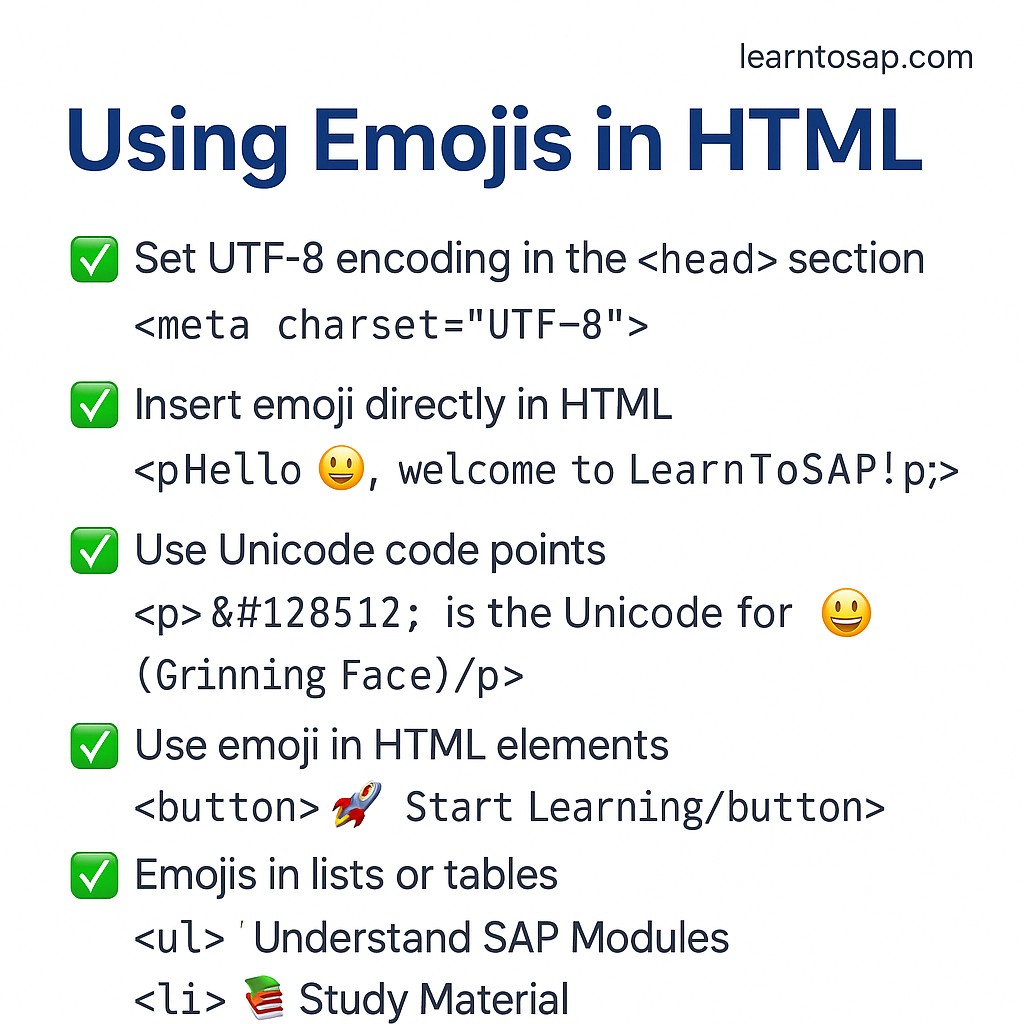

Why Use Emojis on Modern Websites?
Emojis have moved well beyond casual chat messages into mainstream web design, marketing copy, and everyday documentation. A well-placed emoji can draw the eye to a call-to-action button, add a friendly tone to a heading, or make a feature list easier to scan at a glance. Because emojis are genuine Unicode text characters rather than image files, they cost almost nothing in page weight, scale cleanly at any font size, and require no special library or plugin to display — the browser's operating system already ships with an emoji font capable of rendering them.
UTF-8: The One Prerequisite
Before any emoji will render correctly, the page needs to declare UTF-8 character encoding, which is what allows the browser to correctly interpret the multi-byte sequence that makes up an emoji character.
<meta charset="UTF-8">This single line, placed inside <head>, is the same charset declaration covered in this series' HTML head element tutorial, and it is the one dependency every technique on this page relies on.
✅Example 1: Insert Emoji Directly in HTML:-
<p>Hello 😊, welcome to LearnToSAP!</p><p>😀 is the Unicode for 😀 (Grinning Face)</p>Hello 😊, welcome to LearnToSAP!
😀 is the Unicode for 😀 (Grinning Face)
The simplest method of all is pasting the emoji character straight into your HTML source, exactly as you would type any other letter. As long as the file is saved with UTF-8 encoding, the browser displays it exactly as it appears in your code editor, with zero extra markup required.
✅ Example 2: Emojis in HTML:-
<table>
<tr>
<th>Emoji</th>
<th>Description</th>
<th>HTML Code</th>
</tr>
<tr>
<td>😀</td>
<td>Grinning Face</td>
<td>&#128512;</td>
</tr>
<tr>
<td>🚀</td>
<td>Rocket</td>
<td>&#128640;</td>
</tr>
<tr>
<td>❤️</td>
<td>Red Heart</td>
<td>&#10084;</td>
</tr>
<tr>
<td>📚</td>
<td>Books</td>
<td>&#128218;</td>
</tr>
<tr>
<td>🌍</td>
<td>Earth Globe Europe-Africa</td>
<td>&#127757;</td>
</tr>
<tr>
<td>💡</td>
<td>Light Bulb</td>
<td>&#128161;</td>
</tr>
<tr>
<td>🎉</td>
<td>Party Popper</td>
<td>&#127881;</td>
</tr>
</table>| Emoji | Description | HTML Code |
|---|---|---|
| 😀 | Grinning Face | 😀 |
| 🚀 | Rocket | 🚀 |
| ❤️ | Red Heart | ❤ |
| 📚 | Books | 📚 |
| 🌍 | Earth Globe Europe-Africa | 🌍 |
| 💡 | Light Bulb | 💡 |
| 🎉 | Party Popper | 🎉 |
✅ Example 3: Responsive Image:-👇
<h1>📚 SAP Tutorials</h1>
<button>🚀 Start Learning</button>
<a href="#">👉 Go to Dashboard</a>
📚 SAP Tutorials
👉 Go to DashboardDespite the heading label, this example is really about placing emojis inside interactive elements rather than a responsive image — a heading, a button, and a link all accept an emoji exactly like any other character, letting you add a visual accent to navigation and calls-to-action without touching a single image file or icon library.
✅ Example 4: Emoji Faces (Smileys):-👇
| Emoji | Description | Unicode Code |
|---|---|---|
| 😀 | Grinning Face | U+1F600 |
| 😁 | Beaming Face with Smiling Eyes | U+1F601 |
| 😂 | Face with Tears of Joy | U+1F602 |
| 😃 | Grinning Face with Big Eyes | U+1F603 |
| 😄 | Grinning Face with Smiling Eyes | U+1F604 |
| 😅 | Smiling Face with Sweat | U+1F605 |
| 😆 | Grinning Squinting Face | U+1F606 |
| 😉 | Winking Face | U+1F609 |
| 😊 | Smiling Face with Smiling Eyes | U+1F60A |
| 😋 | Face Savoring Food | U+1F60B |
| 😎 | Smiling Face with Sunglasses | U+1F60E |
✅ Example 5: HTML Emoji: People Symbols Table:-👇
| Emoji | Description | Unicode | HTML Code |
|---|---|---|---|
| 👨 | Man | U+1F468 | 👨 |
| 👩 | Woman | U+1F469 | 👩 |
| 👶 | Baby | U+1F476 | 👶 |
| 🧒 | Child | U+1F9D2 | 🧒 |
| 👴 | Older Man | U+1F474 | 👴 |
| 👵 | Older Woman | U+1F475 | 👵 |
| 🧑💻 | Technologist | U+1F9D1 U+200D U+1F4BB | N/A (use emoji directly) |
| 👨🏫 | Male Teacher | U+1F468 U+200D U+1F3EB | N/A (use emoji directly) |
| 👩🎓 | Female Student | U+1F469 U+200D U+1F393 | N/A (use emoji directly) |
| 🧕 | Woman with Headscarf | U+1F9D5 | 🧕 |
✅ Example 6: HTML Emoji: Animals Symbols Table:-👇
| Emoji | Description | Unicode | HTML Code |
|---|---|---|---|
| 🐶 | Dog Face | U+1F436 | 🐶 |
| 🐱 | Cat Face | U+1F431 | 🐱 |
| 🐭 | Mouse Face | U+1F42D | 🐭 |
| 🐰 | Rabbit Face | U+1F430 | 🐰 |
| 🦊 | Fox Face | U+1F98A | 🦊 |
| 🐻 | Bear Face | U+1F43B | 🐻 |
| 🐼 | Panda Face | U+1F43C | 🐼 |
| 🦁 | Lion Face | U+1F981 | 🦁 |
| 🐮 | Cow Face | U+1F42E | 🐮 |
| 🐷 | Pig Face | U+1F437 | 🐷 |
| 🐔 | Chicken | U+1F414 | 🐔 |
| 🐸 | Frog Face | U+1F438 | 🐸 |
| 🐵 | Monkey Face | U+1F435 | 🐵 |
| 🐙 | Octopus | U+1F419 | 🐙 |
| 🐢 | Turtle | U+1F422 | 🐢 |
Decimal vs Hexadecimal Emoji Codes
Every HTML code shown in the tables above uses the decimal entity format, but a hexadecimal equivalent works identically in every modern browser.
| Format | Pattern | Example |
|---|---|---|
| Decimal | Starts with &#, ends with ; | 😀 |
| Hexadecimal | Starts with &#x, ends with ; | 😀 |
Both produce exactly the same 😀 Grinning Face emoji. Hexadecimal codes are generally preferred in technical documentation since Unicode's own official code point references, like U+1F600 shown throughout the tables above, are already written in hex, making the two easy to cross-reference.
Compound (ZWJ) Emojis: Why Some Have No HTML Code
Notice in Example 5 that "Technologist," "Male Teacher," and "Female Student" list N/A (use emoji directly) instead of a simple HTML code. These are compound emojis built by joining two or more separate Unicode characters with an invisible "Zero Width Joiner" (ZWJ, U+200D) so the browser fuses them into a single combined glyph — the Technologist row, for example, joins the "person" character, a ZWJ, and the "laptop" character. Because a compound emoji is really a short sequence of characters rather than one single code point, there's no single decimal or hex entity to write; the practical approach is simply to copy and paste the finished emoji character straight into your markup, exactly as Example 1 demonstrates.
Sizing and Styling Emojis With CSS
Because an emoji is ordinary text, standard CSS text properties apply to it exactly as they would to any letter.
.big-emoji {
  font-size: 2.5rem;
}
Increasing font-size on a <span> wrapping an emoji scales it up cleanly with no pixelation, unlike a raster image icon, since the browser is simply rendering a larger glyph from the system emoji font rather than stretching a fixed-resolution picture.
Emoji Accessibility Best Practices
Emojis carry a built-in Unicode description, but that description does not always match how a designer intends the emoji to be read, and screen reader behavior varies by platform.
- For a purely decorative emoji that adds tone but no essential information, hide it from assistive technology with aria-hidden="true" so it isn't announced at all.
- For an emoji that stands in for meaning, such as a checkmark replacing the word "done," pair it with a clear aria-label so screen readers announce something accurate rather than a generic Unicode name.
- Never use an emoji as the sole way to convey critical information; always back it up with visible text.
- Keep emoji use sparing within any single block of content, since a widely cited accessibility guideline suggests no more than a few emoji per post or paragraph.
<span aria-hidden="true">🎉</span> Congratulations, you're done!
<span role="img" aria-label="check mark">✅</span> Task completeCross-Platform Rendering Differences
The same Unicode code point can look meaningfully different depending on the operating system rendering it, since each platform ships its own emoji artwork rather than sharing a single universal image.
| Platform | Emoji Font Source |
|---|---|
| Windows | Segoe UI Emoji |
| macOS / iOS | Apple Color Emoji |
| Android | Noto Color Emoji |
This means an emoji that looks perfectly clear on your own development machine may render with a subtly different color, expression, or style for a visitor on a different device, so it's worth testing key emojis across a couple of platforms before relying heavily on their exact appearance.
Emojis, SEO, and User Engagement
Google has supported emoji characters directly inside page titles and meta descriptions in search results for years, and a well-chosen emoji, such as a checkmark or an arrow, can help a listing stand out visually in a crowded results page. Used thoughtfully inside body content, emojis can also improve scannability by visually breaking up sections and drawing attention to key points, such as the "📚 SAP Tutorials" heading or "🚀 Start Learning" button shown in Example 3, without adding extra images or page weight. Overdoing it has the opposite effect, so click-through gains from emojis in SEO contexts should always be tested rather than assumed, as noted in the FAQ below.
Common Mistakes to Avoid
❌ Mistake 1 – Forgetting UTF-8 encoding
Without <meta charset="UTF-8">, emojis can render as garbled characters or question marks.
❌ Mistake 2 – Using an emoji as the only carrier of meaning
Screen readers and some users may not interpret the intended message; always back it up with text.
❌ Mistake 3 – Overusing emojis in a single block
Excessive emoji use clutters content and can hurt both readability and accessibility.
❌ Mistake 4 – Assuming identical rendering everywhere
The same emoji can look different across Windows, macOS, iOS, and Android.
❌ Mistake 5 – Expecting a simple HTML code for compound emojis
As Example 5 shows, ZWJ-joined emojis like Technologist have no single decimal or hex entity; paste the character directly instead.
Emoji Best Practices Checklist
✔️ 1) Always declare UTF-8 first
This is the one prerequisite every emoji technique on this page depends on.
✔️ 2) Choose direct paste for readability
Reserve numeric entities for documentation or ASCII-only code contexts.
✔️ 3) Style emojis like text
Use font-size, not fixed pixel dimensions, to scale them cleanly.
✔️ 4) Hide purely decorative emojis from screen readers
Use aria-hidden="true" when the emoji adds tone, not meaning.
✔️ 5) Label meaningful emojis accurately
Use role="img" and aria-label when an emoji conveys real information.
✔️ 6) Use emojis sparingly and intentionally
A handful per section, as in Example 3's heading and button, reads as polish; a wall of emoji reads as clutter.
Try It Yourself (Copy This Code and Paste. See how it works)
Live Code Preview
Practice Exercises: Test HTML Emojis
- Write a welcome sentence using a directly pasted emoji, then rewrite it using its decimal HTML code, like Example 1.
- Look up the hexadecimal Unicode code point for your favorite emoji and add it to a page using the hex entity format.
- Rebuild Example 3's heading, button, and link combination with three emojis of your own choosing.
- Find a compound (ZWJ) emoji, such as a family or profession emoji, and try to explain why it has no simple decimal HTML code.
- Add a decorative emoji next to a heading and hide it from screen readers with aria-hidden, then add a meaningful status emoji with a proper aria-label.
Frequently Asked Questions About Using Emojis in HTML
How do I add emojis in HTML?
You can add emojis by copying and pasting them or using Unicode values in HTML.
Why are emojis not showing in HTML?
Make sure your page uses UTF-8 encoding and your browser supports emojis.
Can emojis improve SEO?
Emojis can improve click-through rates if used properly, but should not be overused.
What encoding is required for emojis?
UTF-8 encoding is required to display emojis correctly in HTML.
What is the difference between an emoji and its Unicode entity code?
An emoji pasted directly is the literal character, while a Unicode entity code like 😀 is a numeric reference the browser converts into that same character at render time. Both display identically once UTF-8 is set.
Can I use emojis inside buttons, links, and headings?
Yes. Since emojis are ordinary text characters, they can be placed inside any element that accepts text content, including h1, button, and a tags, exactly like a normal letter or word.