Account Determination for Entry LNER EKG Not Possible
This error occurs when the system cannot find a GL account for the EKG transaction key during the posting of costs related to price differences (price variance) in purchasing or inventory management, for chart of accounts LNER. Follow the steps below to resolve it using FS00 and OMWB. This guide also explains what the EKG transaction key does, walks through a real business scenario, lists related transactions, and gives you a prevention checklist.
🔍 Understanding This Error in Detail
"Account determination for entry LNER EKG not possible" in SAP occurs when the system cannot find a GL account for the EKG transaction key during the posting of costs related to price differences (price variance) in purchasing or inventory management. This typically happens in scenarios involving material price changes or discrepancies between planned and actual costs -for example, when a goods receipt posts at a different price than what the material's standard cost expected, and SAP needs somewhere to post that variance.
Like the closely related BSX and WRX account determination errors covered elsewhere on this site, this is a configuration gap rather than a transaction data problem -the specific chart of accounts (LNER) has simply never had a GL account mapped under the EKG key for the valuation class involved in this posting.
📦 What Is the EKG Transaction Key, and When Does It Fire?
EKG is the transaction/event key used for Price Differences in Inventory Management, using an Expense Account for price differences. It comes into play specifically when a goods movement's actual price does not match what the material's valuation expected, and SAP needs to record that difference somewhere other than the inventory account itself.
| Scenario | Why EKG Fires |
|---|---|
| Standard-price material with a purchase price above/below standard | The variance between PO price and standard cost cannot be absorbed into inventory value, so it posts as a price difference via EKG |
| Goods receipt after inventory has already been fully consumed | No remaining stock value exists to adjust, so the variance posts as a price difference instead |
| Invoice price differs from goods receipt price beyond available stock coverage | The excess variance beyond what remaining stock can absorb routes through EKG |
In each of these cases, EKG is doing its job correctly by design -the issue in this error is simply that nobody has told SAP which GL account should receive that price difference posting for this specific chart of accounts and valuation class combination.
⚠ The Error
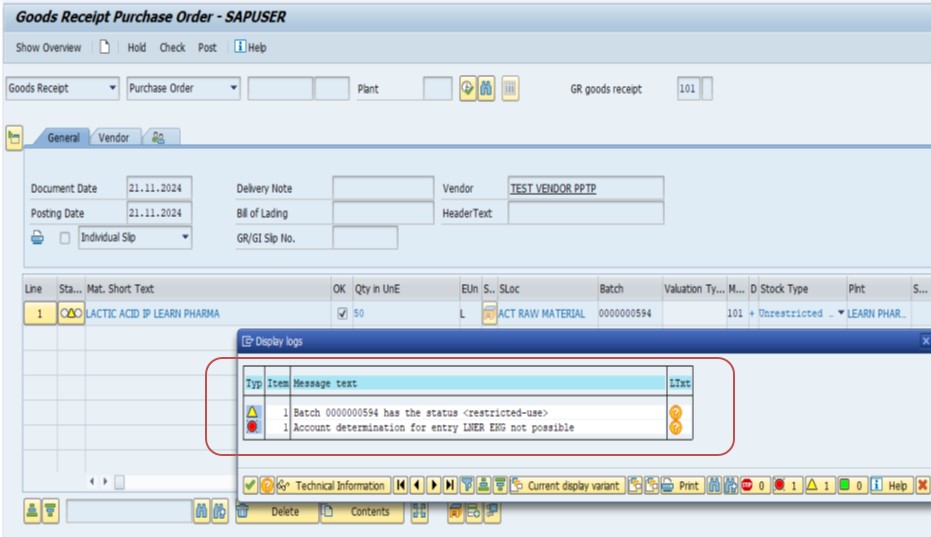
✅ Follow Steps - Solution
Solution - TCode: First check GL code created or not - FS00
Create GL - Purchase Offsetting A/C - 360060
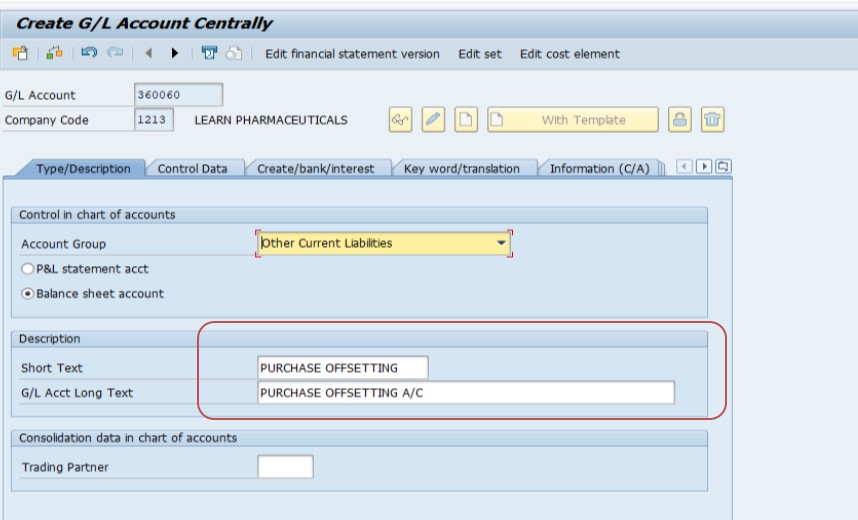
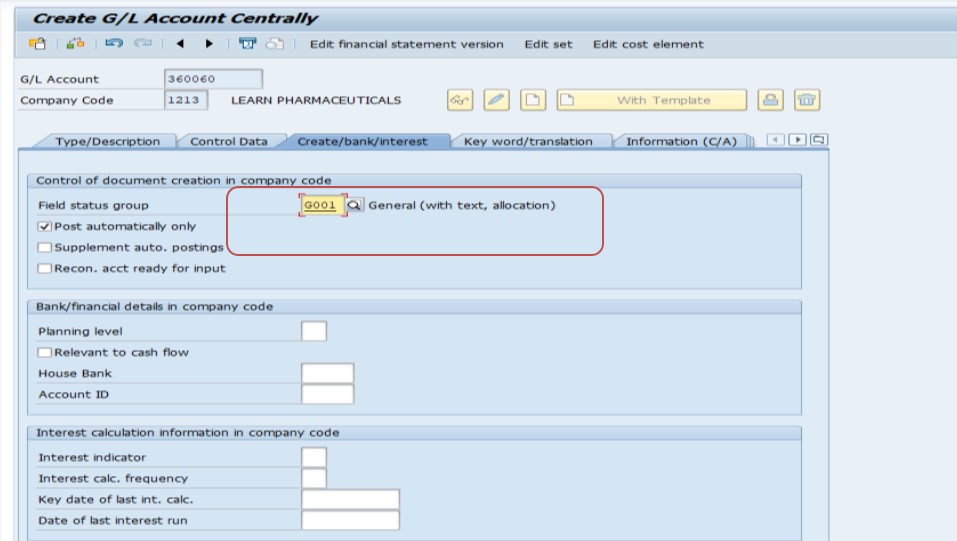
Always check first, rather than assuming the account needs to be created -if 360060 already exists, attempting to create it again in FS00 will simply fail or duplicate an existing account number. Only create a new GL account if the check genuinely confirms it does not exist yet, and name it clearly (Purchase Offsetting Account) so its purpose is obvious to anyone reviewing the chart of accounts later.
Solution - TCode: OMWB
Follow Path: SPRO → Materials Management → Valuation and Account Assignment → Account Determination → Account Determination Without Wizard → Configure Automatic Postings - OMWB
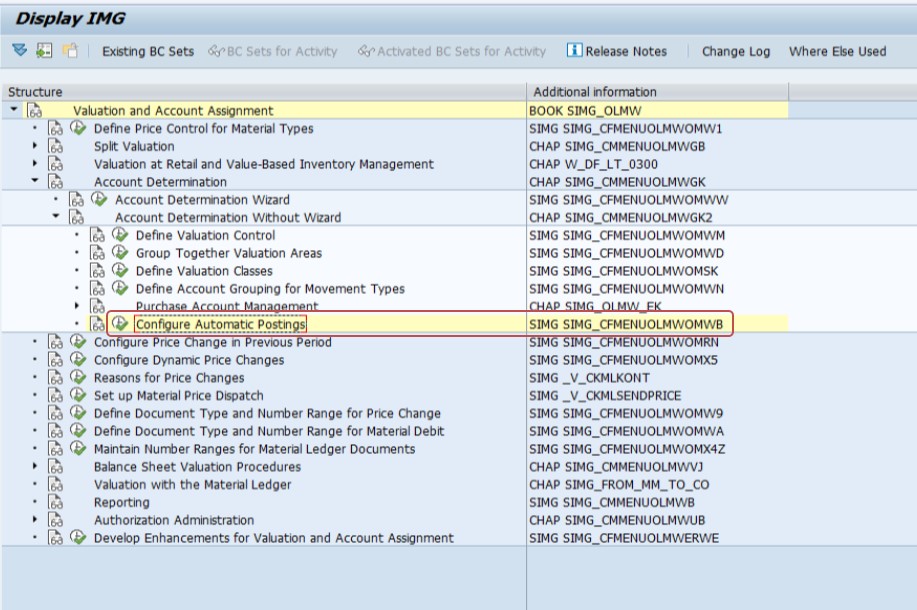
This SPRO path opens the same underlying account determination configuration used to fix BSX and WRX errors elsewhere, just navigated to specifically for the EKG key this time. Whether you reach it via OMWB or transaction code OBYC directly, you land on the same configuration tables.
Select - Account Assignment
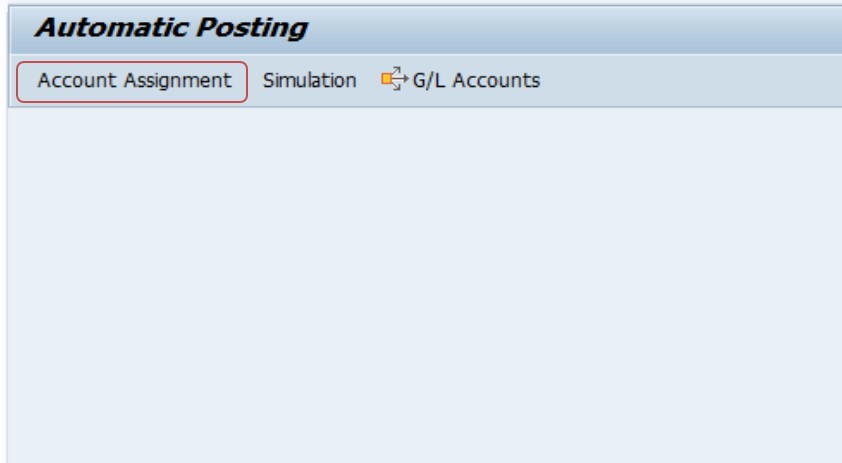
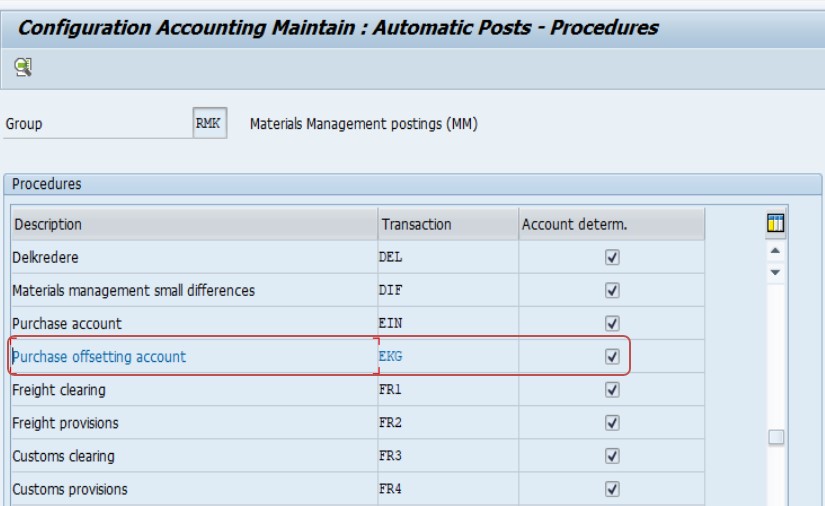
Check the material master valuation class and related settings. Determine which combination of chart of accounts, valuation area, and valuation class needs to be mapped for EKG in OBYC.
Example Configuration in OBYC/OMWB
EKG: Transaction key used for Price Differences in Inventory Management. Use an Expense Account for price differences.
- Transaction Key - EKG, Valuation Class 3000 - Raw Material
- Transaction Key - EKG, Valuation Class 3050 - Packaging
Select - Chart of Account - LNER, then:
- Select WRX - GR/IR Clearing A/C example - Select Valuation Class 3000, Debit 360060, Credit 360060
- Example - Select Valuation Class 3050, Debit 360060, Credit 360060
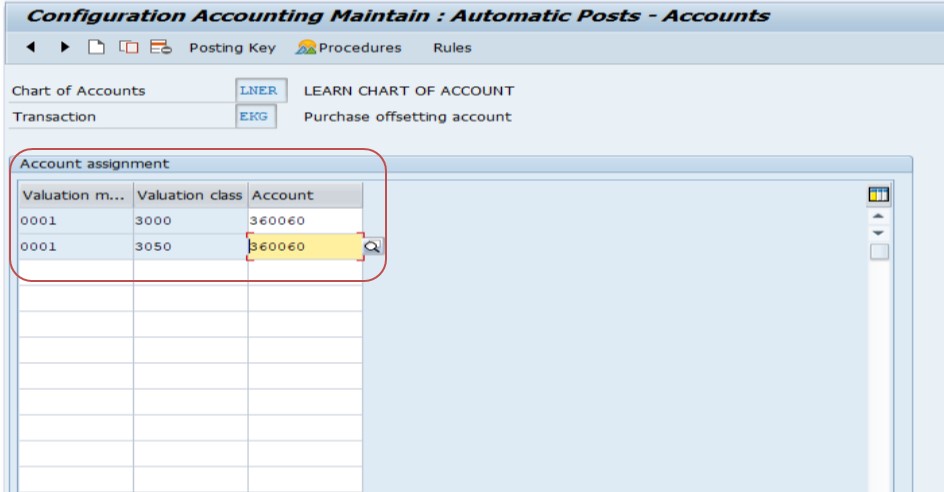
Save.
Repeating this mapping for every valuation class that will realistically trigger a price difference posting -not just one -avoids fixing this error for one material category only to have it reappear for a different one shortly after. The debit and credit both pointing to the same account number (360060) in this example is typical for a straightforward expense-style price difference account, though your organization's chart of accounts design may call for separate debit and credit accounts depending on reporting needs.
💼 Real-World Scenario: How Prakash Patil Fixed This Error
Prakash Patil, supporting a new raw material and packaging product line at Learn Pharma in Pune, was helping the finance team post an invoice where the vendor's actual price differed from the material's standard cost. The posting failed with "Account determination for entry LNER EKG not possible," since chart of accounts LNER had never had a price difference GL account configured for these valuation classes.
Prakash first checked FS00 and confirmed GL account 360060 (Purchase Offsetting Account) did not yet exist, so he created it with a clear, descriptive name. He then navigated to OMWB via SPRO, selected Account Assignment, and mapped EKG under chart of accounts LNER for both valuation class 3000 (Raw Material) and 3050 (Packaging), pointing both to account 360060 for debit and credit. Anticipating that both material categories in this new product line would generate price variances, Prakash configured both valuation classes together rather than waiting for a second error to surface for packaging materials after fixing raw materials first. The invoice posted cleanly on the next attempt, and every future price variance for either material category now routes correctly.
📋 Related Transactions Every MM/FI User Should Know
| Transaction | Purpose |
|---|---|
| OMWB / OBYC | Central configuration for automatic account determination, covering EKG, BSX, WRX, GBB, and other transaction/event keys. |
| FS00 | Create or check GL accounts before assigning them in account determination configuration. |
| MR21 | Price change transaction, one of the most common triggers for an EKG price difference posting. |
| MIRO | Invoice verification, another common trigger point when invoice price differs from goods receipt price. |
| CKM3 | Material price analysis, useful for reviewing price variance history and understanding why EKG postings are occurring for a given material. |
Keeping this list handy helps distinguish price-variance-driven errors (EKG, and to a lesser extent PRD) from stock-value errors (BSX) and clearing errors (WRX), even though all of them share the same underlying OBYC/OMWB configuration home.
❗ Common Mistakes When Fixing This Error
- Configuring EKG for only the valuation class that triggered the immediate error, missing other valuation classes in the same product line that will hit the identical gap shortly after.
- Creating a duplicate GL account in FS00 without first checking whether a suitable account already exists.
- Using the same debit and credit account without considering whether your organization's reporting needs actually call for separate accounts to track favorable versus unfavorable price variances.
- Making the OMWB/OBYC configuration change directly in production without testing the specific valuation class and chart of accounts combination in a sandbox first.
- Not coordinating with the costing or FI team before creating a new expense account, since price difference accounts often feed directly into cost variance reporting.
📋 Related SAP Error Messages You May Also Encounter
| Error / Message | Typical Cause |
|---|---|
| Account determination for entry ... EKG ... not possible | Valuation class missing GL account mapping under EKG for price differences |
| Account determination for entry ... BSX ... not possible | Valuation class missing GL account mapping under BSX for inventory posting |
| Account determination for entry ... WRX ... not possible | Valuation class missing GL account mapping under WRX for GR/IR clearing |
| Account determination for entry ... PRD ... not possible | A related price difference key, often used for production variance scenarios rather than pure purchasing |
If you land on this page after searching for one of these related messages, the diagnostic approach is identical: identify the specific transaction/event key and valuation class combination named in the error, then maintain the correct GL account for that combination in OMWB/OBYC.
💡 Best Practices to Prevent This Error From Recurring
- Whenever a new chart of accounts or valuation class combination is introduced, configure BSX, WRX, and EKG together as a complete set rather than one key at a time as errors surface.
- Establish a naming convention for price difference and offsetting accounts so their purpose is clear to anyone reviewing the chart of accounts later.
- Coordinate with costing/FI teams on whether price variances should be split into separate favorable/unfavorable accounts for more granular reporting.
- Test new EKG configurations with a realistic price variance scenario in a sandbox system before relying on them in production.
- Document which valuation classes are configured under which chart of accounts, especially in multi-company-code landscapes using different charts of accounts like LNER.
📈 Why Price Variance Accounts Matter for Cost Reporting
Price difference postings under EKG are not just a technical requirement to clear an error -they are a genuinely important cost accounting signal. Every time actual purchase price diverges from a material's expected standard cost, that variance tells finance and procurement teams something worth knowing: is the company consistently paying more than planned for a material category, and if so, why? A properly configured, clearly named EKG account makes this variance visible and reportable; a hastily configured or generically named one buries it among unrelated postings.
This is why the fix in this guide's scenario deliberately configures both raw material and packaging valuation classes together with a clearly named Purchase Offsetting Account, rather than treating the immediate error as the only thing that needs fixing. A well-structured price variance account setup gives management a genuine early-warning signal for cost creep on specific material categories, well before it shows up as a larger, harder-to-diagnose problem in overall gross margin.
⚙ EKG vs. PRD: Two Related but Distinct Price Difference Keys
SAP maintains more than one transaction/event key related to price differences, and it is worth knowing the distinction so you configure the correct one for a given scenario rather than assuming they are interchangeable.
| Key | Typical Scenario |
|---|---|
| EKG | Price differences arising during inventory management postings, such as goods receipt or invoice verification against a purchase order, where standard cost and actual price diverge. |
| PRD | Price differences more broadly, including scenarios like production order settlement variances or other cost object-related variance postings, depending on configuration. |
In many systems, EKG and PRD end up pointing to similar or even the same GL accounts by design, since both ultimately represent a cost variance the business wants visible in the same place. But they are triggered by different processes, and confirming which key your specific error references -rather than assuming any price-variance-related fix applies universally -keeps your account determination configuration accurate and easy to audit later.
✅ How to Verify the Fix
After configuring EKG in OMWB/OBYC for the relevant valuation classes and saving, retest the original transaction -typically an invoice verification via MIRO or a goods receipt with a price variance -for a material using one of the newly configured valuation classes. If it posts cleanly, the fix is confirmed. Then check the resulting posting via FBL3N on the price difference account to confirm the variance amount looks correct relative to the actual price discrepancy.
If your organization has multiple valuation classes actively used under this chart of accounts, it is worth proactively testing a price variance scenario for each one configured, rather than only the specific valuation class that triggered the original error, to confirm the complete configuration pass was genuinely thorough.
📚 Quick Glossary of Terms Used in This Guide
- EKG: The transaction/event key in OBYC/OMWB responsible for price difference postings in inventory management.
- Price Variance: The difference between a material's expected (standard) cost and its actual purchase or invoice price.
- Purchase Offsetting Account: A GL account capturing the other side of a price difference posting, reflecting the cost variance as an expense.
- Chart of Accounts: The structured list of GL accounts used by one or more company codes, referenced here as LNER.
- OMWB / OBYC: SAP's central configuration transactions for automatic account determination, covering EKG alongside BSX, WRX, and other keys.
🎯 Conclusion
"Account determination for entry LNER EKG not possible" is a configuration gap in your price difference account mapping, not a data problem -a valuation class simply has no GL account assigned under EKG yet for this chart of accounts. Checking and creating the necessary GL account in FS00, then configuring EKG for every relevant valuation class via OMWB/OBYC, resolves this error completely and gives your organization genuine, structured visibility into purchase price variances going forward.
This guide is written for the range of people who typically land on this page: MM and FI consultants like Prakash Patil configuring account determination for a new chart of accounts or product line, procurement and finance staff hitting this error during invoice verification, and students learning how EKG fits alongside BSX and WRX in SAP's account determination architecture. Whichever group you fall into, the same core principle applies -this error means a valuation class has not yet been introduced to its price difference GL account, and OMWB/OBYC is where that introduction happens.