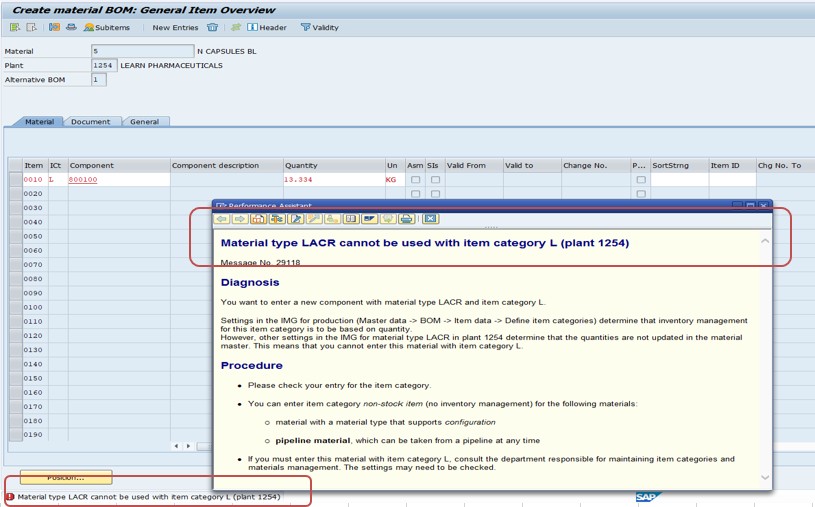
This error means the material type on a purchase order line isn't compatible with item category L (subcontracting), most commonly because Quantity Update and Value Update aren't enabled for that material type in the relevant plant. This guide covers the OMS2 fix, then explains what item category L actually represents and why subcontracting specifically requires full quantity and value tracking. If you encounter any errors in SAP, feel free to send a screenshot to pramod@learntosap.com for help.
Transaction: OMS2
Menu path: SPRO → Materials Management → Material Master → Basic Settings → Define Attributes of Material Types
Find the material type (in this case, LACR) in the list and double-click it.
Select Quantity/Value Updating for the relevant valuation area.
Tick both Quantity Updating and Value Updating.
Save.
Item category L is used specifically for subcontracting purchase order line items - a procurement scenario where your organization sends raw materials or component parts to a vendor, and the vendor performs work on them (assembly, machining, finishing) before returning a finished or semi-finished product. This is common in manufacturing supply chains where certain processing steps are outsourced rather than performed in-house.
Subcontracting is a genuinely more complex process than a standard purchase order (item category blank/standard), since it involves tracking components sent to the vendor as a special stock category (stock at vendor, or "special stock indicator O") while they're at the vendor's location, and then receiving the finished product back, consuming the components from that special stock in the process. Both halves of this - components at the vendor, and the finished product received - need accurate quantity and financial value tracking throughout, which is exactly why item category L has a hard dependency on the material type supporting full Quantity Update and Value Update.
| Requirement | Why Subcontracting Needs It |
|---|---|
| Quantity Update | SAP must track exactly how many units of each component are at the vendor's location (special stock at vendor) and how many have been consumed in finished goods received back, requiring precise quantity tracking throughout the process. |
| Value Update | The finished product received from the vendor typically has its own value (raw materials plus vendor's processing/labor cost), and SAP needs to post the correct combined value to inventory upon goods receipt, which requires the material type to support financial valuation. |
A material type without both settings enabled simply has no mechanism to support this level of tracking - it's not an arbitrary restriction, but a genuine structural requirement of how subcontracting processing works in SAP MM. This is exactly the same underlying logic covered in this site's related guide on error M7097, just surfacing here specifically in the context of item category L rather than a general stock posting.
Sonali Pawar, an SAP MM configuration consultant at a consumer goods manufacturer, was asked to set up a new subcontracting relationship where a vendor would receive raw packaging components and return fully assembled, branded packaging units ready for the production line. The procurement team attempted to create the subcontracting purchase order using material type LACR, an existing material type originally set up years earlier purely for low-value packaging materials tracked by quantity but never intended to carry detailed financial value - a value-only-style configuration, similar to the value-only material types covered in this site's related guide on batch management conversion.
The first attempt to create the subcontracting PO line immediately failed with message 29118, exactly because LACR's original configuration didn't include Value Update - it had been deliberately set up years ago under the assumption these were low-value materials not worth individually valuing. That assumption no longer held for this new subcontracting scenario, where the returned finished packaging units genuinely needed accurate valuation reflecting both the component cost and the vendor's processing fee.
Yusuf's team enabled Value Update (alongside the already-active Quantity Update) for LACR in OMS2, following the same steps in this guide's core solution, and the subcontracting PO created successfully afterward. Working with finance, they also reviewed whether any existing LACR stock needed a valuation correction now that the material type carried financial value going forward - a consideration directly parallel to the guidance in this site's related BSX/account determination guide about material type changes affecting existing stock. This scenario illustrates that 29118 isn't always simply "material type wasn't configured for this item category from the start" - sometimes, as here, it's a material type whose original configuration made sense for its original purpose, but no longer fits a new business scenario it's being asked to support.
As with the related M7097 error covered elsewhere on this site, changing Quantity Update and, particularly, Value Update for a material type affects every material of that type in the relevant plant, not just the specific material driving the current subcontracting need. Most organizations restrict OMS2 access to a small group of MM/FI configuration consultants, and treat enabling Value Update specifically as a change requiring finance sign-off, given its direct impact on inventory valuation and financial reporting.
This is particularly relevant for the scenario illustrated in this guide's real-world example - repurposing an existing material type for a new subcontracting use case - since the original team that configured the material type without Value Update may have had a deliberate reason that's no longer obvious to whoever is troubleshooting the error years later. A quick conversation with the material type's original business owner, where identifiable, is worth the time before making the change.
| Error / Symptom | Root Cause | Typical Fix |
|---|---|---|
| 29118 - Material type cannot be used with item category L | Quantity/Value Update not enabled for the material type, incompatible with subcontracting's tracking requirements | Enable Quantity/Value Update in OMS2 (this guide) |
| M7097 - No stock posting possible for this material | The same Quantity/Value Update gap, but surfacing during a general stock posting rather than specifically item category L | Enable Quantity/Value Update in OMS2 (see this site's related guide) |
| Item category L is not defined for item category group [X] | The material's item category group doesn't have item category L configured as an allowed combination in the item category determination table (transaction OMS2/VOV4-style config) | Extend item category determination configuration, distinct from the Quantity/Value Update fix |
| Valuation class not allowed for material type | The valuation class assigned to the material isn't valid for that material type's account category reference | Assign a valid valuation class, unrelated to Quantity/Value Update settings |
The second row is worth highlighting specifically, since it shares the exact same root cause and fix as this guide's error - Quantity/Value Update gaps can surface through multiple different error messages depending on which specific transaction or item category first triggers the check, even though the underlying configuration fix is identical.
Anita Reddy, an SAP MM support consultant, was asked to help a company roll out subcontracting for a component previously only ever purchased as a standard, non-subcontracted item. The team had successfully fixed error 29118 for the first plant piloting the new subcontracting process, enabling Quantity/Value Update in OMS2 exactly as this guide describes - but assumed the fix was global and were surprised when the same error appeared again once a second plant began piloting the same process a few weeks later.
Checking OMS2,Anita confirmed the reason: Quantity Update and Value Update settings in OMS2 are maintained per valuation area (effectively, per plant), not globally for the material type across the entire company. The first plant's fix had correctly enabled both settings for that specific plant's valuation area, but the second plant - using the same material type but its own separate valuation area - still had the original, unfixed configuration.
Priya extended the fix to the second plant's valuation area, and subcontracting PO creation began working there as well. This scenario reinforces a detail easy to miss when a fix appears to work the first time: OMS2's Quantity/Value Update configuration is genuinely plant-specific, so a multi-plant subcontracting rollout needs the fix applied and tested independently at every plant involved, not assumed to carry over automatically once it's been fixed once.
Item category L, subcontracting processing, and the underlying Quantity/Value Update requirement are unchanged in SAP S/4HANA - subcontracting remains foundational Materials Management functionality rather than something restructured by the simplified data model. Material type configuration can be maintained via classic OMS2 in SAP GUI, or through equivalent Fiori configuration apps in some releases, both enforcing the same underlying requirement covered in this guide.
Subcontracting sits at an intersection of Materials Management, Production Planning, and Finance - the components sent to the vendor are often tracked similarly to how Production Planning tracks components consumed in an in-house production order, and the financial valuation of the returned finished product flows directly into inventory accounting exactly as covered in this site's related account determination guides. Getting the material type's Quantity/Value Update configuration right isn't just about clearing this one error message; it's a prerequisite for the entire subcontracting process working correctly end to end, including the eventual invoice verification against the vendor's subcontracting service charge.
| Transaction | Purpose |
|---|---|
| OMS2 | Configure material type attributes, including Quantity/Value Updating. |
| ME21N | Create a subcontracting purchase order using item category L. |
| ME2O | Monitor stock provided to vendors for subcontracting (special stock at vendor). |
| MIGO | Post the goods receipt for the finished product from the subcontracting vendor. |
| MM03 | Display the material master to confirm current material type and settings. |
Q: What does item category L represent in an SAP purchase order?
Subcontracting - a procurement scenario where components are sent to a vendor, who performs processing and returns a finished or semi-finished product, requiring both component and finished-goods tracking.
Q: Why does subcontracting require both Quantity Update and Value Update on the material type?
Because the process requires tracking exact quantities of components at the vendor's location and consumed in returned goods, plus accurate financial valuation of the finished product received, neither of which a material type lacking these settings can support.
Q: If a material type was deliberately configured without Value Update for a legitimate reason, what should you consider before enabling it just to fix this error?
Review whether existing stock under that material type needs a valuation correction once Value Update is enabled, and confirm with finance that the change reflects a genuine, considered business need rather than a reflexive technical fix.
SAP error 29118 comes down to a material type lacking the Quantity Update and Value Update settings that item category L (subcontracting) fundamentally requires. Enabling both in OMS2 resolves it, but as the real-world scenario in this guide illustrates, it's worth understanding why the material type was configured that way in the first place before making the change, particularly if it means enabling value tracking on a material type that previously didn't have it. Keep this guide bookmarked for the next subcontracting setup that hits this message.