HTML Styles Tutorial: Inline, Internal & External CSS Explained
HTML Tutorials · HTML Styles Tag · Introduction
HTML Styles Tag
HTML (HyperText Markup Language), styles are used to change the appearance of elements on a webpage — like color, font, size, background, alignment, and so more.
Every element you have practiced so far in this series, headings, paragraphs, links, images, has looked exactly the way a browser's default settings decide, with no color, spacing, or custom font applied. Styles are how you take control of that appearance instead of relying on the browser's plain defaults. HTML gives you three separate ways to apply these styles: inline, internal, and external CSS, and this tutorial walks through each one with working examples, starting with the simplest option and building up to the approach most real websites use in production.
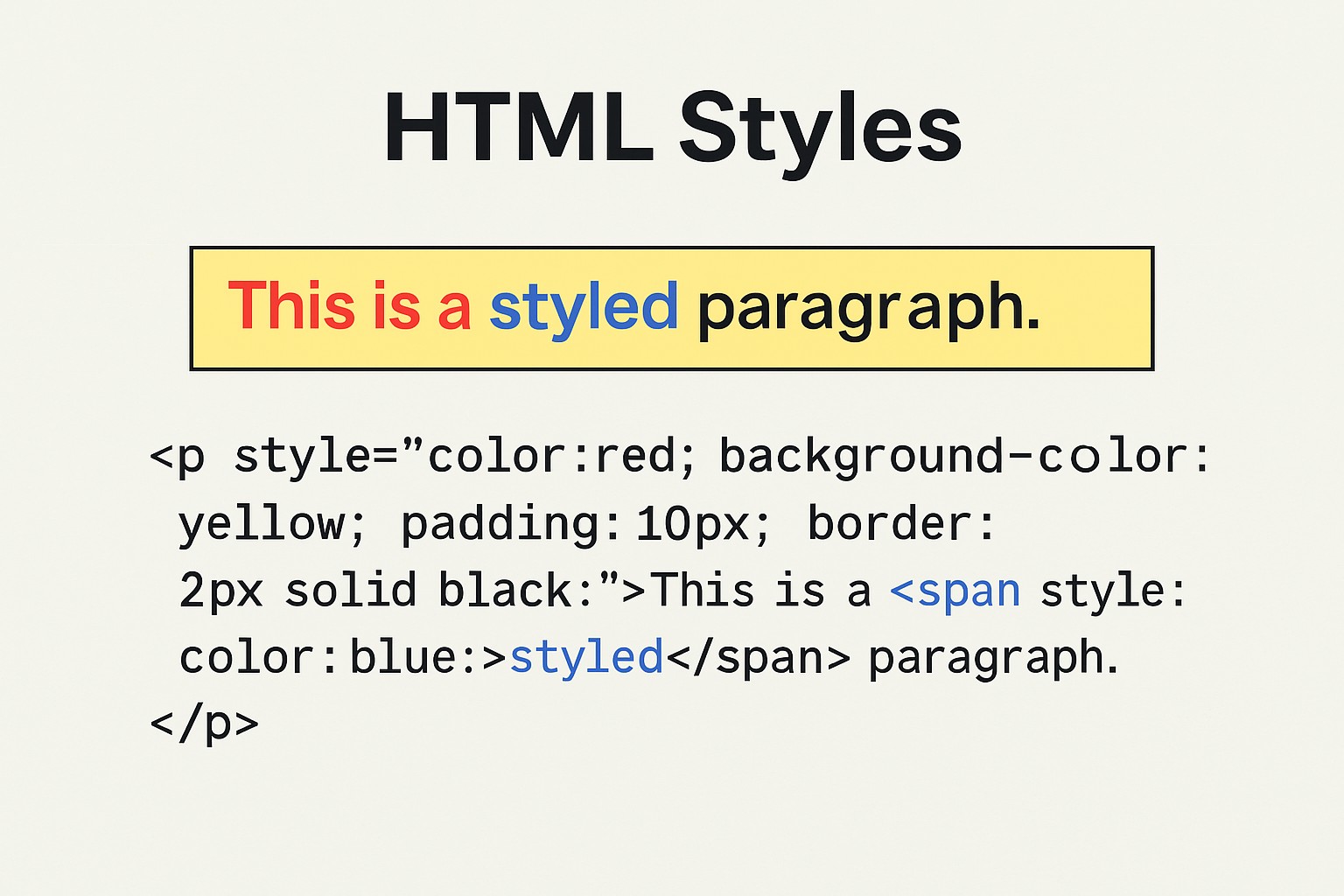
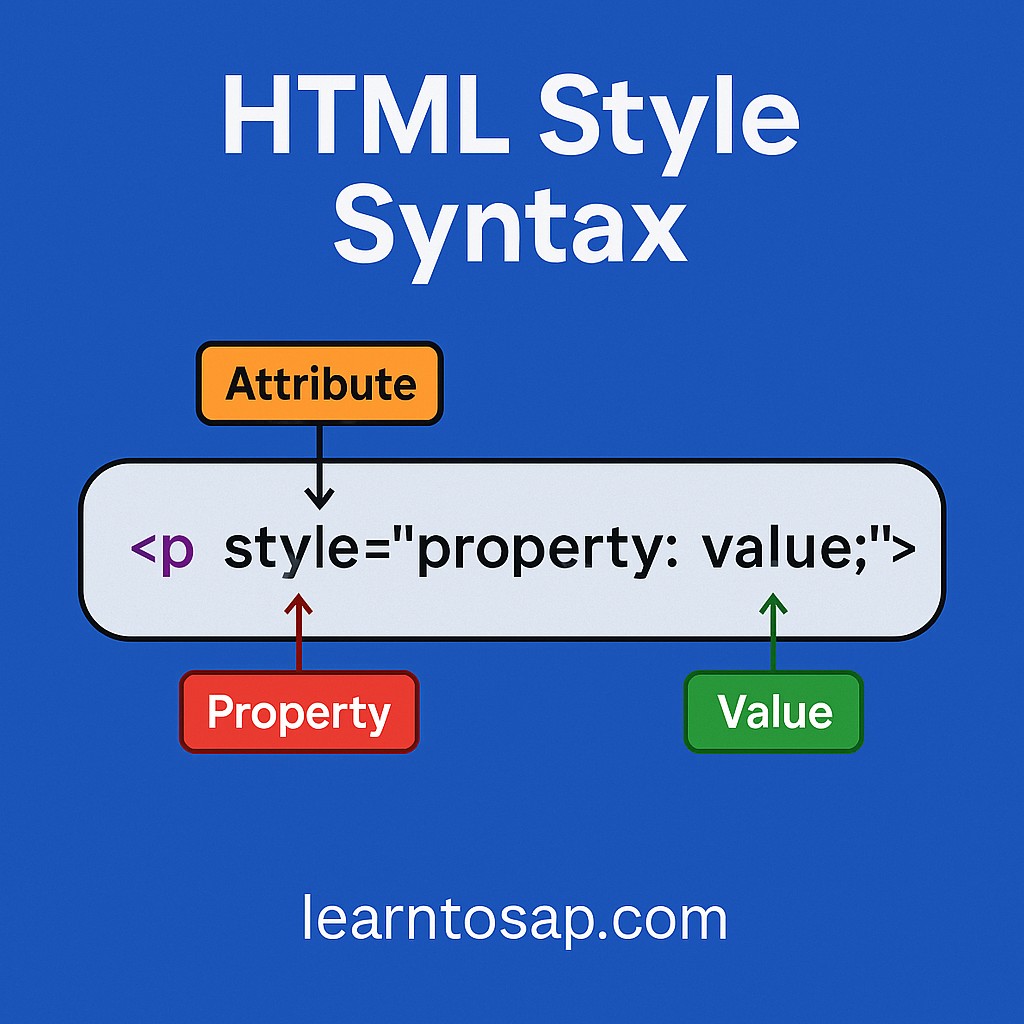
🧩 Inline Style Example
🔍 In this example:
- 🔴 color: blue; sets the text color.
- 🔴 font-size: 20px; changes the size of the text.
✅ Examples: HTML style attribute has the following syntax:
<p style="color: blue; font-size: 20px;">This is a styled paragraph.</p><body>
<p>learntosap.com</p>
<p style="color:red;">welcome to our website</p>
<p style="color:blue;">www.learntosap.com</p>
<p style="font-size:50px;">I am free website</p>
</body>Examples: Font-family Property
Font-family property defines the font to be used for an HTML element:
<h1 style="font-family:verdana;">welcome Free website</h1>
<p style="font-family:courier;">www.learntosap.com</p>
🧩 ✨ Common Style Properties
| Property | Description | Example |
|---|---|---|
| color | Sets the text color | color: red; |
| background-color | Sets background color | background-color: yellow; |
| font-size | Sets the text size | font-size: 18px; |
| font-family | Sets the font type | font-family: Arial; |
| text-align | Aligns text | text-align: center; |
| margin | Adds space outside the element | margin: 10px; |
| padding | Adds space inside the element | padding: 15px; |
| border | Adds border around the element | border: 1px solid black; |
📧 Inline Style on Different Elements
<h1 style="color: green;">Welcome to LearnToSAP</h1>
<div style="background-color: lightgray; padding: 10px;">
This is a styled div.</div>
Try It Yourself (Copy This Code and Paste. See how it works). Paste any example above into the live playground below and adjust a color or size value to see the change render instantly.
Live Code Preview
Internal CSS: Using the <style> Tag in <head>
Inline styles work well for a quick, one-off change on a single element, but repeating the same style="..." attribute on every paragraph on a page quickly becomes repetitive. Internal CSS solves this by letting you write a block of styling rules once, inside a <style> tag placed in the <head> section, and have those rules apply to every matching element throughout the page.
<!DOCTYPE html>
<html>
<head>
    <title>Internal CSS Example</title>
    <style>
        body {
            font-family: Arial, sans-serif;
        }
        h1 {
            color: green;
        }
        p {
            color: blue;
            font-size: 18px;
        }
    </style>
</head>
<body>
    <h1>Welcome to LearnToSAP</h1>
    <p>Every paragraph on this page automatically picks up this styling.</p>
    <p>No repeated style attribute needed on each one.</p>
</body>
</html>
Notice that both paragraphs above are styled identically without either one carrying its own style attribute. Internal CSS is a good fit when a single page needs its own distinct look that other pages on the site do not share.
External CSS: Linking a Separate .css File
External CSS takes the same idea one step further by moving the styling rules out of the HTML file entirely and into their own separate .css file, which any number of HTML pages across a whole website can then link to and share.
<!DOCTYPE html>
<html>
<head>
    <title>External CSS Example</title>
    <link rel="stylesheet" href="styles.css">
</head>
<body>
    <h1>Welcome to LearnToSAP</h1>
    <p>This page's look comes entirely from styles.css.</p>
</body>
</html>body {
font-family: Arial, sans-serif;
margin: 0;
padding: 20px;
}
h1 {
color: green;
}
p {
color: blue;
font-size: 18px;
}The <link rel="stylesheet" href="styles.css"> tag inside the head section is what connects the HTML page to the external file. Every page across a website that links to the same styles.css file automatically shares one consistent look, and updating a single color or font in that one file instantly updates every page that links to it, without needing to touch a single HTML file individually.
Inline vs Internal vs External CSS: Which Should You Use?
| Type | Best For | Scope |
|---|---|---|
| Inline CSS | A quick, one-off style on a single element | That one element only |
| Internal CSS | Styling unique to one specific page | The current page only |
| External CSS | Consistent styling across an entire website | Every page that links the file |
Most real, production websites lean heavily on external CSS for the overall design, occasionally add internal CSS for something specific to one page, and use inline CSS sparingly, mainly for small, situational overrides. Understanding all three, as this page now covers, means you are never stuck if you only knew one method.
CSS Specificity: What Happens When Styles Conflict
Once a page combines more than one type of CSS, it becomes possible for two different rules to target the same element with conflicting values. Browsers resolve this using a set of priority rules, and as a simple starting point for beginners:
- Inline CSS generally wins over internal and external CSS for the same property on the same element, since it is written closest to the element itself.
- Internal CSS generally wins over external CSS if both set the same property, assuming similar specificity, since it is defined later, directly inside the current page.
- External CSS forms the base styling that internal and inline rules can then override as needed.
A practical habit that avoids most specificity confusion altogether: keep your overall site design in external CSS, use internal CSS only for genuine page-specific exceptions, and save inline CSS for rare, one-off situations rather than everyday styling. Following that habit consistently also means far less time spent hunting through a page to figure out why one particular value refuses to change when you edit the stylesheet.
Common Mistakes When Styling HTML
Most styling problems beginners run into trace back to a small handful of easy-to-fix habits, whether the styling is inline, internal, or external:
- Forgetting the semicolon between style declarations, such as writing color: blue font-size: 20px without separating them, which can break the second rule.
- Misspelling a property name, like typing colour instead of color, which browsers will silently ignore rather than flag as an error.
- Overusing inline styles across many elements, which quickly becomes hard to maintain compared to a single internal or external rule.
- Forgetting the closing curly brace in internal or external CSS rules, which can cause every rule after it to be misread.
- Linking the wrong file path in the external stylesheet's href attribute, which silently leaves a page completely unstyled with no visible error message.
CSS Selectors Used in Internal and External CSS
The internal and external examples above used simple tag names, body, h1, p, to target elements, but real stylesheets usually need more precise targeting than "every paragraph on the page." Two additional selector types make that possible:
- Class selectors, written with a leading dot, target any element carrying a matching class attribute, and can be reused across many different elements.
- ID selectors, written with a leading hash symbol, target the one element carrying a matching id attribute, since an id is meant to be unique on a page.
<style>
    .highlight {
        background-color: yellow;
    }
    #main-title {
        color: darkblue;
    }
</style>

<h1 id="main-title">Welcome to LearnToSAP</h1>
<p class="highlight">This paragraph is highlighted.</p>
<p class="highlight">So is this one.</p>
Here, .highlight applies to both paragraphs that share the highlight class, while #main-title applies only to the single heading carrying that exact id. This is the same class and id pattern you will see used throughout internal and external stylesheets on real websites, including the very theme this tutorial page itself is built with.
Styling Text: Color, Font, and Size in More Depth
Text styling is usually the very first thing beginners experiment with, since the visual effect is immediate. A few properties beyond the ones already covered are worth knowing:
| Property | Description | Example |
|---|---|---|
| font-weight | Controls text thickness (normal or bold) | font-weight: bold; |
| text-decoration | Adds or removes underline/strike-through | text-decoration: underline; |
| line-height | Controls spacing between lines of text | line-height: 1.6; |
| letter-spacing | Adjusts spacing between characters | letter-spacing: 1px; |
Combined with the color, font-size, and font-family properties already covered earlier on this page, these give you fairly complete control over how any block of text looks, without needing anything beyond the same style attribute, internal stylesheet, or external stylesheet approach already demonstrated. Mixing a couple of these properties together, for instance bold, slightly letter-spaced text for a heading versus relaxed, generously spaced line-height for a long paragraph, is often enough to make a plain page feel noticeably more polished.
The Box Model: Margin, Padding, and Border Explained
The common style properties table earlier on this page listed margin, padding, and border together, and that grouping is intentional: these three properties describe what web developers call the "box model," the space around and inside every HTML element.
- Padding is the space between an element's content and its own border, effectively pushing the border outward away from the text or image inside.
- Border is the visible (or invisible) line that wraps around the padding and content together.
- Margin is the space outside the border, pushing neighboring elements further away from this one.
<div style="margin: 20px; border: 2px solid black; padding: 15px;">
    Content sits inside the padding, which sits inside the border,
    which has margin pushing everything else away from it.
</div>
Understanding margin, padding, and border as three separate, stacked layers around content, rather than three unrelated properties, makes spacing and layout issues far easier to diagnose once you start building more complex pages.
Practice Exercises: Style Your Own Page
The fastest way to make inline, internal, and external CSS feel natural is to deliberately practice each one. Try these directly in the live editor above:
- Add an inline style to a paragraph that sets both its color and font-size at once.
- Rewrite that same styling as an internal <style> block in the head section instead, targeting the paragraph tag directly.
- Add a class attribute to two different paragraphs and style both of them together using one class selector.
- Give one heading a unique id and style just that heading using an id selector.
- Wrap a paragraph in a <div> with margin, padding, and a border, and adjust each value to see how the box model responds.
Working through inline, internal, and a simulated external approach side by side in the same practice session is the quickest way to genuinely understand not just how each one works, but when to reach for which one on a real project. Keep whatever you build in this exercise, since it doubles nicely as a personal reference the next time you forget the exact syntax for a class selector or a media query.
Why Styling Matters for User Experience and SEO
Styling is not purely decorative. How readable your text is, how much whitespace surrounds it, and how clearly your headings stand out from body text all affect how long a visitor stays on a page and how easily they find what they came for.
- Readable font sizes and line-height reduce eye strain and keep visitors reading longer instead of bouncing away from dense, cramped text.
- Clear color contrast between text and background matters for every visitor, and is essential for visitors with low vision or color blindness.
- Consistent spacing using margin and padding gives a page a organized, trustworthy feel rather than a cluttered one.
- Faster-loading external stylesheets, cached once by the browser and reused across every page on a site, generally load a multi-page website faster than the same styling repeated inline on every element of every page.
None of this is unrelated to SEO either. Search engines increasingly factor in page experience signals such as visual stability and readability, and a well-styled, well-organized page keeps visitors around longer, both of which are outcomes a thoughtful approach to inline, internal, and external CSS directly supports. A page that loads its styling quickly and consistently, rather than flashing unstyled content before the CSS finishes loading, also tends to feel more trustworthy and professional to a first-time visitor.
From Basic Styling to Responsive Design
Everything covered on this page assumes a single, fixed-size screen, but real visitors arrive on phones, tablets, and desktop monitors of wildly different widths. Once the inline, internal, and external CSS techniques on this page feel comfortable, the natural next step is responsive design: CSS rules that adapt based on the size of the screen viewing them, typically using a feature called media queries inside an internal or external stylesheet.
<style>
    h1 {
        font-size: 32px;
    }
    @media (max-width: 600px) {
        h1 {
            font-size: 22px;
        }
    }
</style>
This small example shrinks the heading's font size automatically once the screen narrows below 600 pixels wide, exactly the kind of screen a phone would have. It uses the same internal <style> tag already covered earlier on this page, just with one extra rule layered on top, which is a good sign that the fundamentals taught in this tutorial carry forward directly into more advanced CSS topics.
Real-World Example: One Page, All Three Styling Methods
To see inline, internal, and external CSS working together the way a real page often does, here is a single small file that mixes all three approaches, with comments marking which is which:
<!DOCTYPE html>
<html>
<head>
    <title>Combined Styling Example</title>
    <!-- External CSS: shared site-wide look -->
    <link rel="stylesheet" href="styles.css">
    <!-- Internal CSS: adjustments for this page only -->
    <style>
        .notice {
            background-color: #fff8e1;
            border: 1px solid #f0d97d;
            padding: 12px;
        }
    </style>
</head>
<body>
    <h1>Welcome to LearnToSAP</h1>
    <p class="notice">This box uses internal CSS for a page-specific style.</p>
    <!-- Inline CSS: one-off override -->
    <p style="font-style: italic;">This single line uses inline CSS instead.</p>
</body>
</html>
The heading picks up its look from the external styles.css file shared across the whole site. The notice box uses a class defined in an internal stylesheet, since that particular look only matters on this one page. The last paragraph reaches for a quick inline style because italicizing a single line does not justify a whole new class or rule. Recognizing which situation calls for which technique, rather than always defaulting to one, is really the core skill this entire tutorial has been building toward, and it is exactly the same judgment call professional front-end developers make dozens of times on every real project they work on.
Frequently Asked Questions About HTML Styles
What are the three ways to style HTML?
HTML can be styled with inline CSS using the style attribute directly on an element, internal CSS using a style tag inside the head section, or external CSS using a separate .css file linked with a link tag.
What is the HTML style attribute?
The style attribute is added directly inside an HTML tag to apply CSS to that single element, for example style="color: blue; font-size: 20px;" on a paragraph tag.
When should I use internal CSS instead of inline CSS?
Internal CSS is better when several elements on the same single page need the same styling, since it is written once inside a style tag in the head instead of repeated on every element.
Why is external CSS recommended for real websites?
External CSS keeps styling in one separate file that every page on a website can share, making the site easier to maintain and keeping HTML files focused purely on content and structure.
Which type of CSS takes priority if styles conflict?
Inline CSS generally overrides internal and external CSS, and internal CSS generally overrides external CSS, when the same property is set in more than one place, assuming equal specificity elsewhere.
Can I combine inline, internal, and external CSS on the same page?
Yes. Many real pages use external CSS for overall site-wide styling, internal CSS for page-specific adjustments, and the odd inline style for a one-off override, all on the same page.
What is the difference between a class selector and an id selector?
A class selector, written with a leading dot, can be applied to many elements at once and reused throughout a page. An id selector, written with a leading hash symbol, is meant to target exactly one unique element on a page.
What is the box model in CSS?
The box model describes the space around every HTML element as three stacked layers: padding between the content and its border, the border itself, and margin outside the border that separates it from neighboring elements.