SAP FICO TUTORIALS-
Dispaly Vendor Blance: A Step-by-Step Guide-
Introduction-
✅ SAP Display Vendor Balance (S_ALR_87012082) – Step-by-Step Guide :-
SAP FICO's S_ALR_87012082 transaction code is a valuable tool for organizations looking to efficiently manage and access Vendor balances. represent the outstanding financial obligations your organization has toward its suppliers. They include unpaid invoices, credit notes, and other payables. These balances are essential to maintaining a clear financial overview, ensuring timely payments, and optimizing working capital. In SAP FICO, the S_ALR_87012082 transaction code allows you to display vendor balances for this purpose..
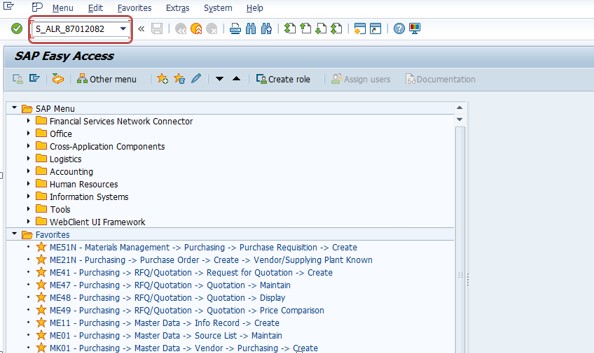
✅ What is SAP Transaction Code S_ALR_87012082? - GO TO TCODE -S_ALR_87012082
In any organization using SAP Financial Accounting (FI), monitoring vendor balances is main. Vendor balance reports help companies keep track of outstanding payables, identify payment discrepancies, and maintain healthy supplier relationships.SAP provides a variety of reporting tools to view vendor balances, but one of the most widely used is transaction code S_ALR_87012082, known as Display Vendor Balances. This report Display Vendor Balance suggest both a summarized and detailed view of vendor accounts for a given period, ensuring transparency and control in accounts payable.
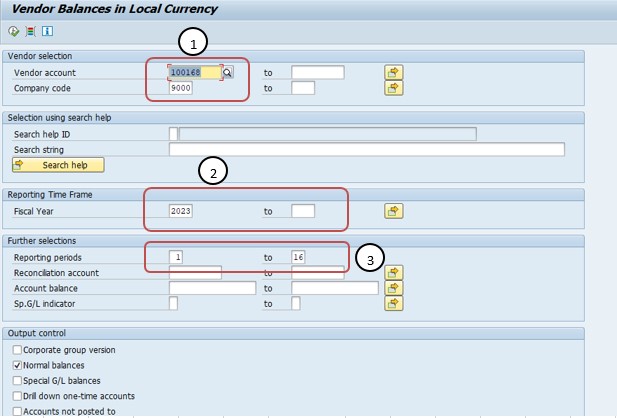
Follow Path-
1)SELECT VENDOR-100168
1)SELECT COMPANY CODE-9000
2)SELECT FISICAL YEAR-2023-2024
3)SELECT REPORTING PERIOD-1-16
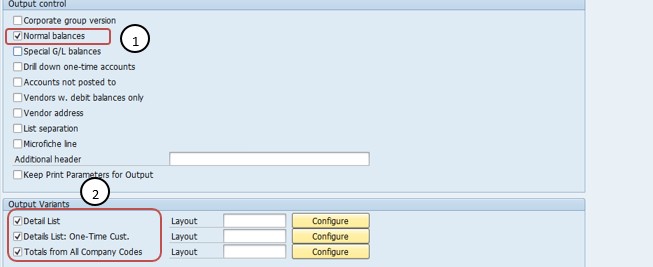
*)SELECT NORMAL BALANCE-TICK
*)SELECT DETAIL LIST-TICK
*)SELECT TOTAL FROM ALL COMPANY CODE-TICK
*)SELECT EXECUTE BUTTON-
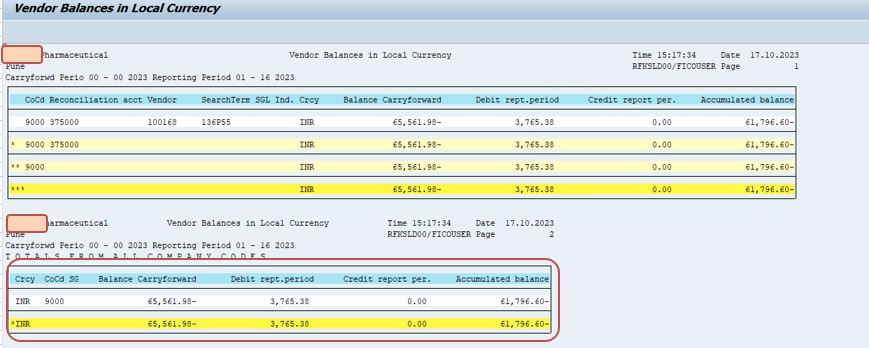
*)SELECT -SAVE