HTML Basic Tags Explained with Examples
HTML Tutorials · HTML Basic Tag Example · Introduction
HTML Basic Tag Example
HTML (HyperText Markup Language) is the standard language for creating web pages. It uses a series of tags to structure the content on a webpage. Below are some of the most commonly used HTML Basic tags with examples.
Every one of the ten tags on this page appears, in some form, on almost every website you have ever visited. Once you can recognize what each one does and can picture roughly how it renders in a browser, reading someone else's HTML, or writing your own, becomes a great deal less intimidating. Keep the live editor further down this page open while you read, so you can paste in each example and see the actual output as you go.
This tutorial builds directly on the earlier pages in this series. If a term like DOM, element, or attribute feels unfamiliar, the "What Is HTML?" tutorial linked at the end of this page covers those basics in more depth, and the Online HTML Editor tutorial explains the live playground tool used throughout this page in detail.
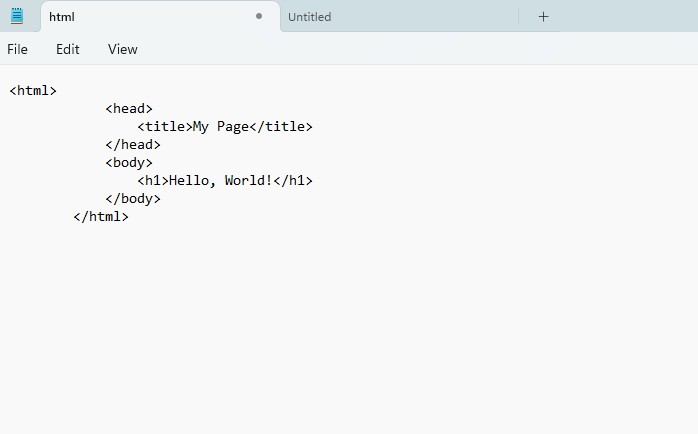
The 10 Core HTML Tags Every Beginner Should Know
These ten tags cover the vast majority of what a beginner needs to build a first, complete webpage. Each one is explained below with the exact example you can copy into the live editor.
1. The <!DOCTYPE> Tag
This tag defines the document type and version of HTML. It is placed at the beginning of an HTML document.
<!DOCTYPE html>
<html>
<head>
    <title>My First HTML Page</title>
</head>
<body>
    <h1>Welcome to My Website</h1>
</body>
</html>
2. The <html> Tag
This tag is the root element that contains all other HTML elements.
<html>
    <head>
        <title>Example Page</title>
    </head>
    <body>
        <p>This is a sample webpage.</p>
    </body>
</html>
3. The <head> and <title> Tags
The Head tag contains metadata such as the title, character set, and linked CSS or JavaScript files.
The Title tag sets the title of the webpage, displayed on the browser tab.
<html>
    <head>
        <title>Example Page</title>
    </head>
    <body>
        <p>This is a sample webpage.</p>
    </body>
</html>
4. The <body> Tag
The Body tag contains the main content of the HTML document.
<body>
    <h1>Welcome!</h1>
    <p>This is a simple HTML page.</p>
</body>
5. Heading Tags (H1 to H6)
These tags define headings of different sizes. (h1) is the largest, and (h6) is the smallest.
<h1>Heading 1</h1>
<h2>Heading 2</h2>
<h3>Heading 3</h3>
<h4>Heading 4</h4>
<h5>Heading 5</h5>
<h6>Heading 6</h6>
6. The Paragraph <p> Tag
This tag Defines a paragraph.
<p>This is a paragraph of text.</p>7. The Anchor <a> Tag
Creates hyperlinks to other web pages.
<a href="https://www.google.com">Visit Google</a>8. The Image <img> Tag
This tag Displays images.
<img src="image.jpg" alt="Sample Image" width="700">9. The <ul> and <ol> Tags
(ul) creates an unordered list (bullet points).
(ol) creates an ordered list (numbered).
<ul>
    <li>Item 1</li>
    <li>Item 2</li>
</ul>

<ol>
    <li>Step 1</li>
    <li>Step 2</li>
</ol>
10. The <table> Tag
This tag Creates tables to organize data.
<table border="1">
    <tr>
        <th>Name</th>
        <th>Age</th>
    </tr>
    <tr>
        <td>John</td>
        <td>25</td>
    </tr>
</table>
Try It Yourself (Copy This Code and Paste. See how it works). Pick any example above, paste it into the live playground below, and watch the preview panel update instantly so you can see exactly how each tag renders.
Live Code Preview
Quick Reference: HTML Basic Tags at a Glance
Once you have seen each tag individually, it helps to have all ten in a single scannable table you can come back to whenever you forget the exact syntax:
| Tag | Purpose | Paired or Self-Closing |
|---|---|---|
| <!DOCTYPE html> | Declares the HTML5 document type | Self-closing |
| <html> | Root element wrapping the whole document | Paired |
| <head> / <title> | Metadata and browser-tab title | Paired |
| <body> | Wraps all visible page content | Paired |
| <h1> to <h6> | Headings, largest to smallest | Paired |
| <p> | A paragraph of text | Paired |
| <a> | A hyperlink to another page | Paired |
| <img> | Displays an image | Self-closing |
| <ul> / <ol> | Bulleted or numbered lists | Paired |
| <table> | Displays data in rows and columns | Paired |
Paired Tags vs Self-Closing (Empty) Tags
Looking at the table above, you may notice that most tags come in pairs, an opening tag and a matching closing tag, while a couple do not. Understanding this distinction early avoids a very common beginner mistake.
- Paired tags wrap around content, like <p>Hello</p>, and must always be closed. Forgetting the closing tag can distort the layout of everything that follows it on the page.
- Self-closing (empty) tags, such as <img> and <br>, do not wrap any content and do not need a separate closing tag, because they represent a single, standalone piece of the page rather than a container.
When in doubt, it is safe to assume a tag is paired unless you already know otherwise; the small handful of genuinely self-closing tags, like img, br, and hr, are used far less often than paired ones like p, div, and a.
How These Basic Tags Fit Into a Full HTML Document
Individually, each tag above is easy to understand, but the real skill in HTML is combining them correctly inside one document. Here is how several of the tags from this page work together in a single, complete file:
<!DOCTYPE html>
<html>
<head>
    <title>My First HTML Page</title>
</head>
<body>
    <h1>Welcome to My Website</h1>
    <p>This is a paragraph of text.</p>
    <a href="https://www.google.com">Visit Google</a>
    <img src="image.jpg" alt="Sample Image" width="700">
    <ul>
        <li>Item 1</li>
        <li>Item 2</li>
    </ul>
    <table border="1">
        <tr>
            <th>Name</th>
            <th>Age</th>
        </tr>
        <tr>
            <td>John</td>
            <td>25</td>
        </tr>
    </table>
</body>
</html>
Notice that every visible tag sits inside <body>, which itself sits inside <html>, right after the <head> section. This nesting order, DOCTYPE first, then html, then head, then body, is the same skeleton every HTML page you build will follow.
Attributes You Will See Attached to These Tags
Several of the examples above included extra information inside the opening tag, such as href on the anchor tag or src and alt on the image tag. These are called attributes, and they let a tag carry extra detail without changing what the tag fundamentally is.
| Attribute | Seen On | Purpose |
|---|---|---|
| href | <a> | Sets the destination URL of a link |
| src | <img> | Sets the file path or URL of an image |
| alt | <img> | Describes the image for accessibility and SEO |
| width | <img> | Sets the display width of an image |
| border | <table> | Adds a visible border around table cells |
Common Mistakes Beginners Make With Basic HTML Tags
- Forgetting to close a paired tag, such as leaving off </p>, which can pull later content out of shape.
- Nesting tags out of order, for example closing an outer tag before an inner one, which confuses how the browser builds the page.
- Leaving out the alt attribute on images, which hurts both accessibility for screen readers and how search engines understand the image.
- Mixing up ordered and unordered lists, using <ul> when the sequence of steps actually matters, or the reverse.
- Skipping the DOCTYPE line, which can cause a browser to render the page using an older, less predictable rendering mode.
Why Start With These Ten Tags First?
New learners sometimes assume HTML has hundreds of tags to memorize before they can build anything useful. In reality, the ten tags covered on this page already let you construct a complete, valid, readable webpage. Everything else in HTML, from forms to semantic layout elements to multimedia tags, builds on the same pattern you have just practiced: an opening tag, some content or attributes, and usually a closing tag.
Focusing on a small, high-value set of tags first also mirrors how most professional developers actually work day to day. A huge share of ordinary web content, blog posts, documentation pages, simple landing pages, is built almost entirely from headings, paragraphs, links, images, lists, and tables, with more advanced tags reserved for specific interactive features. Mastering these ten tags thoroughly, including how to nest and combine them, gives you a genuinely solid foundation rather than a shallow, scattered familiarity with dozens of tags you rarely use.
HTML Tags vs Elements vs Attributes: A Quick Refresher
Three words come up constantly once you start reading further HTML tutorials, and it helps to be precise about what each one means before moving on:
- Tag: The keyword itself, wrapped in angle brackets, such as <p> or <h1>.
- Element: The complete unit: an opening tag, the content inside it, and the closing tag together, for example <p>Hello</p> as a whole.
- Attribute: Extra information placed inside the opening tag, such as href on an anchor or alt on an image, that adds detail without changing what the tag fundamentally represents.
Case Sensitivity and Nesting Rules for HTML Tags
Two small technical rules explain a lot of the "why" behind how the examples on this page are written, and understanding them now will save you confusion later.
- HTML tag names are not case-sensitive. Technically, <P> and <p> behave the same way in a browser. Even so, every example on this page, and the accepted convention across the industry, uses lowercase tags, since consistent lowercase code is easier to read, easier to maintain, and easier to hand off to another developer.
- Tags must close in the reverse order they were opened. If you open <p> and then <strong> inside it, you must close </strong> before </p>, never the other way around. Getting this order backwards is one of the most common sources of oddly broken formatting for beginners.
Both rules apply to every tag covered on this page, from the simple <p> tag to the more structured <table> tag, and both are easy habits to build correctly from your very first practice page rather than un-learning bad habits later.
From Basic Tags to Semantic HTML
Once the ten tags on this page feel comfortable, the natural next step in most HTML courses, including this tutorial series, is semantic HTML: tags such as <header>, <nav>, <main>, <article>, and <footer> that describe the meaning of a section rather than just holding generic content. Semantic tags do not replace the basic tags covered here, a semantic <article> will still contain ordinary <h2> and <p> tags inside it, they simply add an extra layer of structure that helps browsers, search engines, and screen readers understand how a page is organized at a higher level.
In other words, everything you practice on this page remains directly useful even as you progress to more advanced HTML topics later in this series, since headings, paragraphs, links, images, lists, and tables continue to be the actual content inside every more advanced layout you will ever build.
Practice Exercises: Try These Basic Tags Yourself
Reading about tags only goes so far, the fastest way to remember what each one does is to type it yourself. Try each of these directly in the live editor above:
- Build a page with one <h1> heading and two <p> paragraphs describing yourself.
- Add an <a> link to your favorite website underneath your paragraphs.
- Insert an <img> tag with a placeholder src and a meaningful alt description.
- Create a <ul> list of three of your hobbies.
- Build a small <table> with two columns and two rows of made-up data.
Combining all five into one page, in the same order as the full example shown earlier, is a great way to confirm you understand how every tag on this page fits together. Save your finished practice page as a real .html file afterward, whether through the Online HTML Editor covered earlier in this series or a plain text editor like Notepad, so you have a working reference you can look back on the next time you forget the exact syntax for one of these ten tags.
How Basic HTML Tags Affect SEO and Accessibility
The ten tags on this page are not only the foundation of how a page looks, they are also directly read by search engines and by assistive technology such as screen readers. Writing them correctly is one of the simplest, highest-leverage habits for both SEO and accessibility.
- Heading tags create a logical outline of a page. Search engines use this outline to understand which topics matter most, and screen reader users often jump directly between headings to navigate a long page quickly.
- The title tag is one of the strongest on-page SEO signals available, and it is also literally what appears as the clickable blue link in search results, so it deserves real thought rather than being left generic.
- Alt text on images lets search engines index the content of an image and lets a screen reader describe that image out loud to a visually impaired visitor, which is why a meaningful description always beats an empty or keyword-stuffed alt attribute.
- Table markup using proper <th> header cells, as shown in the table example above, helps both search engines and screen readers understand which cell is a label and which is data, rather than treating a table as an unstructured grid of text.
- Well-nested, properly closed tags generally render faster and more predictably across different browsers and devices than messy or broken markup, which indirectly supports both user experience and SEO.
None of this requires any tags beyond the ten covered in this tutorial, it simply requires writing them with a little more care: a specific, descriptive title instead of a placeholder, a meaningful alt description instead of a blank one, and headings used to reflect the actual structure of your content rather than picked for their font size alone.
How Often You Will Actually Use Each Tag
Not all ten basic tags appear with equal frequency once you start building real pages. Knowing roughly how often each one comes up helps set realistic expectations for what to practice most:
| Tag | Typical Frequency on a Page |
|---|---|
| <p> | Very high – used repeatedly throughout the body content |
| <a> | Very high – every internal and external link |
| <h1> to <h6> | Medium – usually one h1 and several h2/h3 per page |
| <img> | Medium – as many times as a page needs an image |
| <ul> / <ol> | Medium – wherever content is naturally list-like |
| <table> | Low to medium – reserved for genuinely tabular data |
| <!DOCTYPE>, <html>, <head>, <title>, <body> | Exactly once each, per page |
This is a useful mental model going forward: the document-skeleton tags (DOCTYPE, html, head, title, body) appear once and set up the page, while content tags like paragraphs, links, and headings repeat as many times as your actual content needs.
Frequently Asked Questions About HTML Basic Tags
What are HTML basic tags?
HTML basic tags are the small set of core elements, such as DOCTYPE, html, head, title, body, headings, paragraph, anchor, image, list, and table tags, that almost every webpage is built from.
What is the difference between a paired tag and a self-closing tag?
A paired tag has both an opening and a closing tag wrapped around content, such as <p>...</p>. A self-closing (empty) tag, such as <img> or <br>, does not wrap any content and does not need a separate closing tag.
Do I need to use all six heading tags on every page?
No. Most pages use only an h1 for the main title and a mix of h2 and h3 tags for sections and subsections. h4 through h6 are used only for deeper nested content when it is genuinely needed.
Why does every HTML file start with the DOCTYPE tag?
The DOCTYPE declaration tells the browser which version of HTML the page uses, so the browser renders it with the correct, modern rendering rules instead of an outdated compatibility mode.
What is the difference between the head and body sections?
The head section holds metadata that is not directly visible, such as the title and linked stylesheets. The body section holds everything a visitor actually sees, such as headings, paragraphs, images, and links.
When should I use ul instead of ol?
Use ul for an unordered, bulleted list when the order of items does not matter. Use ol for an ordered, numbered list when the sequence of steps or items is important.
Can I put text directly inside body without any other tags?
Browsers will usually still display plain text placed directly inside body, but it is considered bad practice. Wrapping text in a proper tag such as p or a heading gives it correct spacing, semantic meaning, and better accessibility support.
Is the border attribute on table still recommended today?
The border attribute still works and is fine for quick practice examples like the one on this page, but in production websites, table borders and styling are normally handled with CSS instead, which gives far more control over appearance.